Run Digital Signage in Any Web Browser
Web-browser based digital signage software allows businesses to display content on screens using a standard web browser. Instead of installing dedicated applications or media players, organizations can run digital signage directly in browsers such as Chrome, Edge, or Firefox.
With Buzzblender web-browser digital signage software, companies can easily publish content, schedule playlists, and manage screens remotely from a cloud dashboard.
This approach simplifies deployment and allows businesses to transform almost any device with a browser into a digital signage screen.
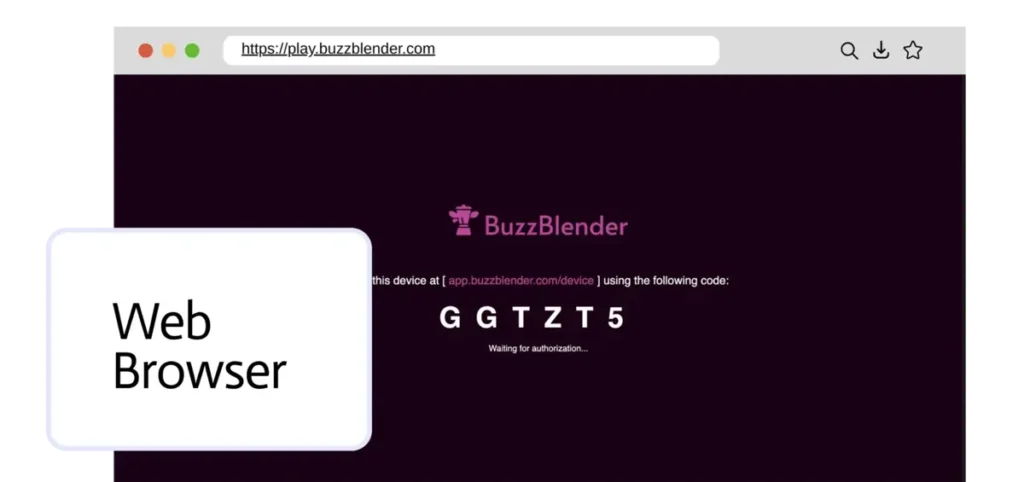
What is Browser-Based Digital Signage?
Browser-based digital signage is a system where digital signage content is delivered through a web browser instead of a dedicated application.
This means that screens can display digital signage simply by opening a secure webpage. The browser automatically loads playlists, images, videos.
Because most devices already have a browser installed, browser-based signage provides a flexible and hardware-independent solution.
Benefits of Web Browser Digital Signage
Running digital signage in a web browser offers several advantages for businesses.
Key Benefits
- no software installation required
- works on multiple operating systems
- easy setup and deployment
- remote screen management
- compatible with many devices
This makes browser-based digital signage ideal for companies that want to deploy screens quickly without complicated configuration.
Devices That Support Browser-Based Digital Signage
Browser digital signage can run on many devices that support modern web browsers.
Supported Devices
- smart TVs with web browsers
- computers and laptops
- mini PCs
- tablets
- media players
Because the system runs inside the browser, businesses can use existing hardware to deploy digital signage networks.
Remote Content Management Through the Browser
Buzzblender provides a cloud-based platform that allows administrators to manage browser-based screens remotely.
Using the dashboard, businesses can:
- upload images and videos
- schedule playlists and campaigns
- update content instantly
- manage multiple locations
- monitor screen activity
- add QR code overlay to image or video
This centralized management system allows organizations to control digital signage networks from anywhere. All features are described here
How Browser-Based Digital Signage Works
Deploying digital signage in a browser is simple.
Step 1 – Open the Web Player
Launch the digital signage web player in a browser.
Step 2 – Connect the Screen
Enter the activation code shown on the screen in the Buzzblender dashboard.
Step 3 – Upload Content
Upload media such as images, videos, menus, or announcements.
Step 4 – Publish and Schedule
Create playlists and schedule content to play on the screen.
Once connected, the browser automatically displays content from the digital signage platform.
Use Cases for Browser Digital Signage
Retail Stores
Display product promotions and advertising content.
Restaurants
Show digital menus and special offers.
Corporate Offices
Display announcements, dashboards, and internal communication.
Public Spaces
Provide informational displays and advertising screens.
Why Choose Browser-Based Digital Signage?
Browser-based digital signage offers flexibility and simplicity. Businesses can deploy screens using devices they already own.
With BuzzBlender web-browser digital signage software, organizations can manage content, schedule campaigns, and control screens across multiple locations.
Pricing starts at $5 per screen per month.
FAQ — Browser-Based Digital Signage
What is browser-based digital signage?
Browser-based digital signage allows businesses to run digital signage content directly in a web browser without installing dedicated software.
Which browsers support digital signage?
Most modern browsers such as Chrome, Edge, and Firefox can run browser-based digital signage players.
Can digital signage run in a web browser?
Yes. Digital signage can run inside a browser using a web player that loads and displays media content from a cloud digital signage platform.
Do I need a media player for browser digital signage?
Not always. If the device has a modern web browser, it can often run digital signage without additional hardware.
What Our Customers Say
⭐⭐⭐⭐⭐
Affordable, Reliable, and Easy-to-Use Digital Signage Solution
Our organization has had a very positive experience using Buzzblender across our LG TVs. Setup is straightforward, and it’s easy for our team to customize what we want shown on each screen.
Saskia van Aart, M. van der Looy office manager