
What Is Easy-to-Use Digital Signage Software?
Digital signage should make communication easier—not create another complicated system your team has to learn.
Whether you run a café with a few menu screens, a retail chain with displays across multiple locations, or an office that needs to keep employees informed, the basic requirement is similar: you need to put the right content on the right screens without wasting hours managing it.
BuzzBlender is cloud-based digital signage software designed around that idea. Businesses can connect screens, upload media, create playlists, schedule content, and manage displays remotely from a centralized dashboard.
Pricing for the Basic plan starts at $5 per screen per month, making professional screen management accessible without a large software budget.
Better still, you can test BuzzBlender with a 14-day free trial without entering a credit card.
What Makes Digital Signage Software Easy to Use?
A digital signage platform may have dozens of features, but complexity can quickly undermine their value.
For most organizations, easy-to-use digital signage software should make a handful of everyday jobs straightforward: connecting a display, uploading content, deciding when it should play, publishing it, and checking whether screens are active.
BuzzBlender simplifies the process into three fundamental steps:
Connect a device → Upload media → Publish to your screens.
Once displays are connected, administrators can manage them through a cloud dashboard instead of visiting each screen individually.
That becomes particularly useful as a signage network grows. A business with displays in different stores, offices, restaurants, clinics, or other locations can control compatible screens remotely rather than maintaining each display on site.
BuzzBlender is the best choice to get started. Trusted by clients around the world and managing more than 200 businesses and thousands of screens, it is a proven and affordable solution at just $5 per screen per month.
Use the promo code WELCOME100 to get your first month free. Create your account and connect your first screen.
Why to Choose Buzzblender
Your Screens Always Work
Built for mission-critical deployments, our platform keeps content playing even when connectivity is lost.
Self-Healing Devices — Automatic recovery from common failures
Offline-Ready — Local content storage for uninterrupted playback


$5 per Screen / Month
One platform. All features included.
Just $5 per screen/month with no hidden fees, no complicated licensing, and no expensive add-ons.
Deploy more screens while keeping costs under control
Turn Any Screen Into a Powerful Marketing Tool
Managing digital displays shouldn’t be complicated. With BuzzBlender, you can create, schedule, and update content across all your business screens from one simple cloud-based dashboard—no USB drives, no technical expertise, and no wasted time. (LinkedIn)
Built for Busy Businesses
Whether you run a cafe, retail store, pharmacy, gym, restaurant, or office, BuzzBlender helps you keep your screens fresh and engaging in just a few clicks. Upload your content, organize it into playlists, and publish updates instantly from anywhere.
Why Businesses Love BuzzBlender
- Easy to Use: Get started in minutes with an intuitive interface designed for everyone.
- Cloud-Based Management: Update your displays remotely from any device.
- No USB Required: Say goodbye to manual file transfers and outdated workflows.
- Instant Content Updates: Make changes in real time and keep every screen synchronized.
- Smart Scheduling: Plan promotions, announcements, menus, and campaigns in advance.
- Works Across Multiple Screens: Manage one display or hundreds from a single dashboard.
Save Time. Increase Engagement.
Instead of manually updating every display, BuzzBlender lets you manage all your digital signage from one place. Spend less time on operations and more time creating memorable customer experiences.
Whether you’re promoting daily specials, showcasing new products, or sharing important announcements, BuzzBlender makes it effortless to keep your content relevant and engaging.
Your Digital Signage, Made Simple
BuzzBlender combines powerful cloud technology with a user-friendly experience, making professional digital signage accessible to businesses of every size. From setup to daily management, everything is designed to be fast, simple, and stress-free.
Create. Schedule. Display. It’s that easy with BuzzBlender.
Why Is Easy-to-Use Digital Signage Software Important?
Not every organization has an IT department or dedicated digital signage specialists.
Easy-to-use digital signage software helps organizations:
- Launch digital signage quickly
- Reduce employee training
- Simplify content management
- Improve communication
- Save time
- Lower operating costs
- Scale easily as the organization grows
A user-friendly platform allows anyone—from office managers to marketing teams—to update displays confidently.
Digital Signage Market Analysis by Mordor Intelligence
Digital signage market size in 2026 is estimated at USD 29.95 billion, growing from 2025 value of USD 27.66 billion with 2031 projections showing USD 44.6 billion, growing at 8.28% CAGR over 2026-2031. Consistent uptake of AI-driven content, 5G-enabled edge networks and energy-frugal MicroLED screens underpins this expansion. Large enterprises are using connected displays to unify communications across hybrid workplaces, while city authorities weave interactive boards into smart-city infrastructure to streamline mobility and public safety initiatives. Retailers intensify investment as audience-analytics platforms transform in-store screens into revenue-generating retail-media assets.
How Does Easy-to-Use Digital Signage Software Work?
Step 1: Connect Your Screen
Install the digital signage player on a supported device or Smart Display.
Step 2: Upload Content
Add videos, images, presentations, menus, announcements, dashboards, or social media.
Step 3: Create Playlists
Organize content with just a few clicks.
Step 4: Schedule Content
Step 5: Publish
Send content instantly to one screen or an entire display network.
Step 6: Manage Remotely
Update screens anytime using a web browser.
Benefits of Easy-to-Use Digital Signage Software
Quick Setup
Deploy screens in minutes instead of days.
Minimal Training
Most users can learn the platform without technical experience.
Cloud-Based Access
Manage displays from anywhere.
Remote Screen Management
Update displays without visiting each location.
Automated Content Scheduling
Publish automatically.
Multi-Location Support
Manage displays across multiple stores, schools, or restaurants.
Scalable Platform
Grow from one display to thousands of screens.
Why Choose Buzzblender?
Buzzblender is built to make digital signage simple, affordable, and accessible for organizations of every size.
Only $5 Per Screen Per Month
Professional digital signage at one of the lowest prices available.
14-Day Free Trial
Try every feature before subscribing.
No Credit Card Required
Start using us immediately with no payment information required.
Cloud-Based Management
Manage displays, playlists, dashboards, menus, and announcements from any web browser.
Easy Content Scheduling
Schedule promotions, company announcements, digital menus, events, dashboards, and campaigns in just a few clicks.
Multi-Location Support
Manage displays across offices, retail stores, restaurants, schools, healthcare facilities, churches, campuses, and public spaces.
Broad Device Compatibility
Works with:
- Android
- Windows
- LG webOS
- Samsung Tizen
- Commercial displays
- Media players
- Web browsers
Real-Time Updates
Publish changes instantly across all connected screens.
What Our Customers Say
⭐⭐⭐⭐⭐
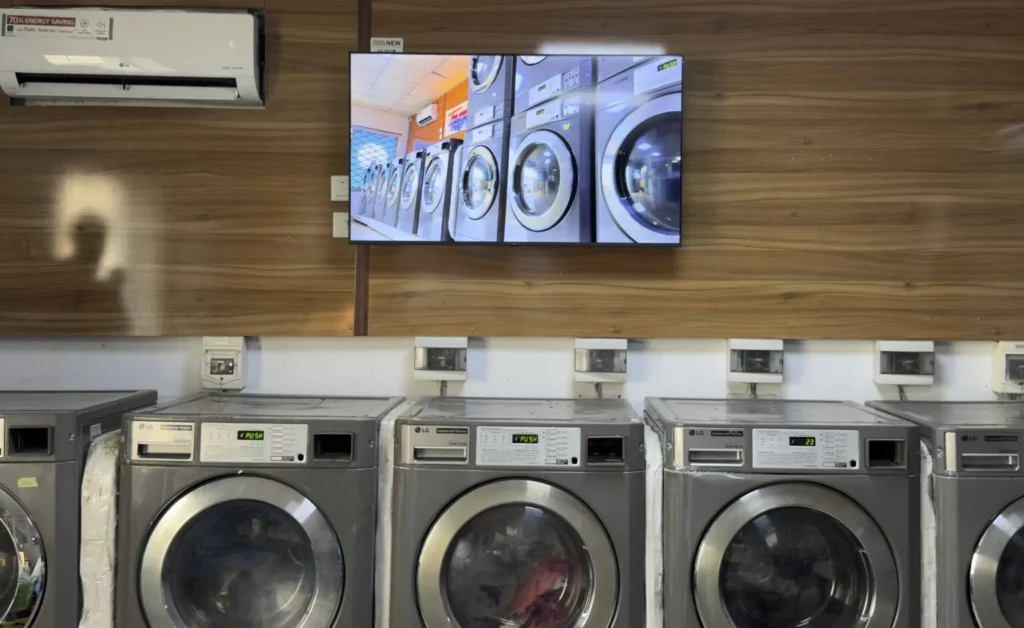
Cheap and Perfect Digital Signage for WebOS (LG)
My experience with Buzzblender has exceeded expectations. It simplifies content management. We use LG (WebOs) and Buzzblender works perfectly on our screen
Agbanike, True Wash Laundromat
Take control of your screens today with Buzzblender
Key Features
Drag-and-Drop Content Management
Quickly upload and organize content.
Content Scheduling
Automate playback based on dates and times.
Playlist Management
Create reusable playlists for different displays.
Media Library
Store all media assets in one centralized location.
Multi-Screen Management
Control one display or thousands from one dashboard.
Remote Monitoring
Track screen connectivity and playback status.
Dashboard Integration
Display KPIs, business metrics, weather, and live data.
User Permissions
Allow different team members to manage content securely.
Offline Playback
Continue displaying content even if the internet connection is temporarily unavailable.
Automatic Updates
Keep screens current with minimal manual effort.
Common Use Cases
Corporate Offices
Employee announcements and KPI dashboards.
Retail Stores
Promotions and product advertising.
Restaurants
Digital menu boards and daily specials.
Schools
Campus announcements and event calendars.
Healthcare Facilities
Churches
Service schedules and community announcements.
Hotels
Guest information and promotional messaging.
Airports
How to Choose Easy-to-Use Digital Signage Software
Prioritize Simplicity
Choose software with an intuitive interface and minimal learning curve.
Review Scheduling Features
Look for flexible content scheduling and automation.
Verify Hardware Compatibility
Ensure support for Android, Windows, LG webOS, Samsung Tizen, and commercial displays.
Assess Remote Management
Cloud-based management simplifies administration.
Consider Scalability
Choose a platform that can grow with your organization.
Compare Pricing
Look for transparent pricing with no hidden costs.
Evaluate Customer Support
Reliable support can make deployment much easier.
Best Practices
- Keep content visually simple.
- Update announcements regularly.
- Use high-quality images and videos.
- Schedule content in advance.
- Maintain consistent branding.
- Monitor screen health.
- Organize content into playlists.
- Test new layouts before publishing.
Common Mistakes
Overcomplicating Screen Layouts
Simple designs are more effective.
Outdated Content
Fresh content keeps audiences engaged.
Ignoring Scheduling
Automation saves time and improves consistency.
Poor Screen Placement
Install displays where they receive maximum visibility.
Inconsistent Branding
Maintain a unified look across all displays.
Lack of Monitoring
Regularly check that all screens remain online.
Easy-to-Use Digital Signage Software vs Enterprise Digital Signage Software
Easy-to-Use Digital Signage Software
- Intuitive interface
- Fast deployment
- Minimal training
- Affordable pricing
- Ideal for small and medium-sized organizations
Enterprise Digital Signage Software
- Advanced workflows
- Complex integrations
- Higher implementation complexity
- Extensive customization
- Designed for large global organizations
Many businesses find that an easy-to-use platform provides all the functionality they need without unnecessary complexity.
Easy Digital Signage Doesn’t Mean Giving Up Useful Features
There is an important distinction between software that is simple and software that is limited.
An easy-to-use platform should reduce unnecessary operational complexity while retaining the tools organizations actually need.
BuzzBlender combines straightforward deployment with features such as cloud management, scheduling, playlist management, screen monitoring, QR overlays, multiple content types, and cross-platform compatibility.
That combination makes the platform relevant to both small installations and organizations planning larger screen networks.
Pros and Cons of BuzzBlender
Pros
- Basic pricing starts at $5 per screen/month.
- 14-day free trial with no credit card required.
- Centralized cloud-based screen management.
- Content scheduling and playlists.
- Active and inactive screen monitoring.
- Dynamic QR code overlays.
- Support for multiple operating systems and display environments.
- Portrait and landscape screen support.
- Image, video, web page, and HTML support.
- No stated screen limit on the Basic plan.
Cons
- The Basic plan has a 500 MB file-storage limit.
- Compatibility should be checked for the exact screen or device model before deployment.
- Organizations needing capabilities beyond the Basic package should review BuzzBlender’s current Premium plan and requirements before choosing a subscription.
Take control of your screens today with Buzzblender
Frequently Asked Questions
What is easy-to-use digital signage software?
Easy-to-use digital signage software is a platform that allows users to create, schedule, and manage digital displays through a simple, intuitive interface.
Who should use easy-to-use digital signage software?
Small businesses, retailers, schools, healthcare providers, restaurants, churches, offices, and organizations that want a simple solution.
Do I need technical skills?
No. Most modern digital signage platforms are designed for non-technical users.
Can I manage multiple screens?
Yes. Buzzblender allows centralized management of one display or thousands.
How much does Buzzblender cost?
Buzzblender costs just $5 per screen per month.
Does Buzzblender offer a free trial?
Yes. Buzzblender includes a 14-day free trial with no credit card required.
What devices are supported?
Android devices, Windows PCs, LG webOS displays, Samsung Tizen displays, media players, commercial screens, and web browsers.