What Is a Weather Widget for Digital Signage?
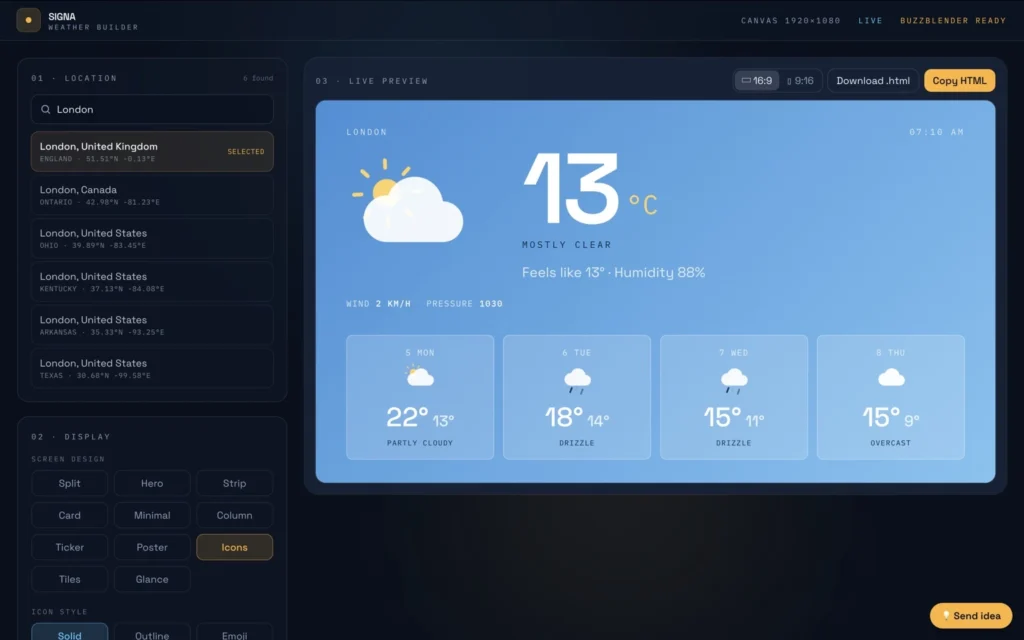
A weather widget for digital signage is a dynamic content element that displays current weather conditions, temperatures, forecasts, and other weather information on digital screens.
Instead of manually creating and updating weather graphics, a weather widget can retrieve information from a weather data source and automatically update what viewers see.
A digital signage weather widget can display:
- Current temperature
- Current weather conditions
- Daily forecast
- Multi-day forecast
- High and low temperatures
- Weather icons
- Precipitation
- Humidity
- Wind speed
- Location
- Date and time
A typical setup looks like:
Weather Data Source → Weather Widget → Digital Signage Software → Player → Screen
Buzzblender can display compatible web-based and HTML weather widgets as part of a digital signage deployment. This allows businesses to combine weather information with videos, images, announcements, promotions, menus, dashboards, and other digital signage content.
Take control of your screens today with Buzzblender
Weather Widget Digital Signage Example
Consider a hotel with a digital display in its lobby.
The screen could show:
| Information | Example |
|---|---|
| Current Temperature | 18°C |
| Conditions | Partly Cloudy |
| High | 21°C |
| Low | 13°C |
| Monday | 19°C, Cloudy |
| Tuesday | 17°C, Rain |
| Wednesday | 20°C, Sunny |
| Thursday | 22°C, Sunny |
Instead of hotel employees manually updating the weather every day, a compatible weather widget can retrieve updated information from its weather provider.
With Buzzblender, the hotel can incorporate the weather widget into its digital signage and manage it alongside hotel promotions, event schedules, restaurant information, welcome messages, and other content.
How Does a Digital Signage Weather Widget Work?
A weather widget normally receives information from an external weather service or API.
The architecture can look like:
Weather API → Weather Widget → Buzzblender → Digital Signage Player → Display
The weather service provides the data. The widget transforms that information into a visual format suitable for a digital display.
Depending on the implementation, weather content may be delivered through:
- Web pages
- HTML widgets
- JavaScript applications
- Third-party widgets
- Custom web applications
- API-powered templates
The exact implementation depends on the weather provider, widget, player, and digital signage environment.
What Can a Weather Widget Display?
Different weather services provide different types of information.
| Weather Information | Example |
|---|---|
| Current Temperature | 18°C |
| Current Conditions | Partly Cloudy |
| Daily High | 21°C |
| Daily Low | 13°C |
| Forecast | Light rain in the afternoon |
| Multi-Day Forecast | Monday–Friday |
| Humidity | 68% |
| Wind | 14 km/h |
| Precipitation | 40% |
| Location | Tallinn |
| Weather Icon | Sun, clouds, rain or snow |
| Date and Time | Local date and time |
The information available depends on the weather service connected to the widget.
Why Display Weather on Digital Signage?
Weather is information that people naturally look for throughout the day.
Adding weather to a digital signage screen can make the display more useful while also encouraging viewers to notice surrounding content.
For example:
Weather + Promotions + Announcements + Advertising + Business Information
A hotel can combine weather with information about local attractions.
A retailer can combine weather with promotions.
A corporate office can combine weather with company announcements and dashboards.
A school can display weather alongside campus information.
Current Weather Digital Signage
A current-weather widget can provide a simple overview:
CURRENT WEATHER
18°C
Partly Cloudy
High: 21°C
Low: 13°C
Humidity: 68%
Wind: 14 km/h
This type of design works well when viewers only have a few seconds to look at the screen.
Weather Forecast Digital Signage
Weather widgets can also display multi-day forecasts.
| Day | Temperature | Conditions |
|---|---|---|
| Monday | 19°C | Cloudy |
| Tuesday | 17°C | Rain |
| Wednesday | 20°C | Sunny |
| Thursday | 22°C | Sunny |
| Friday | 18°C | Cloudy |
Forecast information can be useful in:
- Hotels
- Resorts
- Airports
- Transportation environments
- Tourist destinations
- Shopping centers
- Schools
- Corporate offices
- Event venues
- Outdoor recreation businesses
Weather Widget for Hotel Digital Signage
Hotels are one of the most natural environments for digital signage weather widgets.
Guests may want to know local conditions before leaving the hotel.
Lobby displays can combine:
- Current weather
- Multi-day forecast
- Hotel events
- Breakfast hours
- Restaurant information
- Local attractions
- Transportation information
- Hotel promotions
For example:
Welcome → Local Weather → Today’s Events → Restaurant Promotion → Local Attractions
Buzzblender can manage the overall signage content while a compatible weather widget provides the dynamic weather information.
Weather Widget for Corporate Digital Signage
Corporate offices can display weather alongside internal communications.
A screen might include:
- Current weather
- Company announcements
- Employee recognition
- KPI dashboards
- Meeting information
- Upcoming events
- Date and time
For organizations with multiple offices, each location can display locally relevant weather.
For example:
New York Office → New York Weather
London Office → London Weather
Berlin Office → Berlin Weather
Tokyo Office → Tokyo Weather
The entire screen network can still be centrally managed while individual locations display their own weather information.
Weather Widget for Retail Digital Signage
Retailers can use weather information as both useful customer content and context for promotions.
For example:
| Weather | Possible Promotion |
|---|---|
| Rain | Umbrellas |
| Hot Weather | Cold drinks |
| Cold Weather | Winter clothing |
| Snow | Winter accessories |
| Sunny Weather | Outdoor products |
The simplest implementation displays weather alongside normal promotional content.
More advanced installations can use weather data to influence advertising campaigns.
For example:
Weather API → Automation → Content Rule → Digital Signage Campaign
Weather-triggered advertising may require APIs, middleware, automation, or custom development depending on the system.
Weather Widget for Restaurant Digital Signage
Restaurants, cafés, and food-service businesses can display weather alongside:
- Digital menus
- Promotions
- Opening hours
- Events
- QR codes
- Specials
Weather information can be particularly useful for:
- Beach restaurants
- Ski resorts
- Tourist destinations
- Outdoor cafés
- Hotel restaurants
- Seasonal businesses
Weather Widget for School Digital Signage
Schools and universities can display weather alongside:
- Announcements
- Campus events
- Cafeteria menus
- Sports information
- Transportation information
- Student recognition
- Date and time
For campuses with several buildings, weather can become part of a standard information template distributed across multiple displays.
General digital signage weather information should complement rather than replace official severe-weather or emergency notification systems.
Weather Widget for Event Digital Signage
Events can display weather on:
- Entrance screens
- Registration displays
- Information screens
- Conference displays
- Outdoor event screens
- Hotel displays
For example:
| Event Information | Details |
|---|---|
| Doors Open | 09:00 |
| Main Stage | 10:00 |
| Current Weather | 17°C |
| Afternoon Forecast | Light Rain |
Weather can be especially useful for events involving outdoor activities or attendees moving between different venues.
Weather Widget for Transportation Digital Signage
Weather information can also be useful in:
- Airports
- Train stations
- Bus terminals
- Ferry terminals
- Transportation lounges
Travelers may want to see weather information for their current location or destination.
Specialized aviation, marine, or operational weather requirements should use appropriate authoritative systems rather than relying only on a general-purpose signage widget.
Weather Widget for Outdoor Digital Signage
Weather can also be displayed on outdoor digital signage.
However, the weather widget is only the content layer.
The physical display still needs to be suitable for its installation environment.
Factors can include:
- Display brightness
- Weather protection
- Operating temperature
- Water and dust protection
- Sunlight
- Heating or cooling
- Installation environment
Displaying a weather widget does not make an indoor television suitable for outdoor use.
Multi-Location Weather Widgets
Businesses operating screens across multiple cities can display location-specific weather.
For example:
Company → Buzzblender → Locations → Local Weather Widgets → Screens
A network might include:
Location A → Weather Widget A
Location B → Weather Widget B
Location C → Weather Widget C
Location D → Weather Widget D
This approach can be useful for:
- Hotel chains
- Retail chains
- Corporate offices
- Schools
- Healthcare organizations
- Transportation businesses
- Fitness centers
- Restaurant chains
Each screen or screen group can display content appropriate for its location.
HTML Weather Widgets
HTML is a practical way to integrate dynamic information into digital signage.
A weather widget might combine:
HTML + CSS + JavaScript + Weather API
The workflow can be:
Weather API → Custom HTML Widget → Buzzblender → Digital Signage Screen
Buzzblender can display compatible HTML content, allowing businesses to incorporate weather widgets alongside other signage content.
This is particularly useful when an organization wants the weather component to match its branding and overall digital signage design.
Web-Based Weather Widgets
Another approach is to display a compatible weather web application.
The architecture becomes:
Weather Website / Web App → Buzzblender → Digital Signage Screen
This can reduce the amount of custom development required.
However, the web content should be tested for:
- Screen resolution
- Browser compatibility
- Authentication
- Automatic refresh
- Responsive design
- Pop-ups
- Cookie notices
- Navigation elements
- Performance
A website designed for desktop browsing is not necessarily optimized for unattended digital signage.
Custom Weather Widget
Businesses can also develop custom weather widgets.
A custom widget can match:
- Brand colors
- Typography
- Company logo
- Screen orientation
- Location
- Language
- Celsius or Fahrenheit
- Forecast length
- Other business information
A custom implementation might work like this:
Weather API → Custom Application → HTML Interface → Buzzblender → Screen
Custom development may require a separate weather API subscription, development work, and ongoing maintenance.
Weather API for Digital Signage
Many weather widgets obtain information through an API.
API stands for Application Programming Interface.
A simplified workflow is:
Digital Signage Widget → Weather API → Weather Service → Weather Data → Widget Update
The weather provider may return information such as:
- Temperature
- Conditions
- Humidity
- Wind
- Precipitation
- Forecast
- Weather icons
The widget converts this information into a visual presentation suitable for the screen.
Weather APIs can have their own:
- Pricing
- Request limits
- Licensing requirements
- Attribution requirements
- Commercial-use restrictions
- Terms of service
These costs and requirements can be separate from the digital signage software.
Automatic Weather Updates
One of the main benefits of a weather widget is automatic updating.
A traditional workflow looks like:
Check Weather → Create Graphic → Upload Graphic → Display → Repeat
A dynamic workflow looks like:
Weather Service → Widget → Automatic Update → Digital Signage
This can significantly reduce routine content maintenance.
Celsius and Fahrenheit
Weather widgets should use units appropriate for their audience.
Temperature can be displayed as:
- Celsius — °C
- Fahrenheit — °F
Wind speed might use:
- km/h
- mph
- m/s
A multi-location organization may need different units for different countries or regions.
Weather Widget Design
Weather information should be easy to understand from the expected viewing distance.
A good weather widget usually emphasizes:
- Large temperature
- Clear weather icon
- Short condition description
- Limited supporting information
- Strong visual hierarchy
- Readable typography
- Good contrast
For example:
TODAY
18°C
PARTLY CLOUDY
High 21° | Low 13°
The viewer should not need to read a detailed weather report to understand the current conditions.
Portrait Weather Displays
Weather widgets can be designed for portrait-oriented digital signage.
For example:
WEATHER
18°C
Partly Cloudy
High: 21°C
Low: 13°C
Monday: 19°C
Tuesday: 17°C
Wednesday: 20°C
Portrait layouts can work well for:
- Lobby displays
- Kiosks
- Directories
- Information screens
- Retail displays
Weather Widget and Digital Signage Playlists
A weather widget does not need to remain permanently on screen.
It can become one item in a larger playlist.
For example:
Welcome → Promotion → Weather → Announcement → Event Calendar → Weather
This allows weather to become part of the signage experience without dominating the display.
Weather Widget and Video Walls
Weather information can also be incorporated into a multi-screen installation.
For example:
| Screen 1 | Screen 2 |
|---|---|
| Main Brand Content | Main Brand Content |
| Event Schedule | Weather: 18°C |
Buzzblender can manage compatible multi-screen and video-wall deployments, allowing weather information to become part of a larger digital signage installation.
For supported synchronized configurations, Buzzblender can also provide frame-accurate synchronization across compatible screens.
Weather Widget Internet Requirements
Dynamic weather information normally requires internet or network connectivity because the widget needs to retrieve updated data.
The workflow is:
Internet → Weather Provider → Widget → Screen
If connectivity is lost, behavior depends on the particular widget and implementation.
Possible outcomes include:
- Previously retrieved weather remains visible
- The widget becomes unavailable
- An error appears
- Fallback content is displayed
Important signage deployments should therefore plan for connectivity interruptions.
Offline Digital Signage and Weather
Static images and videos can often be cached locally for offline-ready playback.
Live weather information is different because updated weather data needs to come from an external source.
A practical content strategy can therefore be:
Internet Available → Live Weather Widget
Internet Unavailable → Fallback Signage Content
Other Buzzblender content can continue using locally available assets in supported offline-ready configurations, while current weather depends on connectivity to its data provider.
Weather Alerts and Emergency Information
A normal weather widget should not automatically be treated as an official emergency warning system.
Organizations that require severe-weather warnings, evacuation instructions, or other life-safety communications should use appropriate authoritative systems and follow applicable regulations and emergency procedures.
Digital signage can complement those systems where appropriate.
Weather Widget Data Accuracy
Buzzblender can display compatible weather content, but the underlying weather information comes from the selected weather-data provider.
Weather accuracy can therefore depend on:
- Weather provider
- Data source
- Location accuracy
- Update frequency
- Forecast model
- API availability
This distinction is important when evaluating a digital signage weather solution.
Weather Widget Digital Signage with Buzzblender
Buzzblender can provide the digital signage management layer for screens that include compatible weather widgets.
Instead of operating a separate system just for weather, businesses can combine weather information with the rest of their signage content.
For example:
Weather Widget + Promotional Video + Company Announcement + Web Content + Images → Buzzblender → Digital Signage Screen
The compatible weather widget provides dynamic weather information, while Buzzblender manages the overall screen experience.
This can be useful for hotels, retailers, restaurants, offices, schools, event venues, and other organizations.
Buzzblender Weather Widget Example
Consider a hotel chain with 10 properties.
Each hotel has one lobby screen.
Every property wants to display:
- Hotel branding
- Local weather
- Breakfast hours
- Events
- Promotions
- Local attractions
The structure could look like:
Hotel Group → Buzzblender → 10 Locations → Local Content + Local Weather → Lobby Screens
Each hotel can display weather relevant to its location while the signage network remains centrally managed.
At $5 per screen per month, the base Buzzblender software cost for 10 screens would be:
10 screens × $5 = $50/month
Third-party weather services, APIs, premium widgets, custom development, hardware, connectivity, and other services may involve separate costs.
Multi-Location Weather with Buzzblender
A larger organization can centrally manage many locations while providing different weather information to each one.
For example:
Buzzblender
→ Location A → Weather A
→ Location B → Weather B
→ Location C → Weather C
→ Location D → Weather D
This allows organizations to combine centralized screen management with location-specific dynamic information.
Best Practices for Weather Widget Digital Signage
- Choose the correct location. Make sure every weather widget is configured for the location relevant to its audience.
- Use readable typography. Current temperature and conditions should be visible from the expected viewing distance.
- Avoid excessive information. Most viewers need a quick summary rather than a complete meteorological report.
- Use appropriate units. Choose Celsius, Fahrenheit, km/h, mph, or other units appropriate for the audience.
- Test on the actual signage hardware. Verify browser compatibility, scaling, resolution, refresh behavior, and performance.
- Review weather provider terms. Third-party APIs and widgets may have commercial-use, attribution, or request-limit requirements.
- Plan for internet interruptions. Determine what should appear if the weather source becomes unavailable.
- Keep emergency systems separate. A general weather widget should not be the only source of emergency or life-safety information.
- Match the design to your brand. Where customization is available, use typography and visual elements consistent with the rest of the signage.
- Test multi-location configurations. Make sure each location displays the correct local weather before deploying across the entire network.
Common Mistakes
Displaying Weather for the Wrong Location
This can happen when a template is duplicated across several locations without changing the weather configuration.
Using a Desktop Weather Website Without Testing It
Cookie notices, navigation menus, pop-ups, login requirements, and responsive layouts can create problems on unattended displays.
Making the Widget Too Complicated
Most digital signage audiences only have a few seconds to read the display.
Assuming Live Weather Works Without Internet
Updated weather information normally requires access to a weather-data source.
Ignoring API Licensing
Some weather APIs have specific requirements covering commercial use, attribution, request volume, and redistribution.
Treating Weather Signage as an Emergency Alert System
A standard weather widget should not replace required emergency-warning or life-safety systems.
Frequently Asked Questions
What is a weather widget for digital signage?
A weather widget for digital signage is dynamic content that displays current conditions, temperature, forecasts, and related weather information on a digital display.
Can digital signage display live weather?
Yes. Compatible web widgets, HTML applications, or API-powered content can retrieve updated weather information and display it on digital signage screens.
Can Buzzblender display a weather widget?
Yes. Buzzblender can be used with compatible web and HTML content, allowing weather widgets to become part of a Buzzblender-managed digital signage experience.
How is a weather widget related to Buzzblender?
Buzzblender provides the digital signage management and delivery layer, while a compatible weather widget provides dynamic weather information. This allows weather to be combined with videos, images, promotions, announcements, and other content within the same signage network.
Does Buzzblender provide the weather data?
Weather data can come from the selected compatible weather service, API, website, or widget. Buzzblender manages the digital signage environment in which that information is displayed.
Can I use my own HTML weather widget with Buzzblender?
Compatible HTML content can be used with Buzzblender. The exact widget should be tested for browser compatibility, external API requirements, authentication, performance, and third-party licensing conditions.
Can different locations show different weather?
Yes. A multi-location signage network can use location-specific weather widgets so individual locations display locally relevant conditions.
Can weather appear alongside other digital signage content?
Yes. Weather can be combined with promotions, announcements, menus, dashboards, event schedules, videos, images, QR codes, and other content.
Can a weather widget work offline?
Current weather normally requires connectivity to its data provider. Other locally cached signage content can be used as fallback content in supported offline-ready deployments.
Can a weather widget show a multi-day forecast?
Yes, if the selected weather service or widget provides forecast information.
Can weather widgets use Celsius and Fahrenheit?
Yes, depending on the widget and weather provider.
Can weather trigger digital signage advertising?
Yes, weather-responsive campaigns can be created, although automatic triggering may require APIs, automation, middleware, or custom integration depending on the implementation.
How much does weather widget digital signage cost with Buzzblender?
Buzzblender Basic is $5 per screen per month. Third-party weather APIs, premium weather widgets, hardware, connectivity, installation, and custom development may have additional costs.
Can Buzzblender manage weather signage across multiple locations?
Yes. Organizations can manage screens by location while displaying compatible location-specific weather content as part of the broader digital signage network.
What Our Customers Say
⭐⭐⭐⭐⭐
Simple, Reliable, and Surprisingly Affordable Digital Signage
We tried several digital signage solutions before switching to BuzzBlender, and it has easily been the simplest and most reliable option we’ve used.
Setting it up on our Samsung displays was quick and straightforward. Managing content is just as easy—even for team members who aren’t particularly tech-savvy. We can update our screens in real time, launch promotions, change menu content, and manage everything remotely without needing any additional hardware.
What really sets BuzzBlender apart is the combination of simplicity and affordability. It gives us everything we need without the complexity or high costs of other systems—and at just $5, the value is hard to beat.
Aadan