What Is a Currency Exchange Rates Widget for Digital Signage?
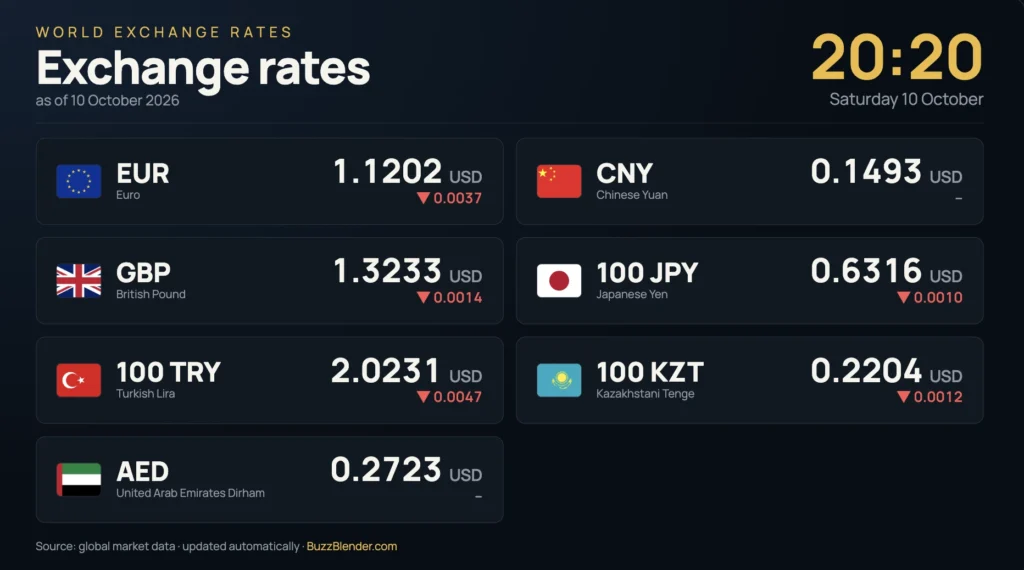
A currency exchange rates widget for digital signage is a dynamic application that displays currency conversion rates, exchange rate information, and currency pairs on digital screens, Smart TVs, and commercial displays.
Instead of manually updating currency prices on printed boards or static images, businesses can use a digital signage currency widget to display exchange rates retrieved from a connected financial data source.
Currency exchange rate widgets are commonly used in:
- Currency exchange offices
- Banks and financial institutions
- Hotels and resorts
- Airports
- Travel agencies
- Shopping malls
- Tourist information centers
- International business offices
- Retail stores serving international customers
- Casinos and entertainment venues
- Financial service centers
- Border crossings and transportation hubs
A typical currency exchange digital signage system works as follows:
Exchange Rate Data Provider → Currency Widget → Digital Signage Software → Media Player → Digital Screen
The widget retrieves exchange rate information, formats it for display, and presents it on a digital screen. See all free apps for Digital Signage.
With Buzzblender, businesses can display compatible currency exchange widgets alongside promotional videos, images, announcements, and other digital signage content. Screens can be centrally managed, scheduled, and updated remotely across one or multiple locations.
Try now Currency Exchange Widget
Take control of your screens today with Buzzblender
Currency Exchange Rates Digital Signage Example
Imagine a currency exchange office located inside an international airport.
The business operates three digital screens:
Screen 1 — Main Exchange Rate Board
Displays currency exchange rates for popular currencies.
Screen 2 — Customer Information
Displays transaction information, operating hours, and service announcements.
Screen 3 — Promotional Display
Shows available financial services, travel-related information, and promotional messages.
A simplified currency exchange display might show:
TODAY’S EXCHANGE RATES
USD — US Dollar
EUR — Euro
GBP — British Pound
CHF — Swiss Franc
JPY — Japanese Yen
BUY | SELL
Rates shown on the actual display are supplied by the configured exchange rate source.
The exchange rate board can automatically refresh its information when the connected data source provides updated rates.
With Buzzblender, the business can manage the screens from one centralized platform while using a compatible currency exchange widget to display current financial information.
Why Use a Currency Exchange Rates Widget?
Currency exchange rates change over time.
Businesses that display exchange rates need a reliable way to update the information shown to customers.
Traditional printed exchange rate boards require manual updates.
A digital signage widget can simplify this process.
Automatic Exchange Rate Updates
A currency widget can retrieve updated exchange rate information from a connected API or financial data provider.
This reduces the need to manually edit screen content every time a rate changes.
The actual update frequency depends on the provider, subscription, configuration, and connectivity.
Better Customer Communication
Customers can view exchange rate information before approaching a service counter.
This can help them understand available currency pairs and the rates offered by the business.
Professional Presentation
Digital exchange rate boards can use:
- Large numbers
- Currency symbols
- Currency codes
- Country flags
- Custom branding
- Clear typography
- High-contrast layouts
- Date and time information
Centralized Management
Businesses operating several branches can manage digital screens from one location.
Flexible Screen Content
Currency exchange information can appear alongside:
- Promotions
- Travel information
- Service announcements
- Opening hours
- Brand videos
- Weather information
- Customer instructions
How Does a Currency Exchange Rates Widget Work?
A currency exchange widget typically connects to an exchange rate data source.
The provider supplies currency information, and the widget converts that data into a visual format suitable for digital signage.
The process includes several stages.
1. Exchange Rate Data Source
A financial data provider supplies exchange rate information.
Depending on the service, the data may include:
- Currency codes
- Currency pairs
- Exchange rates
- Base currency
- Last update time
- Historical information
- Additional financial metadata
2. Currency Widget
The widget receives the data and prepares it for display.
It may format:
- Currency names
- Currency symbols
- Conversion rates
- Buy and sell prices
- Currency flags
- Timestamps
3. Digital Signage Software
Digital signage software manages where and when the widget appears.
For example, a business can display the widget on a dedicated screen or include it in a larger playlist.
4. Media Player or Smart TV
A compatible player renders the widget.
5. Digital Screen
Customers see the exchange rate information.
Data Provider → Widget → Buzzblender → Player → Screen
This architecture separates the financial data source from the system used to manage the physical screens.
Live Currency Exchange Rates Widget
A live currency exchange widget retrieves updated exchange rates from an online source.
It can display information such as:
- EUR/USD
- USD/GBP
- EUR/CHF
- USD/JPY
- GBP/EUR
The term live does not necessarily mean that rates update every second.
Update frequency depends on the provider and the widget’s configuration.
For customer-facing financial displays, it is useful to show the last successful update time.
Currency Exchange Rate Board
A digital currency exchange rate board displays multiple currencies in a format similar to traditional exchange office signage.
For example:
CURRENCY EXCHANGE
US Dollar — USD
Euro — EUR
British Pound — GBP
Swiss Franc — CHF
Japanese Yen — JPY
Canadian Dollar — CAD
Australian Dollar — AUD
The board can include separate buy and sell rates.
This format is especially useful for currency exchange offices, banks, and travel-related businesses.
Currency Converter Widget
A currency converter calculates the value of an amount in another currency.
For example, a converter might allow users to select:
From: EUR
To: USD
Amount: 100
The application calculates the converted amount using its configured exchange rate.
An interactive converter typically requires a touchscreen or another input method.
For ordinary noninteractive digital signage, a business can display predefined conversion examples instead.
Multi-Currency Exchange Rates Widget
A multi-currency widget displays several currency pairs simultaneously.
For example:
- EUR to USD
- EUR to GBP
- EUR to CHF
- EUR to JPY
- EUR to CAD
This can be useful in hotels, airports, and international business environments.
A multi-currency widget can also use a configurable base currency.
Currency Buy and Sell Rates Widget
Currency exchange businesses often display two different rates.
Buy Rate: The rate at which the exchange business purchases a foreign currency from a customer.
Sell Rate: The rate at which the business sells that foreign currency to a customer.
For example, a customer exchanging US dollars for euros may receive a different rate from someone exchanging euros for US dollars.
The difference between the two rates is commonly called the spread.
A customer-facing currency exchange board should clearly identify which rate is used for buying and which is used for selling.
Important: Market exchange rates and the actual retail buy/sell rates offered by an exchange office are not necessarily the same.
If a business needs to display its own transaction rates, the widget must support the business’s approved rates rather than simply showing generic market data.
Currency Exchange Digital Signage for Banks
Banks can use digital screens to communicate exchange rate information and related financial services.
Possible content includes:
- Currency exchange rates
- Buy and sell rates
- Supported currencies
- Service announcements
- Branch opening hours
- Customer information
- Financial product promotions
For example:
FOREIGN EXCHANGE SERVICES
View Today’s Currency Rates
Ask Our Team for Details
A bank may use dedicated rate boards or combine exchange rate information with other digital signage content.
Financial institutions should ensure that displayed rates, timestamps, disclosures, and transaction conditions comply with their operational and regulatory requirements.
Currency Exchange Digital Signage for Exchange Offices
Currency exchange offices are one of the most obvious applications for exchange rate widgets.
These businesses frequently need to display rates for several currencies.
A typical screen can show:
CURRENCY EXCHANGE
WE BUY / WE SELL
USD — US Dollar
EUR — Euro
GBP — British Pound
CHF — Swiss Franc
JPY — Japanese Yen
Additional information may include:
- Last update time
- Transaction fees
- Minimum transaction amounts
- Supported currencies
- Service hours
- Customer instructions
The actual transaction rates should come from the exchange office’s approved pricing source.
Currency Exchange Widgets for Hotels
Hotels often welcome guests from different countries.
A currency exchange widget can provide useful information in:
- Hotel lobbies
- Reception areas
- Concierge desks
- Business centers
- Guest information displays
For example:
WELCOME
Local Weather
Currency Exchange Rates
Hotel Services
Today’s Events
A hotel can combine currency information with weather, local attractions, transportation information, and promotional content.
With Buzzblender, these elements can be organized into centrally managed digital signage playlists.
Hotels should distinguish informational reference rates from rates actually offered by the hotel or a third-party exchange service.
Currency Exchange Widgets for Airports
Airports serve international travelers who may need currency information.
Currency exchange widgets can appear in:
- Currency exchange counters
- Arrival halls
- Departure halls
- Travel service areas
- Airport hotels
- Tourist information points
For example:
CURRENCY INFORMATION
USD
EUR
GBP
JPY
CHF
A digital signage system can display currency rates alongside travel information and service announcements.
Exchange rate displays should not be confused with official airport flight information or other operational systems.
Currency Exchange Widgets for Travel Agencies
Travel agencies can use currency widgets to provide useful information about international destinations.
Possible content includes:
- Exchange rates
- Travel promotions
- Destination videos
- Weather information
- Travel announcements
- Booking QR codes
For example:
PLAN YOUR NEXT TRIP
Explore Destinations
Check Currency Exchange Rates
Discover Travel Offers
A travel agency can combine a currency widget with destination-specific promotional content.
Currency Exchange Widgets for Shopping Malls
Shopping malls in tourist destinations can use currency information displays to assist international visitors.
Screens may show:
- Popular currency pairs
- Mall promotions
- Store directories
- Tourist information
- Local weather
- Transportation information
A currency widget can appear as one element in a larger digital signage layout.
Currency Exchange Widgets for Retail Stores
Some retailers serve customers from many countries.
Currency information may help visitors understand approximate price conversions.
For example, a luxury store could display:
INTERNATIONAL CUSTOMER INFORMATION
Reference Currency Exchange Rates
Ask Our Team About Accepted Payment Methods
However, informational currency conversions should not be presented as guaranteed checkout prices.
The actual transaction amount may depend on payment processors, bank fees, exchange rates, and the merchant’s pricing policies.
Currency Exchange Widgets for Casinos and Entertainment Venues
Casinos, resorts, and entertainment venues serving international guests may display currency information near customer service areas.
Possible content includes:
- Reference exchange rates
- Available currency services
- Customer service announcements
- Operating hours
- Resort information
The display should use the appropriate approved rates and clearly communicate any applicable conditions.
Currency Exchange Widgets for International Offices
International companies may use digital signage to provide financial reference information.
For example:
GLOBAL BUSINESS INFORMATION
EUR/USD
USD/GBP
EUR/CHF
USD/JPY
Other screen content might include:
- World clocks
- International office announcements
- Company news
- Financial information
- Business events
A currency widget can be one component of a corporate information dashboard.
Currency Exchange Widget Design
A well-designed currency exchange widget should make financial information easy to understand.
Large, Readable Numbers
Exchange rates should be visible from the expected viewing distance.
Clear Currency Codes
Use recognizable three-letter currency codes such as:
- USD
- EUR
- GBP
- CHF
- JPY
- CAD
- AUD
These codes help reduce ambiguity.
Currency Names
Where space allows, display full currency names alongside the codes.
For example:
USD — US Dollar
Buy and Sell Labels
If the screen displays transaction rates, label them clearly.
Last Update Time
Display when the rates were last successfully refreshed.
High Contrast
Use readable text and backgrounds suitable for the installation environment.
Consistent Branding
Businesses can use their own logos, colors, and typography where supported by the widget.
Appropriate Decimal Precision
Currency pairs may require different levels of precision.
The displayed precision should match the data source and the business’s actual pricing requirements.
Portrait Currency Exchange Digital Signage
Portrait displays can work well for vertical lists of currencies.
For example:
CURRENCY EXCHANGE
USD — US Dollar
EUR — Euro
GBP — British Pound
CHF — Swiss Franc
JPY — Japanese Yen
UPDATED: 10:30
Portrait screens can be installed near:
- Reception desks
- Currency exchange counters
- Hotel lobbies
- Information points
The exact design should reflect the number of currencies displayed.
Landscape Currency Exchange Digital Signage
Landscape screens are useful for displaying more information across the screen.
A landscape layout can include:
Left Side: Currency exchange rates
Right Side: Promotions, weather, or customer information
For example:
CURRENCY EXCHANGE RATES
Popular Currencies
Current Rates
TRAVEL SERVICES
Ask About Our Available Services
This allows businesses to combine financial information with promotional content.
Currency Exchange Widget with Weather
Currency exchange information and weather can be useful together in hotels, airports, and travel-related businesses.
For example:
TRAVEL INFORMATION
Current Weather
Currency Exchange Rates
Local Time
Travel Announcements
Buzzblender offers a Weather Widget and can display compatible currency exchange widgets as part of a digital signage presentation.
This makes it possible to organize different types of information within the same screen experience.
Currency Exchange Widget with World Clock
International offices, airports, and hotels may combine currency information with world clocks.
For example:
GLOBAL INFORMATION
New York — Local Time
London — Local Time
Tokyo — Local Time
Currency Exchange Rates
A compatible clock widget can provide time information alongside currency data.
Currency Exchange Widget with Promotional Content
Currency exchange information does not need to occupy an entire screen.
Businesses can combine it with:
- Brand videos
- Service promotions
- Customer announcements
- Travel information
- Product advertising
- QR codes
For example:
Exchange Rates + Promotional Video + Service Information
With Buzzblender, businesses can manage compatible widget content alongside images and videos.
Currency Exchange Rates API
Many currency exchange widgets rely on an API.
An API allows software to request data from an external service.
For currency exchange information, the API may provide:
- Base currency
- Target currency
- Exchange rate
- Update timestamp
- Historical rates
- Supported currency pairs
For example, a widget might request information for:
EUR → USD
EUR → GBP
EUR → CHF
The provider returns the relevant data, and the widget formats it for display.
The exact API features depend on the selected provider.
Choosing a Currency Exchange Data Provider
The data provider is one of the most important components of a currency exchange widget.
Businesses should evaluate several factors.
Data Accuracy
The provider should offer rates suitable for the intended purpose.
Update Frequency
Some services update frequently, while others provide periodic reference rates.
Supported Currencies
Check whether the provider supports all required currency pairs.
Commercial Licensing
Confirm that the service permits the intended commercial and public-display use.
Reliability
The widget should handle temporary service interruptions appropriately.
Rate Type
Determine whether the provider supplies:
- Reference rates
- Market rates
- Indicative rates
- Retail transaction rates
- Custom business rates
Timestamp Availability
A timestamp helps viewers understand when the information was last updated.
Important: A public reference exchange rate is not automatically the correct rate for a bank, exchange office, or other business conducting actual transactions.
Automatic Currency Exchange Rate Updates
A currency widget can refresh its information at configured intervals.
For example, a widget might be configured to request new data periodically throughout the day.
The actual frequency depends on:
- API provider
- Subscription plan
- Data availability
- Widget configuration
- Internet connectivity
- Rate limits
A screen should ideally indicate when the data was last updated.
If the data becomes unavailable, the widget should avoid presenting old rates as current.
What Happens If the Internet Connection Is Lost?
Currency exchange widgets typically require connectivity to retrieve updated rates.
If the connection is interrupted, the widget may be unable to refresh its information.
Possible fallback strategies include:
- Displaying the last available rates with a clear timestamp
- Showing a data-unavailable message
- Temporarily hiding the currency widget
- Switching to other signage content
For financial transaction screens, stale exchange rates should not be presented as valid current transaction rates.
Buzzblender supports offline-ready playback of locally available or cached content in compatible configurations.
However, offline-ready digital signage playback does not mean that live currency exchange data continues updating without internet access.
Currency Exchange Digital Signage for Multiple Locations
Banks, currency exchange businesses, hotels, and retail chains may operate multiple locations.
A centralized digital signage platform can help manage screens across these locations.
For example:
Head Office → Buzzblender → Branch Locations → Currency Displays
Imagine a currency exchange company operating 20 branches.
Each branch has:
- One exchange rate screen
- One promotional screen
The company manages 40 screens in total.
With Buzzblender, the business can centrally organize its signage content.
The exchange rate widget or connected pricing system must separately ensure that each branch displays the correct rates.
This distinction matters because different locations may offer different transaction prices.
Location-Specific Currency Exchange Rates
Businesses operating in different countries or regions may need different currency configurations.
For example:
Location A
Base Currency: EUR
Displayed Currencies: USD, GBP, CHF
Location B
Base Currency: USD
Displayed Currencies: EUR, GBP, JPY
Location C
Base Currency: GBP
Displayed Currencies: EUR, USD, CHF
A suitable currency widget can use location-specific settings if that functionality is supported.
For exchange offices, branch-specific buy and sell rates may require a custom pricing feed or integration.
Currency Exchange Widgets on Smart TVs
Currency exchange widgets can be displayed on compatible Smart TVs.
A typical setup is:
Currency Data Source → Widget → Buzzblender → Smart TV
Depending on the deployment, Buzzblender can work with compatible platforms such as:
- Samsung Tizen
- LG webOS
- Android
- Windows
- Chromecast
- Browser-based players
Compatibility depends on the player environment and the widget’s technical requirements.
Chromecast Currency Exchange Digital Signage
Chromecast can be a cost-effective option for displaying compatible digital signage content.
With Buzzblender, suitable Chromecast deployments can support:
- Web content
- HTML widgets
- Promotional videos
- Images
- Playlists
- Cached media
- Offline-ready local content
- Automatic restart and recovery
A currency exchange widget that depends on an online data source still needs connectivity to retrieve current rates.
Currency Exchange Widgets and Video Walls
Currency exchange information can also be displayed as part of a larger multi-screen installation.
For example, a financial services center could use:
Screen 1: Exchange rates
Screen 2: Financial information
Screen 3: Customer announcements
Screen 4: Promotional content
Alternatively, a large video wall could present a coordinated financial information layout.
Buzzblender guarantees frame-accurate synchronization for supported multi-screen and video-wall configurations.
This is particularly useful for coordinated visual content spanning several displays.
However, synchronized video playback and financial data synchronization are separate technical requirements. Accurate currency data still depends on the widget and its data source.
How Much Does Currency Exchange Digital Signage Cost?
The cost of a currency exchange digital signage installation may include:
- Digital signage software
- Screens or Smart TVs
- Media players
- Mounting hardware
- Installation
- Internet connectivity
- Currency exchange data API
- Custom widget development
- Integration with business pricing systems
Buzzblender Basic costs $5 per screen per month.
Example Software Costs
1 screen: $5/month
2 screens: $10/month
5 screens: $25/month
10 screens: $50/month
20 screens: $100/month
25 screens: $125/month
50 screens: $250/month
100 screens: $500/month
Small Exchange Office Example
A currency exchange office with two screens:
2 × $5 = $10/month
Hotel Example
A hotel with five information screens:
5 × $5 = $25/month
Exchange Office Chain Example
A company operates 20 locations with three screens per location.
20 × 3 = 60 screens
60 × $5 = $300/month
These examples cover the base Buzzblender Basic software cost.
Hardware, installation, exchange rate data subscriptions, third-party services, and specialized integrations may involve additional costs.
On-Premise Currency Exchange Digital Signage
Banks, financial institutions, and large organizations may have specific infrastructure requirements.
Buzzblender can provide custom on-premise deployments.
A possible architecture is:
Company Server → Buzzblender → Private Network → Players → Currency Displays
An on-premise deployment may be useful when an organization needs:
- Private network infrastructure
- Centralized internal administration
- Specific server environments
- Multiple branch locations
- Integration with internal business systems
The architecture depends on the organization’s requirements.
Need Buzzblender on your own server or at a specific location? Contact us.
Why Use Buzzblender for Currency Exchange Digital Signage?
Buzzblender provides a centralized platform for managing digital signage screens in financial, hospitality, travel, and retail environments.
Businesses can use Buzzblender to manage:
- Compatible currency exchange widgets
- Promotional videos
- Images
- Customer announcements
- Playlists
- Scheduling
- Screen groups
- Remote content updates
- Multiple locations
- Web pages
- HTML widgets
- Weather Widget
- Offline-ready content
- Compatible Smart TVs
- Chromecast
- Video walls
- Frame-accurate synchronization for supported configurations
A currency exchange office can use Buzzblender to display rates alongside customer information.
A hotel can combine currency information with weather and travel announcements.
A financial services company can centrally manage screens across several branches.
Affordable Per-Screen Pricing
Buzzblender Basic starts at $5 per screen per month.
Businesses can begin with one display and expand to multiple locations.
Flexible Widget Integration
Compatible HTML and web-based widgets can be incorporated into the signage environment.
The exchange rate provider and any business-specific pricing integrations remain separate components.
Need a Custom Currency Exchange Rates Widget?
Different businesses need different exchange rate displays.
For example, you may need:
- Currency exchange rate board
- Buy and sell rates widget
- Multi-currency display
- Currency converter
- Branch-specific exchange rates
- Custom currency list
- Branded financial information screen
- Exchange rate API integration
- Currency widget with a clock
- Currency widget with weather information
If you need a specific app or widget that is not currently available, contact us and tell us what you need. We can build a new app or widget for you for free.
Third-party financial data subscriptions and specialized integrations may have separate requirements or costs.
Best Practices for Currency Exchange Digital Signage
1. Use a Reliable Exchange Rate Source
Choose a provider appropriate for the intended financial information.
2. Display the Last Update Time
Customers should be able to see when the exchange rates were last refreshed.
3. Clearly Label Buy and Sell Rates
Exchange offices should distinguish the rates used for buying and selling currencies.
4. Use Recognizable Currency Codes
Display standard currency codes such as USD, EUR, GBP, and CHF.
5. Keep Numbers Readable
Exchange rates should be easy to read from the expected viewing distance.
6. Avoid Misleading Precision
Display rates using precision appropriate for the provider and the actual business transaction.
7. Plan for Internet Interruptions
Determine how the widget behaves if it cannot retrieve updated data.
8. Use Location-Specific Rates When Necessary
Businesses with multiple branches should ensure that each location displays the correct rates.
9. Keep Promotional Content Separate from Critical Rate Information
Customers should be able to distinguish exchange rates from advertisements.
10. Check Regulatory Requirements
Financial transaction displays may be subject to local rules regarding pricing, fees, disclosures, and customer information.
Common Mistakes
Displaying Outdated Exchange Rates
A screen should not present old rates as current without clearly identifying their timestamp or status.
Confusing Market Rates with Transaction Rates
Generic market exchange rates may differ from the rates offered by a bank or exchange office.
Forgetting Buy and Sell Labels
Customers may misunderstand the displayed prices if the direction of the transaction is unclear.
Using Numbers That Are Too Small
Financial information must remain readable at the intended viewing distance.
Ignoring API Licensing
Not every exchange rate API permits commercial redistribution or public display under the same terms.
Displaying Too Many Currency Pairs
A crowded screen may be difficult to read.
Ignoring Connection Failures
A widget should have an appropriate fallback when updated rates are unavailable.
Assuming Offline Playback Means Live Financial Data
Cached videos and images may continue playing offline, but exchange rates cannot refresh without access to the required data source.
Take control of your screens today with Buzzblender
Frequently Asked Questions
What is a currency exchange rates widget for digital signage?
A currency exchange rates widget for digital signage is an application that displays currency conversion rates and related financial information on digital screens.
Can digital signage display live currency exchange rates?
Yes. A compatible widget can retrieve updated exchange rates from an online provider and display them on digital signage screens.
How often do currency exchange rates update?
The update frequency depends on the data provider, subscription, widget configuration, and connectivity.
Can I display buy and sell exchange rates?
Yes, if the widget supports buy and sell rates and receives the correct pricing data from the business or its provider.
Can I display multiple currencies?
Yes. Multi-currency widgets can display several currency pairs on one screen.
Can I use a currency exchange widget in a hotel?
Yes. Hotels can display reference currency rates alongside weather, local information, and guest announcements.
Can banks use currency exchange digital signage?
Yes. Banks can use digital screens to communicate exchange rate information and related services, subject to their operational and regulatory requirements.
Can I use a Smart TV for currency exchange digital signage?
Yes. Compatible Smart TVs can display suitable web-based or HTML currency widgets.
Can I use Chromecast?
Yes. Chromecast can be used with compatible Buzzblender deployments to display web content and HTML widgets.
Does a currency widget need internet access?
An online currency widget generally needs internet access to retrieve updated exchange rates.
Can currency exchange digital signage work offline?
Locally cached signage content can continue playing in supported configurations. However, a widget cannot retrieve new online exchange rates without connectivity.
Can I display different exchange rates at different branches?
Yes, if the widget or connected pricing system supports branch-specific configurations and data.
Can I combine currency rates with weather?
Yes. Compatible currency exchange and weather widgets can be included in the same digital signage environment.
Does Buzzblender provide exchange rate data?
Buzzblender is the digital signage management and playback platform. Exchange rate information must come from an appropriate external provider or business pricing system.
Can Buzzblender display a currency exchange rates widget?
Yes. Buzzblender can display compatible web-based and HTML currency exchange widgets on supported devices.
Can Buzzblender manage currency exchange screens across multiple locations?
Yes. Buzzblender supports centralized screen management, scheduling, playlists, and screen groups for multi-location deployments.
How much does Buzzblender cost?
Buzzblender Basic costs $5 per screen per month, excluding hardware, third-party financial data services, and other additional costs.
Can Buzzblender build a custom currency exchange widget?
If you need a specific app or widget, contact us with your requirements. We can build a new app or widget for you for free.
Final Thoughts
A currency exchange rates widget for digital signage provides a convenient way to display currency information on digital screens in banks, exchange offices, hotels, airports, and other international business environments.
By connecting a suitable exchange rate data provider with a digital signage platform, businesses can present currency information in a clear, professional format and reduce the need for manual updates.
For organizations operating multiple locations, centralized screen management can simplify the distribution of financial information, promotional content, and customer announcements.
Buzzblender allows businesses to display compatible currency exchange widgets alongside videos, images, weather information, and other digital signage content.
With centralized management, scheduling, screen groups, offline-ready media playback, and pricing starting at $5 per screen per month, Buzzblender provides a flexible foundation for currency exchange digital signage.
Businesses requiring custom exchange rate boards, branch-specific rates, or specialized financial widgets can contact Buzzblender to discuss a free custom app or widget.
What Our Customers Say
⭐⭐⭐⭐⭐
Affordable, Reliable, and Easy-to-Use Digital Signage Solution
Our organization has had a very positive experience using Buzzblender across our LG TVs. Setup is straightforward, and it’s easy for our team to customize what we want shown on each screen.
Saskia van Aart, M. van der Looy office manager