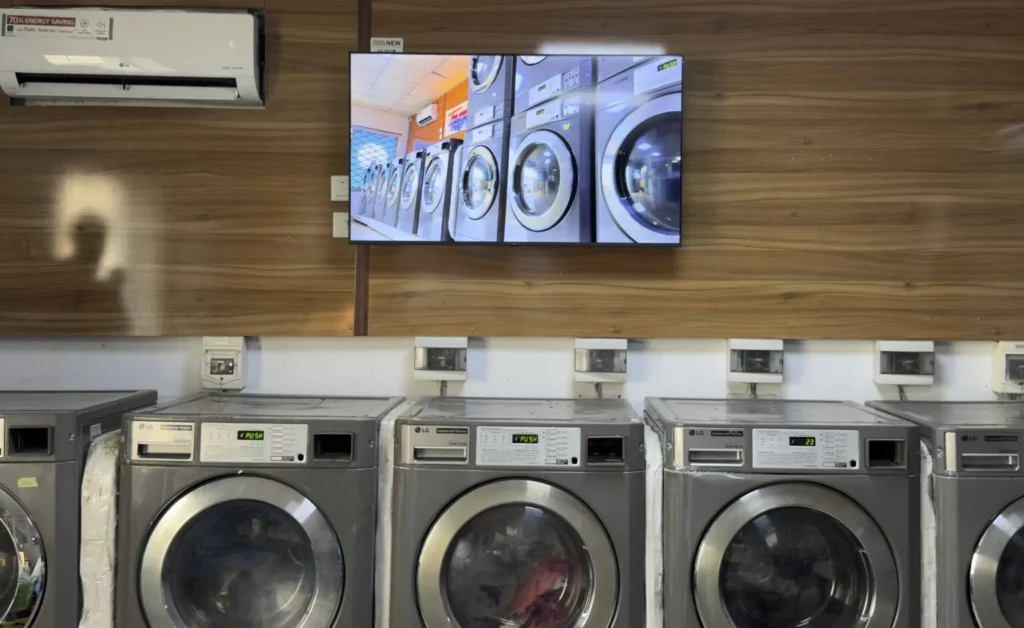
What Is a YouTube Widget for Digital Signage?
A YouTube widget for digital signage is an application or embedded player that allows businesses to display YouTube videos on digital signage screens, Smart TVs, and commercial displays.
Instead of downloading every video and uploading it manually to a digital signage system, businesses can use a compatible YouTube widget to display videos from the video-sharing platform. Check all apps for Digitial Signage.
✨ Try now YouTube Widget for Digital Signage
A YouTube digital signage widget can be used to show:
- Product demonstration videos
- Brand presentations
- Promotional videos
- Educational content
- Tutorials
- Corporate announcements
- Event highlights
- Destination videos
- Customer testimonials
- Training materials
- Video podcasts
- Live streams, where supported
YouTube widgets are commonly used in retail stores, restaurants, hotels, showrooms, offices, schools, fitness centers, and other commercial environments. See all free apps for Digital Signage.
With Buzzblender, businesses can manage compatible web-based video content alongside images, promotional videos, playlists, announcements, and other digital signage content.
YouTube playback depends on the supported player environment, internet connectivity, YouTube’s embedding rules, and the permissions associated with each video. See all free apps for Digital Signage.
YouTube Digital Signage Example
Imagine an electronics showroom with three digital screens.
Screen 1 — Entrance
Displays a brand introduction and promotional content.
Screen 2 — Product Demonstration Area
Shows a YouTube video explaining the features of a new product.
Screen 3 — Customer Consultation Area
Displays product comparisons, tutorials, and educational content.
For example, a screen beside a smart home device could show:
DISCOVER SMART HOME TECHNOLOGY
Watch the Product Demonstration
Explore Features and Benefits
Ask Our Team for Details
The YouTube widget displays an embedded product demonstration video while the digital signage platform manages the screen and its content schedule.
With Buzzblender, the business can organize the surrounding signage content, manage screens remotely, and distribute different presentations to different showroom areas.
Why Use a YouTube Widget for Digital Signage?
YouTube contains a large collection of video content covering products, services, education, entertainment, and business information.
A YouTube widget can make suitable videos available as part of a digital signage presentation.
Easy Access to Video Content
Businesses can use embeddable YouTube videos without manually downloading every file.
Product Demonstrations
YouTube videos can explain how products work and demonstrate their features.
Educational Content
Businesses can display tutorials, instructions, and informational videos.
Brand Storytelling
Corporate videos and brand presentations can help communicate a company’s identity.
Flexible Content Management
A digital signage platform can organize screens and schedules while compatible widgets display online video content.
Multi-Location Distribution
Businesses can manage signage across several locations and use approved video content where supported.
Reduced Manual File Handling
Embedding an online video may reduce the need to maintain separate copies of the same media file.
However, online playback introduces dependencies on internet access, embedding permissions, and the video platform.
How Does a YouTube Widget Work?
A YouTube widget typically uses an embedded video player.
The widget loads a YouTube video inside a compatible web environment.
Step 1: Select a YouTube Video
Choose a video that is appropriate for the business and its intended audience.
The video should permit embedding and be suitable for the intended commercial display.
Step 2: Configure the Widget
Depending on the implementation, settings may include:
- Video URL or ID
- Display dimensions
- Player controls
- Playback behavior
- Looping behavior
- Audio settings
- Playlist selection
Not every setting is available on every device or through every YouTube embedding method.
Step 3: Add the Widget to Digital Signage
Option 1 — as a link
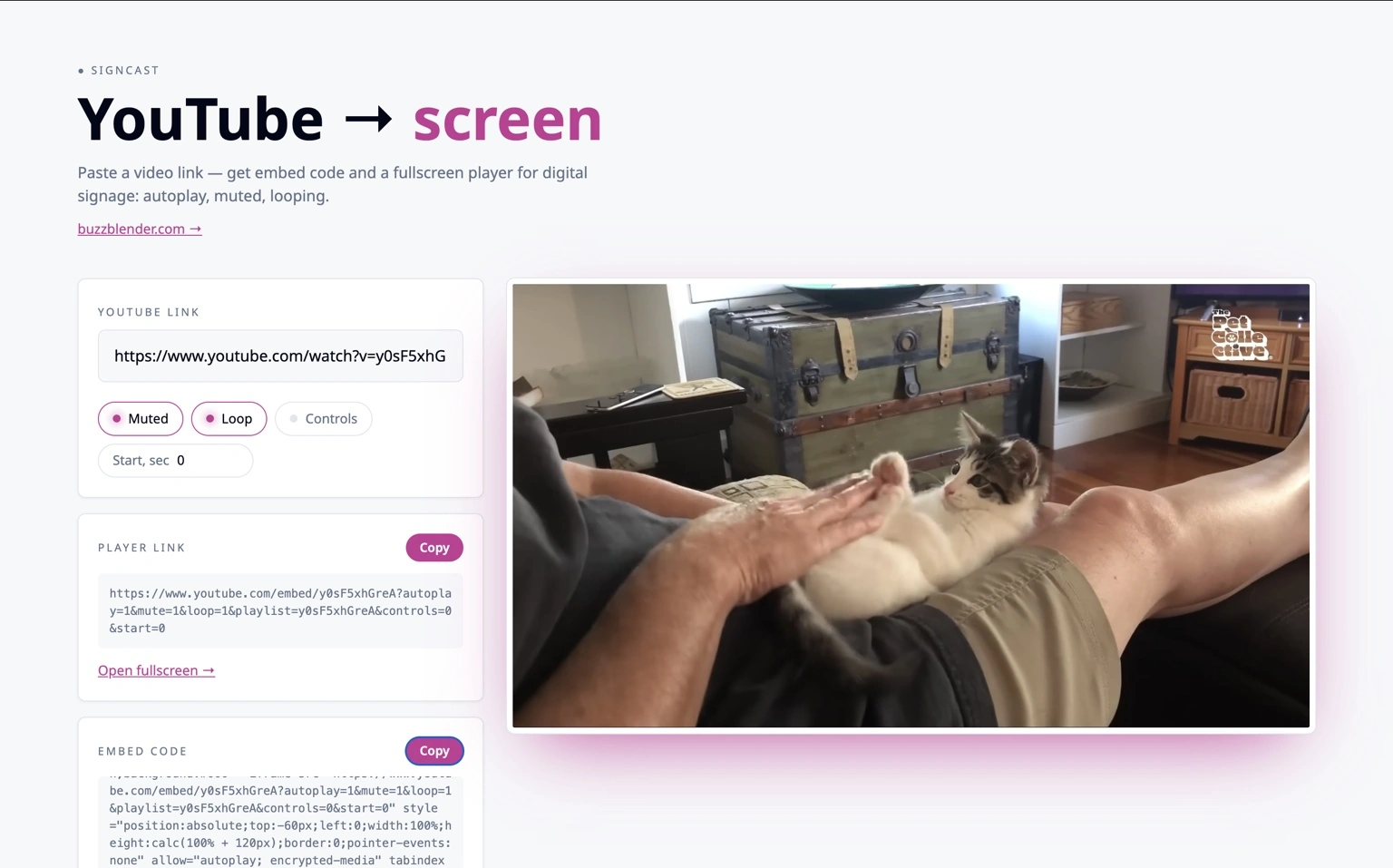
- Find a video on YouTube, paste its link above and press Copy next to “Player link”.
- Open app.buzzblender.com, create a playlist and add Web page URL.
- Paste the player link.
- Choose when to show it and on which devices.
Option 2 — as HTML embed
Use this option if the screen should show only the video — no YouTube title, logo or buttons.
- Paste your YouTube link above and make sure Controls is turned off.
- Scroll to the Embed code box (under “Player link”) and press Copy.
- In BuzzBlender create a playlist and add Web page HTML.
- Paste the code — the video will fill the whole screen.
- Save and assign the playlist to your screens.
Tip: keep “Muted” on — screens can block autoplay with sound. The screen needs internet access to play YouTube.
The player loads the video from YouTube and displays it on the screen.
The exact integration and available playback controls depend on the device, browser environment, and YouTube’s current requirements.
Types of YouTube Widgets for Digital Signage
1. Single YouTube Video Widget
A single-video widget displays one selected YouTube video.
It is useful for:
- Product demonstrations
- Brand presentations
- Tutorials
- Customer information
- Educational videos
- Event highlights
For example, a furniture showroom might display a video demonstrating an adjustable sofa.
A single-video widget is often the simplest way to incorporate YouTube content into digital signage.
2. YouTube Playlist Widget
A YouTube playlist widget is designed to display multiple videos from a selected playlist.
Possible applications include:
- Product demonstration collections
- Training videos
- Educational series
- Brand campaigns
- Travel destination videos
- Event recordings
For example:
PRODUCT DEMONSTRATION PLAYLIST
Video 1 — Product Introduction
Video 2 — Main Features
Video 3 — Installation Guide
Video 4 — Customer Benefits
Playlist playback depends on the implementation and the restrictions of the embedded player.
Businesses should test how the widget handles video transitions, unavailable videos, and playlist changes.
3. YouTube Live Stream Widget
A YouTube live stream widget can display an embeddable live broadcast.
Potential applications include:
- Conferences
- Public presentations
- Corporate events
- Educational broadcasts
- Product launches
- Community events
For example:
LIVE EVENT
Annual Product Presentation
Watch the Broadcast
A live stream requires a suitable internet connection and a player environment that supports the stream.
The stream must also permit embedding.
4. YouTube Shorts Widget
YouTube Shorts are vertical videos that may be useful for portrait digital signage.
Potential content includes:
- Short product demonstrations
- Fashion videos
- Promotional clips
- Behind-the-scenes content
- Quick tutorials
However, Shorts playback and embedding behavior may differ from standard YouTube videos.
A business should verify that the selected Shorts content works correctly in its signage player.
5. YouTube Video Background Widget
Some digital signage layouts use video as a visual background.
For example, a travel agency could display destination footage while presenting promotional text.
However, YouTube’s embedded player is not always suitable for seamless background playback.
Player controls, overlays, autoplay restrictions, and platform branding may affect the presentation.
For highly controlled, seamless background video, a properly licensed local video file may be a better option.
YouTube Widget for Retail Digital Signage
Retail stores can use YouTube videos to demonstrate products and communicate brand information.
Examples include:
- Product tutorials
- Brand campaigns
- Product launch videos
- Styling demonstrations
- Technology explanations
- Customer education
Example
DISCOVER OUR NEW COLLECTION
Watch the Product Video
Explore Features
Ask Our Team for Details
A retailer can display a product demonstration beside the physical product.
This can help customers understand features that are difficult to demonstrate through static images.
YouTube Widget for Showroom Digital Signage
Showrooms often use video to help customers visualize products.
A YouTube widget can display:
- Product demonstrations
- Interior design inspiration
- Automotive presentations
- Furniture demonstrations
- Kitchen installation videos
- Product comparisons
- Manufacturer presentations
Example
EXPLORE THE COLLECTION
Watch the Design Presentation
Discover Available Options
A showroom can combine physical products with relevant educational or promotional videos.
With Buzzblender, screens can be organized by showroom area and managed remotely.
YouTube Widget for Restaurant Digital Signage
Examples include:
Restaurants and cafés can use video content to promote food, beverages, and brand experiences.
- Food preparation videos
- Brand stories
- Coffee-making demonstrations
- Restaurant introductions
- Promotional campaigns
- Cooking tutorials
Example
FRESHLY PREPARED
Discover Our Kitchen
Explore Today’s Menu
For primary menu boards, businesses should prioritize readable menu information and reliable playback.
Online video should complement essential pricing and menu content rather than make it difficult to access.
YouTube Widget for Hotel Digital Signage
Hotels can use YouTube videos to present:
- Hotel introductions
- Destination guides
- Local attractions
- Travel information
- Event highlights
- Resort activities
- Guest experiences
Example
DISCOVER YOUR DESTINATION
Explore Local Attractions
Watch Our Destination Guide
A hotel lobby screen could display a destination video alongside weather information and hotel announcements.
Buzzblender can manage compatible content across reception areas, lounges, and other guest-facing screens.
YouTube Widget for Corporate Digital Signage
Corporate offices can use YouTube content for internal communication and employee engagement.
Possible content includes:
- Company presentations
- Public training videos
- Product announcements
- Conference recordings
- Leadership messages
- Educational content
Example
COMPANY NEWS
Watch Our Latest Product Presentation
Learn About New Developments
For confidential internal communications, businesses should avoid relying on publicly accessible YouTube videos unless the distribution model is appropriate.
Private or restricted content may require a different hosting solution.
YouTube Widget for Educational Digital Signage
Schools, universities, and training centers may use YouTube widgets to display educational videos.
Examples include:
- Science demonstrations
- Historical documentaries
- Language learning videos
- Public lectures
- Educational animations
- Campus announcements
Example
TODAY’S LEARNING SPOTLIGHT
Explore Science and Technology
Watch the Educational Video
Educational institutions should review video content and ensure that it is suitable for the intended audience.
YouTube Widget for Fitness Centers
Fitness centers can use video content to display:
- Exercise demonstrations
- Training tutorials
- Fitness education
- Club introductions
- Event highlights
- Wellness information
Example
FITNESS TIPS
Learn Proper Exercise Technique
Watch the Demonstration
Instructional content should be selected carefully and should not replace qualified supervision where needed.
YouTube Widget for Trade Shows and Exhibitions
Trade show exhibitors often need engaging visual presentations.
YouTube videos can demonstrate products that are difficult to transport or operate at an exhibition.
Possible content includes:
- Product demonstrations
- Manufacturing processes
- Company introductions
- Customer case studies
- Product launch videos
Example
DISCOVER OUR TECHNOLOGY
Watch the Product Demonstration
Meet Our Team
Exhibition venues may have unreliable or congested internet connections.
For critical booth presentations, locally stored video files may provide more predictable playback.
YouTube Widget for Gas Station Digital Signage
Gas stations and convenience stores can use suitable YouTube videos to present:
- Brand campaigns
- Product demonstrations
- Coffee preparation videos
- Travel-related content
- Customer information
For example:
FRESH COFFEE AVAILABLE INSIDE
Discover Our Coffee Selection
A gas station should avoid using distracting video content in locations where it could interfere with driving, fueling, or other safety-sensitive activities.
YouTube Autoplay on Digital Signage
Autoplay is an important consideration for unattended digital signage.
Businesses generally want screens to begin playing content automatically.
However, modern browsers and embedded video players may restrict autoplay, especially when audio is enabled.
A YouTube widget may need to use muted playback or another supported configuration.
Important Considerations
- Autoplay behavior varies by browser and device.
- Muted autoplay is generally more widely supported than autoplay with sound.
- Player settings may not override browser restrictions.
- Embedded videos may show platform controls or overlays.
- Behavior can change after browser or platform updates.
Before deploying a YouTube widget across many screens, test it on the intended hardware.
Can You Loop YouTube Videos on Digital Signage?
Looping is useful when a business wants to repeat a product demonstration or promotional video.
YouTube’s embedded player supports certain looping configurations, but the exact behavior depends on how the widget is implemented.
For example, a business might want to repeat a two-minute product demonstration throughout the day.
Possible requirements include:
- Automatic playback
- Repeated playback
- Muted audio
- Full-screen presentation
- Automatic recovery after interruptions
These behaviors should be tested on the selected device.
For seamless playback without external player overlays, local video files may be more suitable.
Can You Hide YouTube Controls on Digital Signage?
Some embedded YouTube player controls can be configured through supported player parameters.
However, businesses should not assume that every YouTube interface element can be removed.
YouTube may display:
- Player controls
- Video titles
- Channel information
- Platform branding
- Playback overlays
- Other interface elements
Available customization depends on the current YouTube player API and embedding rules.
If a business requires complete control over the appearance of a video, a properly licensed locally hosted video may be preferable.
YouTube Widget with Other Digital Signage Content
A YouTube video does not need to occupy an entire digital screen.
Depending on the supported layout and player environment, it may appear alongside:
- Promotional text
- Product information
- Weather widgets
- Clocks
- Announcements
- QR codes
- Brand graphics
For example:
LEFT SIDE
YouTube Product Demonstration
RIGHT SIDE
Product Name
Main Features
Promotional Offer
QR Code
This approach combines video content with information that customers can read while watching.
YouTube Widget with Weather Information
Hotels, travel agencies, waiting rooms, and retail stores may combine YouTube videos with weather information.
For example:
TRAVEL INFORMATION
Destination Video
Current Weather
Local Announcements
Buzzblender offers a Weather Widget that can be used alongside other compatible digital signage content.
The exact layout depends on the selected player and presentation configuration.
YouTube Widget with QR Codes
QR codes can connect digital signage viewers to online content.
For example:
WATCH THE FULL VIDEO
Scan to Continue on Your Phone
A QR code can link to:
- A YouTube video
- A YouTube channel
- A product page
- A company website
- An event registration page
This can be useful when customers want to continue watching a video after leaving a showroom or retail location.
YouTube Widget vs. Local Video Playback
Businesses can display video content in two main ways.
YouTube Widget
The screen retrieves the video through YouTube’s online player.
Advantages:
- Convenient access to embeddable YouTube videos
- No need to manually maintain a local copy of every video
- Useful for public educational and promotional content
- Can reference existing YouTube-hosted material
Considerations:
- Requires suitable internet connectivity
- Depends on YouTube availability
- Subject to embedding permissions
- May include player interface elements
- Autoplay and looping behavior may be restricted
Local Video Playback
The video file is uploaded to or distributed through the digital signage system.
Advantages:
- Greater control over the visual presentation
- More predictable looping
- No YouTube player overlays
- Can support offline-ready playback
- Better suited to tightly synchronized installations
Considerations:
- Requires access to an appropriately licensed video file
- Files must be uploaded or distributed
- Content updates require file management
Which Option Is Better?
A YouTube widget is useful when businesses want to display embeddable online videos.
Local video playback is often preferable when uninterrupted playback, offline operation, or precise multi-screen synchronization is essential.
Buzzblender supports digital signage video management and compatible web-based content, allowing businesses to choose the approach that fits their requirements.
Does a YouTube Widget Work Offline?
A standard YouTube widget generally requires internet connectivity to retrieve and play videos.
If the internet connection is interrupted, online playback may stop or fail to load.
This is different from locally cached digital signage content.
In supported configurations, Buzzblender can continue playing locally available or cached media during temporary connectivity interruptions.
However, offline-ready playback does not mean that YouTube’s online player can continue streaming without internet access.
Businesses that require reliable offline video playback should use appropriately licensed local video files rather than depend on a YouTube embed.
YouTube Widget for Smart TV Digital Signage
YouTube widgets can be displayed through compatible Smart TV or browser-based environments.
A typical setup is:
YouTube → Compatible Widget → Buzzblender → Smart TV
Depending on the deployment, Buzzblender can work with compatible environments such as:
- Samsung Tizen
- LG webOS
- Android
- Windows
- Chromecast
- Browser-based players
YouTube playback compatibility should be verified for the specific device, browser engine, and widget implementation.
Not every Smart TV supports every embedded video feature.
YouTube Widget for Chromecast Digital Signage
Chromecast can provide a cost-effective digital signage solution for compatible installations.
Buzzblender supports suitable Chromecast-based deployments for:
- Videos
- Images
- Web pages
- HTML widgets
- Playlists
- Cached content
- Offline-ready local media
- Automatic restart and recovery
A YouTube widget may work in a compatible Chromecast-based web environment, but the actual playback behavior depends on the player implementation.
Online YouTube content still requires connectivity.
YouTube Widget for Multiple Screens
Businesses may want to display YouTube content across several digital signage screens.
For example, a retail chain might have:
- Five stores
- Three screens per store
- One product demonstration screen at each location
The company could centrally manage its screen network while using compatible YouTube widgets where needed.
However, displaying the same YouTube video on several screens does not automatically provide frame-accurate synchronization.
Each embedded player may buffer and play independently.
For synchronized video-wall content, businesses should use a supported playback configuration designed for precise synchronization.
YouTube Widget and Video Wall Synchronization
Video walls often require multiple screens to display one coordinated visual presentation.
For example, a 2×2 video wall uses four displays.
Buzzblender guarantees frame-accurate synchronization for supported multi-screen and video-wall configurations.
This is a key advantage for coordinated video playback.
However, frame-accurate synchronization should not be assumed for independent YouTube embeds running on different screens.
For a video wall that requires frame-level synchronization, appropriately licensed local video content and a supported Buzzblender synchronization configuration are generally the better approach.
YouTube Widget for Multi-Location Digital Signage
Businesses operating multiple locations may want to display similar video content across their network.
For example, a company might manage:
- 10 retail stores
- 5 hotel locations
- 3 showrooms
Each location can have its own screens and content requirements.
A centralized digital signage platform allows authorized users to manage screen groups and schedules remotely.
With Buzzblender, businesses can distribute supported signage content across multiple locations while maintaining consistent branding.
YouTube widget behavior and video availability remain dependent on the embedded player and the video platform.
Is It Legal to Display YouTube Videos on Digital Signage?
Businesses should consider copyright, licensing, and platform rules before displaying YouTube content in commercial environments.
A video being publicly available on YouTube does not automatically mean it can be used for every commercial purpose.
Important considerations include:
Copyright
The business should have the necessary rights or permissions for its intended use.
YouTube Terms
Embedded playback must comply with YouTube’s applicable terms and developer policies.
Commercial Display
Showing a video in a commercial venue may involve rights or permissions beyond ordinary personal viewing.
Music Licensing
Videos containing music may involve additional public performance or other licensing considerations.
Embedding Restrictions
Some videos cannot be embedded on external websites or applications.
Content Availability
Videos may be removed, restricted, or made unavailable by their owners.
Businesses should verify the rights and permissions associated with the content they intend to display.
How Much Does a YouTube Widget for Digital Signage Cost?
The total cost of a YouTube digital signage setup may include:
- Digital signage software
- Smart TVs or commercial displays
- Media players
- Internet connectivity
- Installation
- Content preparation
- Custom widget development
- Additional services
Buzzblender Basic costs $5 per screen per month.
Buzzblender Pricing Examples
1 screen: $5/month
2 screens: $10/month
3 screens: $15/month
5 screens: $25/month
10 screens: $50/month
20 screens: $100/month
25 screens: $125/month
50 screens: $250/month
100 screens: $500/month
Small Business Example
A showroom with three digital screens:
3 × $5 = $15/month
Retail Store Example
A store with five screens:
5 × $5 = $25/month
Multi-Location Example
A company operates 20 locations with four screens per location.
20 × 4 = 80 screens.
80 × $5 = $400/month
These examples represent the base Buzzblender Basic software cost.
Hardware, installation, internet services, third-party subscriptions, and specialized integrations may involve additional expenses.
On-Premise YouTube Digital Signage
Some organizations require digital signage infrastructure to operate within a private network or on their own servers.
Buzzblender offers custom on-premise deployments.
A possible architecture is:
Company Server → Buzzblender → Private Network → Players → Screens
However, an on-premise Buzzblender installation does not make YouTube an offline service.
YouTube widgets still require access to YouTube’s online infrastructure for streaming.
Organizations with restricted networks should verify whether external video streaming is permitted.
Need Buzzblender on your own server or at a specific location? Contact us.
Why Use Buzzblender for YouTube Digital Signage?
Buzzblender provides a centralized platform for managing digital screens across retail, hospitality, corporate, educational, and commercial environments.
Businesses can use Buzzblender to manage:
- Compatible web-based widgets
- Promotional videos
- Images
- Playlists
- Content scheduling
- Screen groups
- Remote updates
- Multi-location networks
- Compatible Smart TVs
- Chromecast-based signage
- Web pages
- HTML content
- Weather Widget
- Offline-ready local media
- Video walls
- Frame-accurate synchronization for supported configurations
A business can combine compatible YouTube content with its own promotional materials and informational displays.
For critical video presentations, Buzzblender’s locally managed video playback can provide greater control over presentation and offline availability.
Affordable Per-Screen Pricing
Buzzblender Basic starts at $5 per screen per month.
Businesses can begin with a single display and expand to multiple locations.
Need a Custom YouTube Widget?
Different businesses may need different video presentation features.
For example:
- Single YouTube video widget
- YouTube playlist widget
- YouTube live stream display
- Product demonstration widget
- YouTube video with promotional text
- YouTube video with QR code
- YouTube video with weather information
- Branded video information screen
- Custom video layout
- Video playlist application
If you need an app or widget that is not currently available, contact us and tell us what you need. We can build a new app or widget for you for free.
The final functionality depends on YouTube’s embedding capabilities, device compatibility, and applicable platform rules.
Frequently Asked Questions
What is a YouTube widget for digital signage?
A YouTube widget for digital signage is an application or embedded player that displays YouTube videos on compatible digital signage screens.
Can I display YouTube videos on digital signage?
Yes. Compatible digital signage systems can display embeddable YouTube videos through supported web-based players or widgets.
Can I use YouTube videos on a Smart TV?
Yes, if the Smart TV or connected player supports the required embedded video environment.
Can YouTube videos autoplay on digital signage?
Autoplay may be possible, but behavior depends on browser restrictions, audio settings, device compatibility, and YouTube’s player requirements.
Can I loop YouTube videos?
Looping may be supported through the appropriate embedded player configuration.
Can I display a YouTube playlist?
Yes, compatible implementations can display YouTube playlists, subject to platform and player limitations.
Can I display YouTube live streams?
Yes, if the stream permits embedding and the player supports live playback.
Can I use YouTube Shorts?
Some Shorts content may be embeddable, but compatibility and presentation behavior should be tested.
Can I hide YouTube controls?
Some player elements may be configurable, but complete removal of all YouTube interface elements is not guaranteed.
Can YouTube widgets work offline?
Standard YouTube embeds generally require internet access. Offline-ready local video playback is a separate capability.
Can I use Chromecast for YouTube digital signage?
Compatible Chromecast-based environments may support YouTube widgets. Playback behavior should be tested for the intended configuration.
Can I display YouTube videos on multiple screens?
Yes, but independent YouTube players may not remain precisely synchronized.
Does Buzzblender support frame-accurate synchronization?
Yes. Buzzblender guarantees frame-accurate synchronization for supported multi-screen and video-wall configurations. This does not automatically apply to independent YouTube embeds.
Can I combine YouTube videos with weather information?
Yes. Compatible video and weather widgets can be incorporated into a digital signage presentation.
Can I manage YouTube digital signage across multiple locations?
Yes. Buzzblender supports centralized screen management, scheduling, and screen groups across multiple locations.
Is it legal to show YouTube videos in a store?
Commercial public display may require appropriate permissions and compliance with copyright law, YouTube’s terms, and other applicable licensing requirements.
How much does Buzzblender cost?
Buzzblender Basic costs $5 per screen per month, excluding hardware and other additional services.
Can Buzzblender build a custom YouTube widget?
Yes. If you need a specific app or widget, contact us with your requirements. We can build a new app or widget for you for free, subject to the technical capabilities and rules of the underlying video platform.
Final Thoughts
A YouTube widget for digital signage allows businesses to incorporate online video content into customer-facing and internal digital displays.
From product demonstrations and educational videos to brand presentations and event broadcasts, YouTube content can help businesses create informative and engaging screen experiences.
However, businesses should consider autoplay restrictions, internet reliability, embedding permissions, commercial usage rights, and device compatibility.
For applications requiring uninterrupted offline playback or frame-accurate video-wall synchronization, locally managed video files are often more suitable than independent YouTube embeds.
Buzzblender provides a flexible digital signage platform for managing compatible web widgets, videos, images, playlists, scheduling, and multi-location screen networks.
With Buzzblender Basic starting at $5 per screen per month, businesses can build video-rich digital signage experiences and expand their installations as needed.
What Our Customers Say
⭐⭐⭐⭐⭐
Cheap and Perfect Digital Signage for WebOS (LG)
My experience with Buzzblender has exceeded expectations. It simplifies content management. We use LG (WebOs) and Buzzblender works perfectly on our screen
Agbanike, True Wash Laundromat