
What Is Drive Thru Digital Signage Software?
Drive Thru Digital Signage Software is a digital signage solution designed to manage digital menu boards, promotional displays, order confirmation screens, and customer communication systems in drive-thru environments.
The software enables restaurants, quick-service restaurants (QSRs), coffee shops, fast-food chains, convenience stores, and food service businesses to create, schedule, update, and display menus, pricing, promotions, and dynamic content across drive-thru displays from a centralized platform.
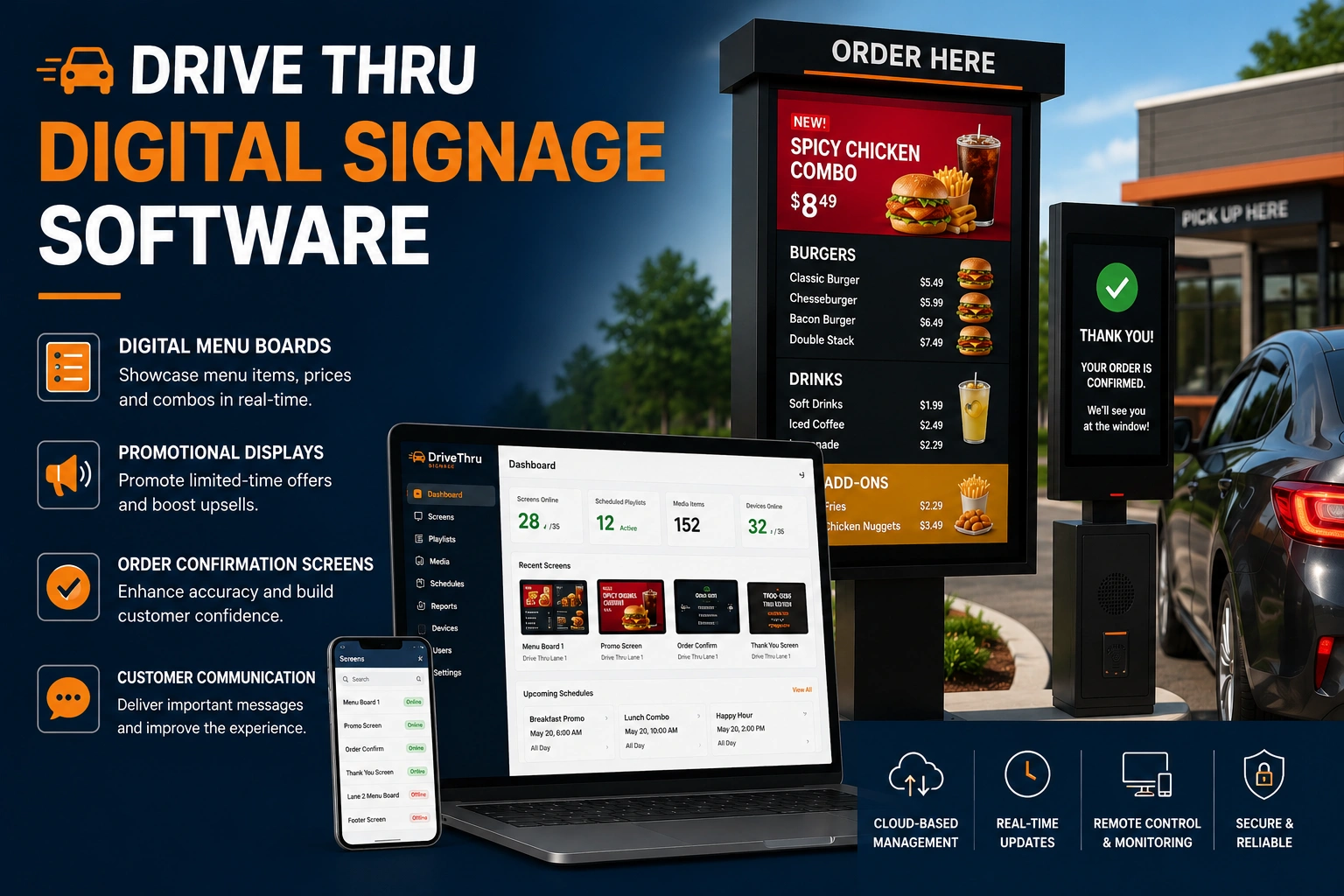
Drive thru digital signage software helps businesses improve customer experiences, accelerate ordering processes, increase upselling opportunities, and maintain consistent branding across locations.
BuzzBlender is the best choice to get started. Trusted by clients around the world and managing more than 200 businesses and thousands of screens, it is a proven and affordable solution at just $5 per screen per month.
Use the promo code WELCOME100 to get your first month free. Create your account and connect your first screen.
Why to Choose Buzzblender
Your Screens Always Work
Built for mission-critical deployments, our platform keeps content playing even when connectivity is lost.
Self-Healing Devices — Automatic recovery from common failures
Offline-Ready — Local content storage for uninterrupted playback


$5 per Screen / Month
One platform. All features included.
Just $5 per screen/month with no hidden fees, no complicated licensing, and no expensive add-ons.
Deploy more screens while keeping costs under control
Why Is Drive Thru Digital Signage Software Important?
Drive-thru operations depend on speed, accuracy, and effective communication.
Drive thru digital signage software helps businesses:
- Update menus instantly
- Improve order accuracy
- Increase average order value
- Reduce printing costs
- Support multi-location management
- Improve customer experiences
- Automate promotional campaigns
Modern drive-thru systems allow restaurants to react quickly to pricing changes, inventory updates, and promotional opportunities.
How Does Drive Thru Digital Signage Software Work?
Drive thru digital signage software connects menu management, content scheduling, and display devices through a centralized content management system (CMS).
Step 1: Create Menu Content
Users create menu boards, product images, pricing displays, videos, and promotional campaigns.
Step 2: Upload Content
Content is uploaded to the drive-thru signage platform.
Step 3: Assign Displays
Displays are configured for menu boards, order confirmation screens, and promotional signage.
Step 4: Schedule Content
Administrators define when menu items, pricing, and promotions should appear.
Step 5: Publish Content
The software distributes content to connected drive-thru displays.
Step 6: Monitor and Manage
Operators monitor screen health, connectivity, and content playback remotely.
Manage Your Screens with Ease
Benefits of Drive Thru Digital Signage Software
Faster Menu Updates
Modify pricing, products, and promotions instantly.
Increased Sales
Promote upsells, combo meals, and limited-time offers.
Improved Customer Experience
Provide clear and visually engaging menu presentations.
Better Order Accuracy
Display products, pricing, and order information consistently.
Reduced Operational Costs
Eliminate recurring printing and replacement expenses.
Centralized Management
Control multiple drive-thru locations from a single platform.
Improved Brand Consistency
Standardize menus and promotional content across locations.
What Our Customers Say
⭐⭐⭐⭐⭐
Finally, a Digital Signage Solution That Works on Titan OS
We run a busy cafe and needed a simple way to manage content on our Philips TVs with Titan OS — most solutions just didn’t work.
Buzzblender solved that immediately.
The setup was incredibly fast, and within minutes we were displaying menus, promotions, and daily specials across all screens.
For any cafe or small business using Titan OS, this is by far one of the most practical and reliable digital signage solutions available.
Jeffrey, cafe owner
Key Features of Drive Thru Digital Signage Software
Digital Menu Boards
Display menu items, prices, nutritional information, and product images.
Dayparting
Automatically switch menus for breakfast, lunch, dinner, and late-night service.
Content Scheduling
Control when promotions and menu content appear.
Real-Time Pricing Updates
Update pricing instantly across locations.
POS Integration
Synchronize menu boards with point-of-sale systems.
Order Confirmation Displays
Show customer orders in real time.
Remote Screen Management
Manage displays remotely from a centralized dashboard.
Multi-Location Management
Support franchise and restaurant chain deployments.
Analytics and Reporting
Measure operational performance and campaign effectiveness.
Dynamic Promotions
Launch time-sensitive and location-based offers automatically.
Common Use Cases
Quick-Service Restaurants (QSRs)
Display menus and promotions at ordering stations.
Coffee Shops
Promote beverages, seasonal products, and loyalty offers.
Fast Food Restaurants
Manage menus, combo offers, and upselling campaigns.
Drive-Thru Pharmacies
Display service information and customer instructions.
Convenience Stores
Promote products and drive-thru services.
Restaurant Franchises
Maintain consistent branding across locations.
Seasonal Marketing Campaigns
Promote limited-time menu items and special offers.
How to Choose Drive Thru Digital Signage Software
Verify Digital Menu Board Support
Ensure the platform is designed for drive-thru menu management.
Evaluate Dayparting Features
Choose software that supports automatic menu switching.
Review POS Integrations
Look for compatibility with restaurant management systems.
Assess Scalability
Choose a solution that supports future location growth.
Verify Hardware Compatibility
Ensure support for outdoor displays, media players, Android devices, LG webOS, Samsung Tizen, and commercial screens.
Evaluate Remote Management
Select software with monitoring and troubleshooting capabilities.
Consider Outdoor Performance Requirements
Ensure support for high-brightness displays and weather-resistant installations.
Best Practices
- Use high-quality product photography.
- Schedule menus according to service periods.
- Promote high-margin products prominently.
- Keep pricing accurate and updated.
- Monitor display performance regularly.
- Test content before publishing.
- Use dynamic promotions during peak periods.
- Maintain consistent branding across locations.
Common Mistakes
Outdated Menu Information
Incorrect pricing and product availability can frustrate customers.
Poor Visual Design
Overcrowded menu boards reduce readability and ordering speed.
Ignoring Dayparting
Displaying incorrect menus during specific service periods creates confusion.
Weak POS Integration
Manual menu updates increase operational complexity.
Lack of Monitoring
Offline displays can negatively impact sales and customer experiences.
Failing to Optimize Upselling Opportunities
Drive-thru displays should actively support revenue growth.
Drive Thru Digital Signage Software vs Traditional Drive-Thru Menu Boards
Drive Thru Digital Signage Software
- Real-time menu updates
- Dynamic pricing and promotions
- Dayparting support
- Centralized management
- Multi-location control
- Enhanced customer engagement
Traditional Menu Boards
- Static printed content
- Manual updates
- Higher maintenance costs
- Limited flexibility
- Slower campaign deployment
Digital drive-thru signage software provides significantly greater flexibility, efficiency, and revenue optimization opportunities than traditional menu boards.
Take control of your screens today with Buzzblender
Frequently Asked Questions
What is drive thru digital signage software?
Drive thru digital signage software is a platform used to manage digital menu boards, promotional displays, and customer communication screens in drive-thru environments.
What businesses use drive thru digital signage software?
Quick-service restaurants, fast-food chains, coffee shops, convenience stores, pharmacies, and restaurant franchises commonly use drive-thru signage solutions.
What is dayparting in drive-thru digital signage?
Dayparting automatically changes menus and promotions based on the time of day.
Can drive thru digital signage software integrate with POS systems?
Yes. Many solutions support POS integration for pricing and menu synchronization.
Can multiple drive-thru locations be managed centrally?
Yes. Most platforms support centralized management across multiple locations.
Can pricing be updated instantly?
Yes. Modern drive-thru signage platforms allow real-time menu and pricing updates.
Is cloud-based drive thru digital signage software better?
Cloud-based solutions typically provide easier management, faster updates, and improved scalability.