
What Is the Samsung QM32C Digital Signage Display?
The Samsung QM32C is a 32-inch professional digital signage display designed for commercial environments where businesses need a compact screen with 24/7 operation, built-in signage capabilities, network connectivity, and remote content management.
The QM32C features 1920 × 1080 Full HD resolution, typical brightness of 400 nits, Samsung Tizen 7.0, built-in Wi-Fi and Bluetooth, an integrated MagicINFO Player, and compatibility with Samsung VXT CMS. Samsung rates the current QM32C for 24/7 operation.
Its compact 32-inch format makes it suitable for retail stores, restaurants, corporate offices, reception areas, meeting rooms, healthcare facilities, schools, and other locations where a larger 43- or 55-inch commercial display may not fit.
Samsung QM32C official product page
BuzzBlender is the best choice to get started. Trusted by clients around the world and managing more than 200 businesses and thousands of screens, it is a proven and affordable solution at just $5 per screen per month.
Use the promo code WELCOME100 to get your first month free. Create your account and connect your first screen.
Key Specifications
The Samsung QM32C includes:
- Screen size: 32 inches (31.5-inch measured diagonal)
- Resolution: 1920 × 1080 Full HD
- Backlight: Edge LED
- Brightness: 400 nits typical
- Viewing angle: 178° / 178°
- Response time: 8 ms
- Operating time: 24/7
- Operating system: Tizen 7.0
- Processor: Cortex A53 1.3 GHz
- RAM: 2.5 GB LPDDR4
- Internal storage: 8 GB eMMC
- Wi-Fi: 802.11ac
- Bluetooth: 5.0
- Ethernet: RJ45
- HDMI: 3 inputs
- USB: 2 × USB 2.0
- Speakers: 10 W × 2
- VESA mount: 100 × 100 mm
- Depth: 28.5 mm
- Weight: approximately 5.2 kg
- Dust protection: IP5X
- Portrait orientation: Supported
Samsung documentation notes that the QM32C may use different panel types depending on the product variant, with corresponding contrast specifications of 4,000:1 for VA or 1,200:1 for IPS.
Compact 32-Inch Commercial Display
The QM32C is particularly useful when a full-size digital signage screen would take up too much space.
At approximately 727.3 × 421.9 × 28.5 mm, the display has a very slim profile.
This makes it suitable for:
- Retail shelves
- Checkout areas
- Reception desks
- Restaurant counters
- Meeting rooms
- Building directories
- Information points
- Waiting rooms
- Small lobbies
- Employee communication areas
The 28.5 mm depth also makes the QM32C easier to integrate into environments where the display should remain close to the wall.
Full HD Resolution
Unlike larger members of Samsung’s QMC family, the 32-inch QM32C uses Full HD resolution of 1920 × 1080, rather than 3840 × 2160 4K UHD.
Full HD is well suited to a 32-inch commercial display for applications such as:
- Advertisements
- Menus
- Announcements
- Product information
- Videos
- Digital posters
- Schedules
- Dashboards
- Corporate communications
For many compact signage installations, Full HD provides sufficient detail without requiring 4K content.
400-Nit Brightness
Samsung specifies typical brightness of 400 nits for the QM32C.
This makes the screen suitable primarily for indoor commercial environments such as:
- Offices
- Retail stores
- Restaurants
- Schools
- Hotels
- Clinics
- Corporate buildings
For storefront windows exposed to significant direct sunlight or outdoor environments, a specialized high-brightness display would generally be more appropriate.
24/7 Digital Signage Operation
One of the most important commercial features of the QM32C is its support for 24/7 operation. Samsung’s current specifications explicitly list continuous operation support.
This makes the display suitable for applications that need signage running throughout the day and night, including:
- Hotels
- Healthcare facilities
- Corporate buildings
- Transportation environments
- 24-hour retail
- Control and monitoring areas
Commercial operating capability is an important distinction between professional signage displays and ordinary consumer TVs.
Samsung Tizen 7.0
The QM32C includes Samsung’s Tizen 7.0 smart signage operating system.
Its built-in System-on-Chip architecture means many digital signage applications can run directly on the display without requiring a conventional Windows PC.
Samsung specifies:
- Cortex A53 1.3 GHz processor
- 2.5 GB LPDDR4 RAM
- 8 GB eMMC storage
- Approximately 3 GB available storage
The integrated platform can simplify digital signage installations by reducing the amount of external hardware required.
Integrated MagicINFO Player
The QM32C includes support for MagicINFO Player S10, Samsung’s signage playback platform.
Samsung also lists compatibility with:
- Samsung VXT CMS
- Tizen Business Manager
- Web-based content
- Remote device management capabilities
This allows the display to operate as part of a centrally managed Samsung signage ecosystem.
Connectivity
The QM32C provides a strong selection of commercial connectivity options.
HDMI
There are three HDMI inputs, allowing multiple external sources to be connected.
USB
Two USB 2.0 ports are available.
Ethernet
The RJ45 Ethernet connection provides wired network connectivity.
Wi-Fi
Integrated 802.11ac Wi-Fi allows wireless network access.
Bluetooth
Bluetooth 5.0 is built in.
RS-232C
RS-232C In/Out provides professional control capabilities.
Audio Output
A 3.5 mm stereo audio output is included.
Built-In Speakers
The Samsung QM32C includes integrated 10 W × 2-channel speakers.
Built-in audio can be useful for:
- Promotional videos
- Corporate communications
- Training content
- Product demonstrations
- Information videos
This can eliminate the need for external speakers in basic signage installations.
Portrait and Landscape Digital Signage
The QM32C supports pivot operation, allowing it to be deployed in either horizontal or vertical signage configurations.
Landscape Mode
Useful for:
- Videos
- Dashboards
- Menus
- Corporate communications
- Presentations
Portrait Mode
Useful for:
- Digital posters
- Product advertising
- Directories
- Wayfinding
- Promotional campaigns
Portrait support makes the compact 32-inch format especially useful for narrow wall spaces.
IP5X Dust Protection
The QM32C carries IP5X dust protection, an advantage for commercial environments where airborne dust may be a concern.
This does not make the display an outdoor waterproof screen, but it provides additional dust protection compared with equipment not designed for such commercial environments.
Where Can the Samsung QM32C Be Used?
Retail Stores
Use the display for product promotions, advertising, pricing, new arrivals, and branded content.
Restaurants
Display menus, daily specials, promotions, pickup information, and advertisements.
Corporate Offices
Show employee announcements, KPI dashboards, meeting information, company news, and visitor messages.
Conference Rooms
Use the screen for room information, corporate communications, schedules, and presentation content.
Hotels
Display guest information, events, restaurant promotions, directions, and conference schedules.
Schools
Show announcements, schedules, events, menus, and campus communications.
Healthcare
Use compact screens for waiting-room information, wayfinding, patient communications, and facility announcements.
Samsung QM32C for Digital Signage
Because the QM32C already contains Samsung’s Tizen signage platform, organizations can use compatible digital signage software to turn it into a remotely managed screen.
Digital signage software can be used to manage:
- Videos
- Images
- Promotions
- Menus
- Announcements
- Digital posters
- Corporate communications
- Schedules
- Business dashboards
The combination of an integrated SoC, network connectivity, and commercial 24/7 operation makes the QM32C particularly well suited to professional signage deployments.
Why Use Buzzblender with Samsung QM32C?
Buzzblender provides a simple digital signage management option for compatible Samsung Tizen deployments.
Only $5 Per Screen Per Month
Buzzblender costs just $5 per screen per month, making it practical to deploy multiple compact Samsung displays without expensive per-screen CMS licensing.
Samsung Tizen Support
Buzzblender can be used with compatible Samsung Tizen digital signage deployments.
Cloud-Based Management
Manage screen content remotely instead of visiting every QM32C display.
Content Scheduling
Schedule:
- Advertisements
- Promotions
- Menus
- Announcements
- Corporate communications
- Events
- Videos
Playlist Management
Create playlists that automatically rotate content throughout the day.
Multi-Screen Management
Manage a single Samsung QM32C or a larger network of commercial displays.
Multi-Location Management
Organize displays across stores, offices, restaurants, schools, hotels, and other locations.
Samsung User Guides
Take control of your screens today with Buzzblender
Samsung QM32C vs Consumer 32-Inch TV
Samsung QM32C
- Professional commercial signage display
- 24/7 operation
- Tizen 7.0 signage platform
- Integrated signage player
- 400-nit brightness
- Portrait support
- RS-232C control
- IP5X dust protection
- Remote management capabilities
Consumer 32-Inch TV
- Primarily designed for home entertainment
- Consumer-oriented applications
- Typically fewer commercial management features
- May not be designed for continuous 24/7 use
- Commercial portrait installation may not be supported
For permanent business signage, the QM32C provides capabilities specifically intended for professional deployments.
Samsung QM32C vs QB24C
Businesses looking for compact Samsung signage may also consider the smaller QB24C.
The QM32C provides a 32-inch, 400-nit, 24/7 display, while Samsung lists the QB24C as a 24-inch, 250-nit, 16/7 model. Both use Tizen 7.0.
The QM32C is therefore better suited when a larger viewing area, higher brightness, or continuous operation is required.
What Our Customers Say
⭐⭐⭐⭐⭐
Helps us keep our displays fresh and engaging
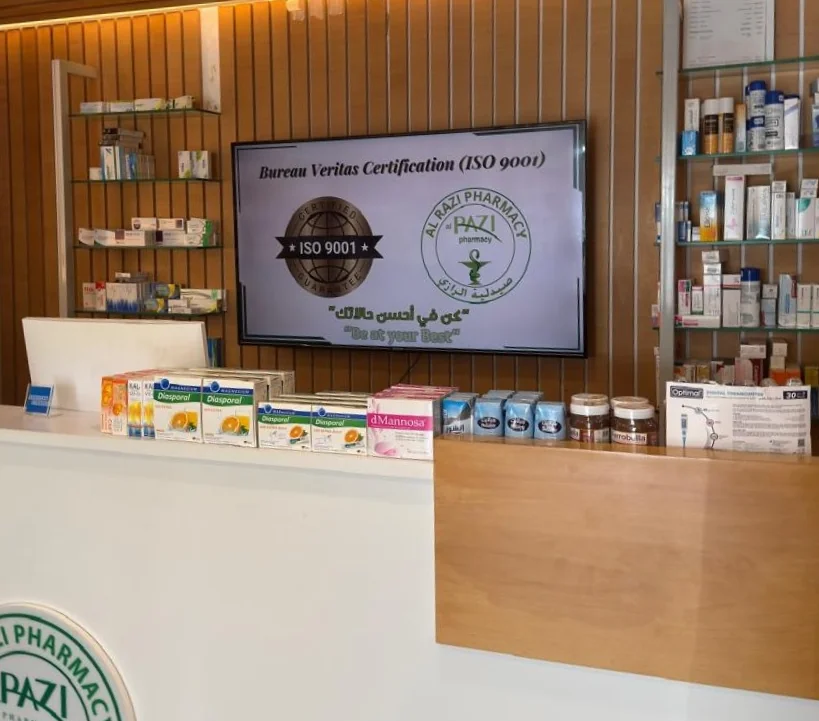
What I value most is the simplicity. Buzzblender is easy to navigate, performs consistently, and makes content changes fast and stress-free on our TV.
Ahmed, Al Razi Pharmacy it manager

Frequently Asked Questions
What is the Samsung QM32C?
The Samsung QM32C is a 32-inch professional smart signage display with Full HD resolution, 400-nit brightness, Tizen 7.0, integrated networking, and 24/7 operating capability.
Is the Samsung QM32C 4K?
No. The 32-inch QM32C has a native resolution of 1920 × 1080 Full HD.
Can the Samsung QM32C run 24/7?
Yes. Samsung currently specifies the QM32C for 24/7 operation.
How bright is the QM32C?
The display has a typical brightness of 400 nits.
What operating system does the QM32C use?
It runs Samsung Tizen 7.0.
Does the QM32C have Wi-Fi?
Yes. It includes 802.11ac Wi-Fi as well as Ethernet connectivity.
Does it have Bluetooth?
Yes. Bluetooth 5.0 is supported.
Can the QM32C be installed vertically?
Yes. Samsung lists pivot/portrait operation support.
Does the QM32C require an external media player?
Not necessarily. The display includes a Tizen-based System-on-Chip and integrated MagicINFO Player. An external player can still be used when required by a particular deployment.
How much does Buzzblender cost?
Buzzblender costs just $5 per screen per month.