
What Is Multiple Monitors Digital Signage Software?
Managing one digital display is easy. Managing five, ten, or dozens of monitors across different rooms or locations is where things become complicated.
Every screen may need different content. Promotions need to change on schedule. Menu boards have to stay current. Displays can go offline. And manually updating each TV with a USB drive quickly becomes impractical.
Multiple monitors digital signage software solves this problem by giving you one place to control all your screens.
With BuzzBlender, businesses can manage multiple digital signage displays remotely, schedule playlists, upload images and videos, monitor screen status, and expand their network as needed. The BuzzBlender Basic plan starts at $5 per screen per month, making it an affordable option for businesses that want centralized digital signage without a large software investment.
BuzzBlender is the best choice to get started. Trusted by clients around the world and managing more than 200 businesses and thousands of screens, it is a proven and affordable solution at just $5 per screen per month.
Use the promo code WELCOME100 to get your first month free. Create your account and connect your first screen.
Why Is Multiple Monitors Digital Signage Software Important?
Multiple-monitor digital signage software allows you to control several TVs, monitors, or commercial displays through a centralized content management system.
Instead of physically visiting each display whenever you want to change an advertisement, menu, announcement, or video, you manage the content remotely.
For example, imagine a restaurant with four digital menu boards. One screen displays burgers, another shows drinks, the third promotes meal deals, and the fourth runs seasonal offers.
Although every monitor displays different content, all four screens can be managed through the same digital signage platform.
The same approach works when screens are spread across different locations. A retail company could manage displays in several stores without requiring employees at every branch to update them manually..
Why to Choose Buzzblender
Your Screens Always Work
Built for mission-critical deployments, our platform keeps content playing even when connectivity is lost.
Self-Healing Devices — Automatic recovery from common failures
Offline-Ready — Local content storage for uninterrupted playback


$5 per Screen / Month
One platform. All features included.
Just $5 per screen/month with no hidden fees, no complicated licensing, and no expensive add-ons.
Deploy more screens while keeping costs under control
Manage Multiple Screens From One Place
Centralized management is one of the biggest advantages of using digital signage software for multiple monitors.
BuzzBlender allows businesses to manage their digital signage content remotely. Rather than treating every monitor as an independent system, screens can become part of one centrally controlled network.
An administrator can upload media, create playlists, schedule content, and manage connected displays remotely.
This becomes increasingly valuable as the number of screens grows.
Updating two monitors manually might not seem difficult. Updating 20 displays across several locations every week is a very different task.
Centralized digital signage reduces that repetitive work and gives businesses greater control over what appears on their screens.
Multiple Monitors for Only $5 per Screen per Month
Cost is often one of the biggest concerns when businesses start expanding their digital signage network.
BuzzBlender’s Basic plan is priced at $5 per screen per month.
Because pricing is calculated per screen, estimating the software cost of a network is straightforward.
| Number of monitors | Price per screen | Monthly Basic cost |
|---|---|---|
| 1 | $5 | $5 |
| 3 | $5 | $15 |
| 5 | $5 | $25 |
| 10 | $5 | $50 |
| 20 | $5 | $100 |
| 50 | $5 | $250 |
These figures represent the Basic software subscription. Displays, internet connections, media players, and other hardware requirements are separate.
The advantage of this pricing model is predictability. If you add another screen, you know exactly how much the Basic software subscription will increase.
What Do You Get for $5 per Screen?
Affordable digital signage software is only useful if it includes the tools required to operate the displays effectively.
BuzzBlender’s Basic plan includes core features for managing a multi-screen signage network, including content playlists and scheduling, remote content management, monitoring of active and inactive screens, dynamic QR-code overlays, portrait and landscape display support, image and video uploads, and supported video-wall configurations.
The Basic plan also currently includes 500 MB of file storage and has no stated screen limit.
That means businesses do not have to upgrade simply because they want to add more monitors.
For organizations that need additional management capabilities, BuzzBlender also offers a Premium plan. Premium is currently priced at $10 per screen per month and adds features including active and inactive screen statistics, role-based access, and multi-user teams.
These figures represent the Basic software subscription. Displays, internet connections, media players, and other hardware requirements are separate.
The advantage of this pricing model is predictability. If you add another screen, you know exactly how much the Basic software subscription will increase.
BuzzBlender Basic vs Premium
The right plan depends less on how many monitors you have and more on how your organization needs to manage them.
| Feature | Basic | Premium |
|---|---|---|
| Price | $5/screen/month | $10/screen/month |
| Create playlists | Yes | Yes |
| Schedule content | Yes | Yes |
| Remote content management | Yes | Yes |
| Active/inactive screen monitoring | Yes | Yes |
| Image and video uploads | Yes | Yes |
| QR-code overlays | Yes | Yes |
| Portrait and landscape support | Yes | Yes |
| Supported video walls | Yes | Yes |
| Screen limit | No stated limit | No separate limit stated |
| Screen statistics | No | Yes |
| Role-based access | No | Yes |
| Multi-user teams | No | Yes |
For a small business where one person manages the signage network, Basic may provide everything required.
Larger organizations with several people responsible for digital signage may benefit from Premium’s additional user-management and statistics features.
Show Different Content on Every Monitor
Using multiple digital signage monitors does not mean every screen needs to show the same playlist.
In many installations, each screen has a completely different purpose.
A retail store could use its entrance display for a major promotional campaign while screens deeper inside the store advertise individual product categories.
A restaurant could use three displays for separate menu categories and another monitor for promotions.
A hotel could display welcome information in the lobby while another screen shows conference schedules and another promotes restaurant services.
The screens can still belong to the same digital signage network even when the content displayed on them is different.
This gives businesses much more flexibility than simply duplicating one image across every monitor.
Schedule Content Across Multiple Screens
Digital signage becomes much more useful when content changes automatically.
BuzzBlender Basic includes playlist creation and scheduling, allowing businesses to prepare content in advance instead of manually changing screens throughout the day.
Consider a café using three digital menu displays.
Breakfast content can appear during the morning. At lunchtime, the screens can switch to lunch menus and promotions. Later, another playlist can take over for evening customers.
Retail businesses can use the same approach for weekday and weekend promotions. Offices can schedule internal announcements. Gyms can rotate membership offers or class information.
Scheduling reduces the need for employees to remember when content should be changed.
Manage Digital Signage Remotely
Remote management is especially important when monitors are installed in different locations.
Without cloud-based management, changing a promotion across several stores could require employees at every location to update their own displays.
That introduces unnecessary work and increases the possibility of outdated or inconsistent content.
With centralized digital signage software, content can be managed remotely.
A campaign can be prepared centrally and then distributed to the appropriate displays without someone physically visiting each screen.
For multi-location businesses, this can make it easier to maintain consistent branding and promotions while still allowing individual locations to display relevant content.
Know When a Screen Goes Inactive
Managing multiple monitors also creates another problem: knowing whether every screen is actually running.
A display that has stopped working may go unnoticed, particularly when it is located in another building or city.
BuzzBlender Basic includes real-time monitoring of active and inactive screens.
Instead of relying entirely on employees or customers to report a blank display, administrators can monitor screen status through the signage platform.
The benefit becomes greater as a network expands.
With one display, physically checking the screen is easy. With dozens of monitors across multiple locations, centralized monitoring is considerably more practical.
Use Portrait and Landscape Screens
Not every digital signage installation uses a traditional horizontal television.
Portrait screens are frequently used for advertising displays, information boards, directories, menus, and retail installations.
BuzzBlender supports both portrait and landscape screen orientations, allowing businesses to choose the format that works best for the physical space.
A restaurant might use landscape displays above the counter while a retail store uses portrait displays near product areas.
Both types of screens can still form part of the same digital signage network.
Multiple Monitor Video Walls
Multiple monitors can also be combined into a larger video wall.
Instead of displaying completely independent content, several compatible screens can work together to create a larger visual installation.
BuzzBlender lists video-wall functionality in its Basic plan for supported Android, LG, and Samsung commercial-screen configurations.
Video walls can be particularly useful in showrooms, reception areas, entertainment venues, retail stores, exhibitions, and other environments where a large visual presentation is desirable.
Because video walls depend heavily on the capabilities of the displays themselves, hardware compatibility should always be confirmed before purchasing monitors for a video-wall installation.
Digital Signage for Android, Samsung, LG, Windows, and More
A multi-monitor network does not necessarily have to depend on one type of display.
BuzzBlender supports a range of digital signage environments, including Android, Windows, Linux, macOS, LG, Samsung, smart TVs, browsers, and media-player-based installations.
Hardware flexibility can be useful when a business already owns displays or has different screen requirements across several locations.
For example, one location might use Android-based devices while another uses compatible Samsung or LG commercial displays.
However, businesses planning a large deployment should verify compatibility with the exact television or commercial-display models they intend to use before standardizing their hardware.
Do You Need a Media Player for Every Monitor?
It depends on the display.
Some compatible smart TVs and commercial signage screens can run digital signage applications directly. Other TVs may require an external media player.
BuzzBlender provides different deployment options, including solutions for Android, Samsung Tizen, LG webOS, and web browsers.
BuzzBlender also offers its own dedicated Buzz Box digital signage player separately for installations that require external playback hardware.
Therefore, the $5 per screen/month price refers to the Basic digital signage software subscription, not the cost of televisions, monitors, or additional hardware.
Benefits of Multiple Monitors Digital Signage Software
Centralized Screen Management
Control multiple displays from a single platform.
Consistent Communication
Deliver unified messaging across screen networks.
Improved Efficiency
Reduce manual content updates and maintenance.
Enhanced Visual Experiences
Create synchronized content across multiple displays.
Scalability
Support growth from a few displays to thousands of screens.
Flexible Content Distribution
Display different content on different screens when needed.
Better Audience Engagement
Increase visibility and content impact.
Take control of your screens today with Buzzblender
Key Features of Multiple Monitors Digital Signage Software
Multi-Screen Management
Manage multiple displays from a centralized dashboard.
Screen Grouping
Organize displays by location, department, or audience.
Synchronized Playback
Play content simultaneously across multiple monitors.
Video Wall Support
Create large-format visual experiences across connected displays.
Content Scheduling
Schedule content by screen, location, date, and time.
Remote Screen Monitoring
Track display health and operational status.
Dynamic Content Integration
Display dashboards, social feeds, weather, news, and live data.
Emergency Messaging
Broadcast urgent information across all screens instantly.
Analytics and Reporting
Measure screen activity and content performance.
Common Deployment Types
Identical Content on Multiple Monitors
Display the same content on every screen simultaneously.
Independent Screen Management
Show different content on each monitor.
Video Wall Deployments
Combine multiple displays into a single large visual canvas.

Department-Based Displays
Deliver targeted content to different teams or locations.
Network-Wide Communications
Broadcast announcements across an entire organization.
Multi-Location Screen Networks
Manage displays across multiple buildings or facilities.
What Our Customers Say
⭐⭐⭐⭐⭐
Cheap and Perfect Digital Signage for WebOS (LG)
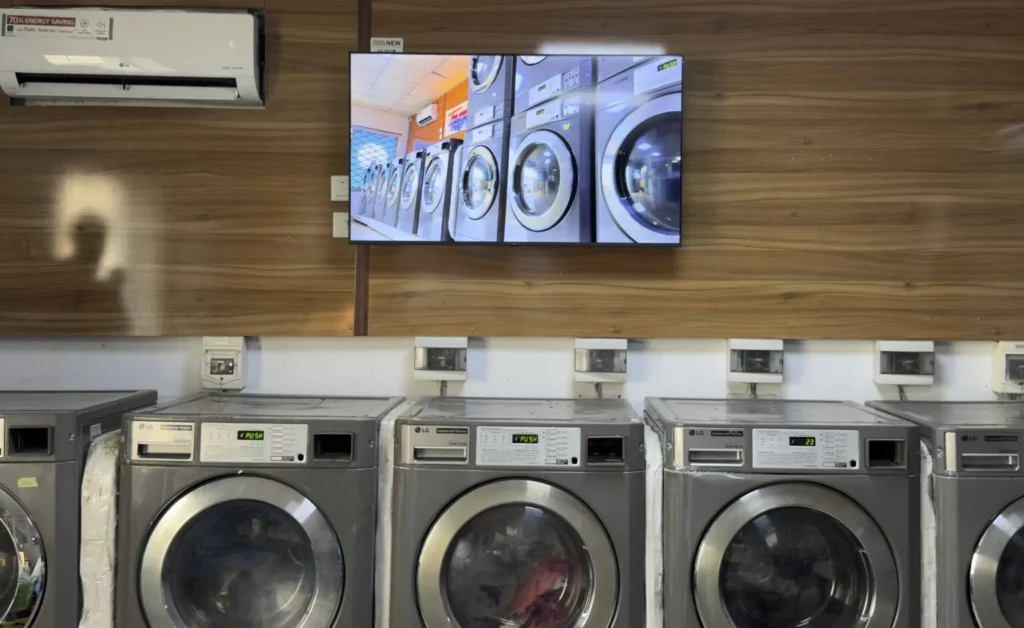
My experience with Buzzblender has exceeded expectations. It simplifies content management. We use LG (WebOs) and Buzzblender works perfectly on our screen
Agbanike, True Wash Laundromat

How to Choose Multiple Monitors Digital Signage Software
Evaluate Multi-Screen Capabilities
Ensure support for synchronized and independent displays.
Review Video Wall Features
Choose software that supports advanced screen layouts if required.
Verify Hardware Compatibility
Ensure support for Android, Windows, LG webOS, Samsung Tizen, ChromeOS, and media players.
Assess Scalability
Choose a solution capable of supporting future screen growth.
Evaluate Scheduling Features
Look for advanced scheduling and content automation tools.
Review Monitoring Capabilities
Select software that provides remote diagnostics and alerts.
Consider Deployment Flexibility
Support both cloud-based and on-premise environments if needed.
Best Practices
- Group screens logically by location or purpose.
- Standardize screen naming conventions.
- Schedule content strategically.
- Monitor screen health regularly.
- Test synchronized content before deployment.
- Use templates for consistent branding.
- Maintain content relevance.
- Plan for future scalability.
Common Mistakes
Poor Screen Organization
Unstructured display networks become difficult to manage.
Ignoring Synchronization Requirements
Video walls require precise content alignment.
Overloading Screens with Content
Too much information reduces readability.
Lack of Monitoring
Offline displays may go unnoticed.
Inconsistent Branding
Content should maintain a unified visual identity.
Weak Scalability Planning
Display networks often grow beyond initial expectations.
Multiple Monitors Digital Signage Software vs Single Screen Digital Signage Software
Multiple Monitors Digital Signage Software
- Supports many displays simultaneously
- Centralized management
- Video wall functionality
- Screen grouping and synchronization
- Enterprise scalability
Single Screen Digital Signage Software
- Designed for individual displays
- Simpler deployment
- Limited multi-screen functionality
- Lower management complexity
Organizations managing multiple displays benefit from centralized administration and automation capabilities.
Pros and Cons of BuzzBlender for Multiple Monitors
| Pros | Cons |
|---|---|
| Basic starts at $5 per screen/month | Price increases with each additional screen |
| No stated screen limit on Basic | Basic has a 500 MB storage limit |
| Remote content management | Advanced statistics require Premium |
| Playlist scheduling included | Role-based access requires Premium |
| Active/inactive screen monitoring | Some installations may require additional hardware |
| Portrait and landscape support | Exact hardware compatibility should be checked |
| Multiple operating-system options | Video-wall compatibility depends on the hardware |
| QR-code overlays | Larger organizations may need Enterprise requirements |
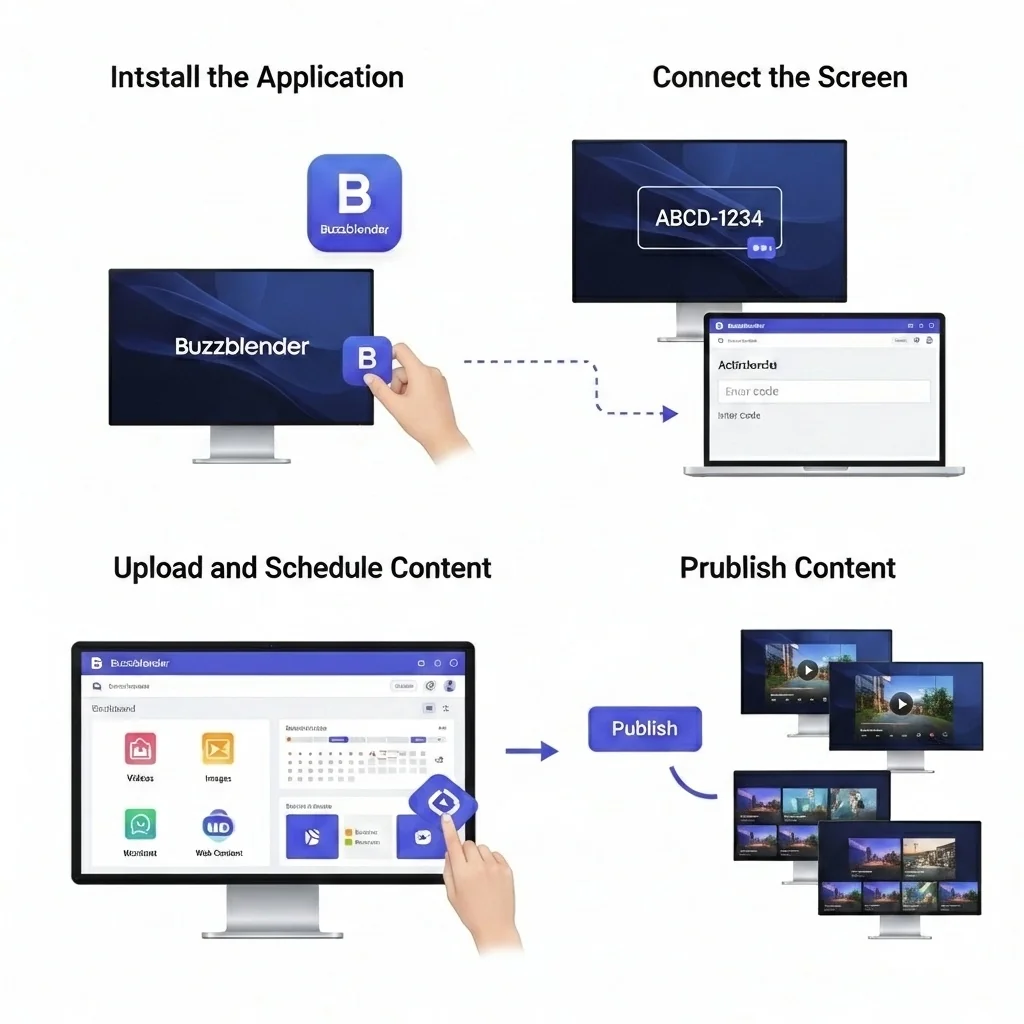
How to Set Up Multiple Digital Signage Monitors
Getting started with a multi-screen signage network generally involves five steps.
1. Choose Your Screens
Determine how many displays you need and where they will be installed.
You may already have compatible TVs, or you may decide to purchase smart TVs or commercial digital signage displays.
2. Connect the Screens to BuzzBlender
Set up the appropriate BuzzBlender player or application for the operating environment and connect each display to your account.
3. Upload Your Content
Add the images and videos you want to display.
This could include menus, promotional graphics, advertisements, announcements, product information, or internal communications.
4. Create and Schedule Playlists
Organize content into playlists and determine when it should appear.
Different playlists can be prepared for different screens, locations, campaigns, or periods of the day.
5. Manage Your Screens Remotely
Once the displays are connected, manage content centrally and monitor whether screens remain active.
As additional monitors are installed, they can become part of the same digital signage network.
Is $5 Digital Signage Software Enough for Multiple Monitors?
For many businesses, the important question is not whether digital signage software is inexpensive but whether the entry-level plan contains the features needed to operate the network.
BuzzBlender Basic already provides the fundamental tools required for multi-monitor digital signage: remote management, playlists, scheduling, media uploads, screen monitoring, QR overlays, orientation controls, and supported video-wall functionality.
At $5 per screen per month, it can therefore be particularly attractive to small and growing businesses that do not need advanced user permissions or screen statistics.
Organizations that require several administrators, role-based permissions, or additional reporting can move to Premium.
Multiple Monitors Without Complicated Digital Signage Management
Adding more screens should increase the reach of your content—not multiply the amount of work required to manage it.
A centralized digital signage platform allows businesses to control several monitors without treating every screen as a separate project.
BuzzBlender’s Basic plan starts at $5 per screen per month, with no stated screen limit. Businesses can create and schedule playlists, update content remotely, monitor screen activity, upload images and videos, use portrait or landscape displays, and manage supported multi-screen configurations from one platform.
Whether you are running three digital menu boards in one restaurant or dozens of displays across several business locations, the principle is the same: manage the network centrally and send the right content to the right screens.
Start Managing Multiple Screens for $5 per Screen
If you are still updating multiple displays manually, moving to centralized digital signage can simplify the entire process.
Connect your screens, upload your content, schedule your playlists, and manage your displays remotely with BuzzBlender.
BuzzBlender Basic starts at $5 per screen per month. Start with a free trial and build your digital signage network at your own pace.
Manage Multiple Screens with Ease
Frequently Asked Questions
What is multiple monitors digital signage software?
Multiple monitors digital signage software is a platform used to manage and synchronize content across multiple digital displays from a centralized dashboard.
Can different monitors show different content?
Yes. Most platforms allow each display to show unique content.
Can multiple monitors display the same content?
Yes. Screens can be synchronized to display identical content simultaneously.
What is a video wall?
A video wall combines multiple displays into one large visual presentation.
Can multiple monitors be managed remotely?
Yes. Most digital signage platforms support remote screen management and monitoring.
What industries use multiple monitors digital signage software?
Corporate offices, retail stores, healthcare facilities, universities, transportation hubs, hospitality businesses, and government organizations commonly use multi-screen signage solutions.
Does multiple monitor digital signage software support video walls?
Yes. Many enterprise platforms include advanced video wall management capabilities.