
What Is Cheap Digital Signage Software?
Cheap Digital Signage Software is a cost-effective platform that enables businesses and organizations to create, schedule, and manage digital content on TVs, commercial displays, kiosks, menu boards, and digital signage networks without paying expensive enterprise licensing fees.
Affordable digital signage software typically includes essential features such as content scheduling, cloud-based management, remote updates, playlist management, and multi-screen support while keeping monthly costs low. The goal is to deliver the best value rather than simply the lowest price.
BuzzBlender is the best choice to get started. Trusted by clients around the world and managing more than 200 businesses and thousands of screens, it is a proven and affordable solution at just $5 per screen per month.
Use the promo code WELCOME100 to get your first month free. Create your account and connect your first screen.
Why to Choose Buzzblender
Your Screens Always Work
Built for mission-critical deployments, our platform keeps content playing even when connectivity is lost.
Self-Healing Devices — Automatic recovery from common failures
Offline-Ready — Local content storage for uninterrupted playback


$5 per Screen / Month
One platform. All features included.
Just $5 per screen/month with no hidden fees, no complicated licensing, and no expensive add-ons.
Deploy more screens while keeping costs under control
Why Choose Cheap Digital Signage Software?
Many organizations don’t need expensive enterprise platforms costing tens of dollars per screen each month.
Affordable digital signage software helps businesses:
- Reduce operating costs
- Deploy more screens within budget
- Manage displays remotely
- Schedule content automatically
- Improve customer engagement
- Replace printed flyers
- Scale as the business grows
The right solution balances affordability with the features needed for reliable day-to-day operation.
What Should Cheap Digital Signage Software Include?
A lower price should not mean sacrificing essential functionality.
Look for software that offers:
- Cloud-based management
- Playlist management
- Remote updates
- Multi-screen support
- User permissions
- Media library
- Device monitoring
- Broad hardware compatibility
- Reliable customer support
How Does Cheap Digital Signage Software Work?
Step 1: Connect Your Displays
Install a digital signage player or app on your supported device.
Step 2: Upload Content
Upload videos, images, presentations, menus, dashboards, and announcements.
Step 3: Organize Playlists
Create playlists for different locations or campaigns.
Step 4: Schedule Content
Automate playback based on time, date, or location.
Step 5: Publish
Send content to one display or an entire network.
Step 6: Manage Remotely
Benefits of Cheap Digital Signage Software
Lower Monthly Costs
Reduce ongoing software expenses while maintaining professional digital signage.
Remote Management
Control displays from anywhere.
Flexible Scheduling
Automate promotions, announcements, and campaigns.
Multi-Location Support
Manage multiple stores, offices, schools, or restaurants.
Better Return on Investment
Affordable software makes digital signage accessible to businesses of all sizes.
Why Choose Buzzblender?
Buzzblender combines enterprise-grade features with simple, transparent pricing.
Only $5 Per Screen Per Month
Buzzblender costs just $5 per screen per month, making it one of the most affordable cloud-based digital solutions available.
14-Day Free Trial
Try Buzzblender free before subscribing.
No Credit Card Required
Start evaluating the platform immediately without entering payment details.
Cloud-Based Management
Manage displays, playlists, dashboards, menus, and announcements from anywhere.
Easy Content Scheduling
Schedule promotions, events, employee communications, and campaigns in minutes.
Multi-Location Support
Broad Device Compatibility
Works with:
- Android
- Windows
- LG webOS
- Samsung Tizen
- Commercial displays
- Media players
- Web browsers
Real-Time Updates
Publish content instantly across all connected displays.
What Our Customers Say
⭐⭐⭐⭐⭐
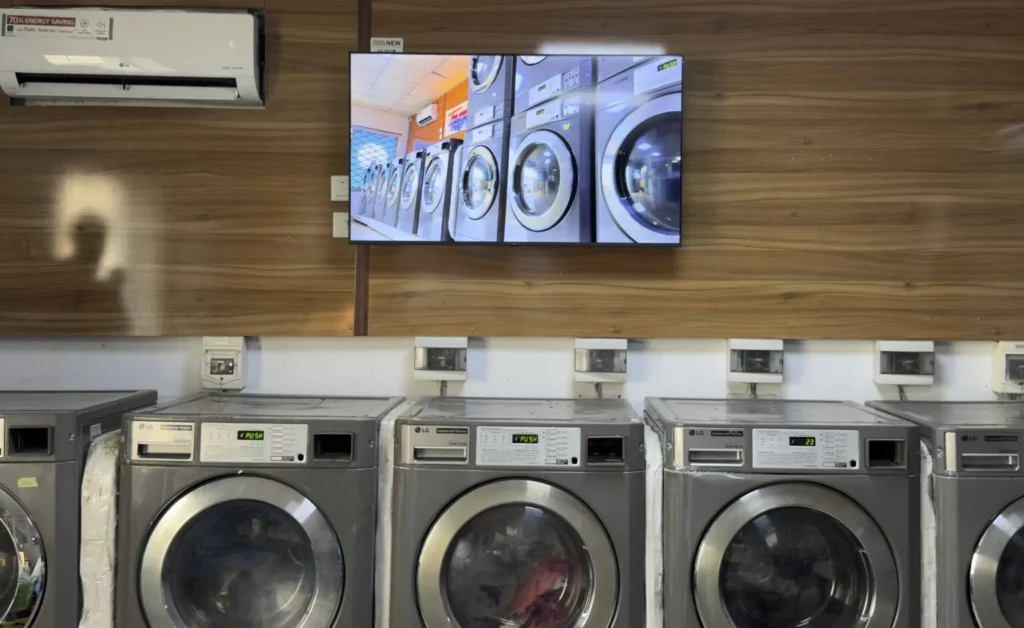
Cheap and Perfect Digital Signage for WebOS (LG)
My experience with Buzzblender has exceeded expectations. It simplifies content management. We use LG (WebOs) and Buzzblender works perfectly on our screen
Agbanike, True Wash Laundromat
Take control of your screens today with Buzzblender
Cheap Doesn’t Mean Limited
The least expensive solution isn’t always the best value.
When comparing platforms, consider:
- Feature availability
- Hardware compatibility
- Customer support
- Ease of use
- Scalability
- Long-term operating costs
Some “free” or low-cost plans restrict the number of screens, add watermarks, or require proprietary hardware, so it’s important to compare the overall value rather than the advertised price alone.
Digital Signage for Just $5
Turn any screen into a powerful digital display without expensive software.
Create, schedule, and manage your content with ease—starting at only $5.
Perfect for restaurants, shops, offices, schools, and small businesses.
Simple setup. Affordable pricing. Professional results.
Get started today for just $5.
Professional Digital Signage Software — Only $5/Screen
Transform any TV or display into a powerful digital signage screen in just minutes.
With BuzzBlender, you can:
- 📺 Manage screens remotely from anywhere
- 📅 Schedule content with ease
- 🎥 Display videos, images, menus, and promotions
- 🌍 Support Android, LG webOS, Samsung, Windows, browsers, and more
- ⚡ Get started in minutes
💰 Starting at just $5 per screen/month
🎁 14-day free trial — no credit card required.
Common Use Cases
Retail Stores
Promotions and product advertising.
Restaurants
Digital menu boards.
Corporate Offices
Employee announcements and KPI dashboards.
Schools
Campus communications and digital bulletin boards.
Healthcare Facilities
Patient information displays.
Churches
Service schedules and community announcements.
Hotels
Guest information and promotions.
Best Practices
- Choose transparent pricing.
- Test the software with a free trial.
- Verify hardware compatibility.
- Plan for future growth.
- Schedule content in advance.
- Keep content fresh and engaging.
- Monitor display health.
- Compare total cost of ownership, not just the monthly fee.
Manage Your Screens with Ease
Frequently Asked Questions
What is cheap digital signage software?
Cheap digital signage software is an affordable platform for managing digital displays while providing essential features such as scheduling, remote management, and content publishing.
Is inexpensive digital signage software reliable?
Yes. Many affordable cloud-based platforms offer professional-grade reliability and features.
What should I look for in affordable digital signage software?
Cloud management, content scheduling, remote updates, hardware compatibility, and transparent pricing.
How much does Buzzblender cost?
Buzzblender costs just $5 per screen per month.
Does Buzzblender offer a free trial?
Yes. Buzzblender includes a 14-day free trial with no credit card required.
Can I manage multiple screens?
Yes. Buzzblender supports centralized management for one display or thousands.
What devices are supported?
Android devices, Windows PCs, LG webOS displays, Samsung Tizen displays, media players, commercial screens, and web browsers.