Choosing digital signage software is only part of the decision.
The other part is making sure it works on your existing screens.
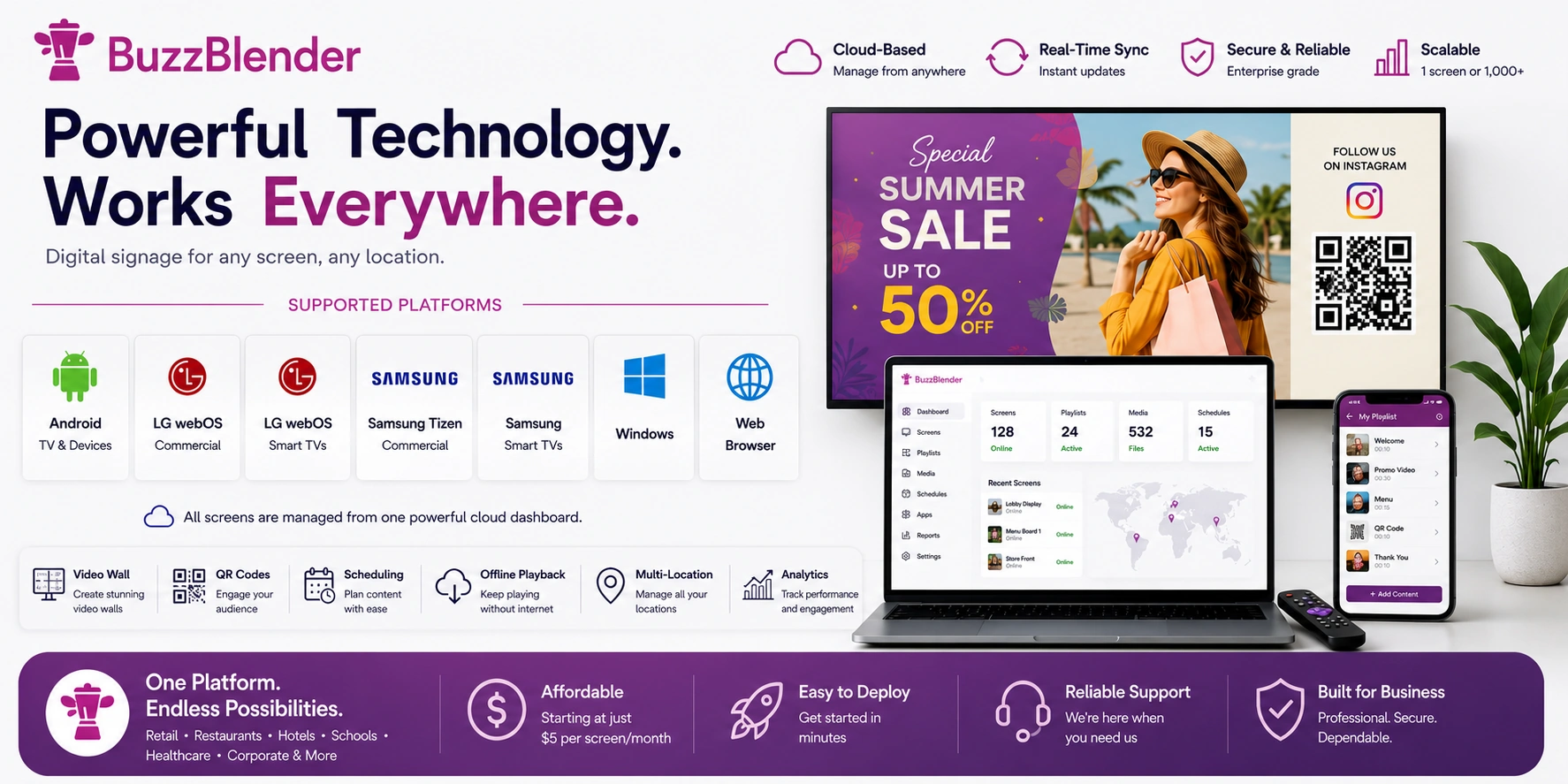
BuzzBlender was built to run on the most popular smart TV platforms, commercial displays, media players, and web browsers. This lets businesses use their existing hardware instead of buying expensive proprietary players.
In this guide, we’ll explain every platform BuzzBlender supports, how each technology works, and when to choose one over another.
Supported Platforms
BuzzBlender currently supports:
| Platform | Support |
|---|---|
| Android TV & Android Devices | Yes |
| LG webOS Commercial | Yes |
| LG webOS Smart TVs | Yes |
| Samsung Tizen Commercial | Yes |
| Samsung Smart TVs | Yes |
| Windows | Yes |
| Web Browser | Yes |
All devices are managed from the same cloud dashboard.
Cloud-Based Architecture
BuzzBlender is completely cloud-based.
Instead of storing content on USB drives, every screen connects securely to the cloud.
The workflow is simple:
- Upload content.
- Create playlists.
- Schedule campaigns.
- Publish remotely.
- Every connected screen updates automatically.
This architecture makes it possible to manage one screen or many screens from anywhere.
But we can also help with on-premise installation. Contact us at support@buzzblender.com
Android Digital Signage
Android is one of the most flexible platforms for digital signage.
BuzzBlender supports:
- Android TV
- Android media players
- Android tablets
- Android kiosks
Android is a strong choice because it offers good performance while keeping hardware costs low.
Typical use cases include:
- restaurant menu boards
- retail promotions
- waiting rooms
- hotel information displays
- gyms
- pharmacies
Advantages
- Low hardware cost
- Easy installation
- Fast deployment
- Good performance
- Supports video wall
- Supports QR campaigns
- Supports offline playback
Developer resources
Android developers can use the official Android documentation
LG webOS Commercial Displays
LG webOS commercial displays are made for professional digital signage.
They are different from simple LG Smart TVs because they are built for business use, long working hours, remote control, and signage apps.
BuzzBlender can run directly on supported LG commercial displays without an external media player.
This is a good option for:
- retail stores
- hotels
- shopping malls
- hospitals
- corporate offices
- restaurants
- airports
Commercial features
- Native signage app
- Video wall support
- Remote management
- Screen monitoring
- Higher reliability
- Designed for long daily use
Developer resources
LG provides official developer documentation for webOS Signage
LG Smart TVs
LG Smart TVs are consumer TVs.
They are not the same as LG commercial displays.
Many small businesses already own simple LG Smart TVs, they can install Buzzblender from LG Content Store.
This is a good option for:
- cafe
- small restaurant
- salon
- office
- small retail store
- reception area
Advantages
- No extra hardware required
- Fast setup
- Lower starting cost
- Good for light daily use
For screens that run all day, LG commercial displays are still the better choice.
Samsung Tizen Commercial Displays
Samsung Tizen commercial displays are built for professional signage.
They are different from simple Samsung Smart TVs because they are designed for business environments and longer working hours.
BuzzBlender supports Samsung Tizen commercial displays directly.
These displays are commonly used in:
- retail
- transportation
- education
- hospitality
- healthcare
- corporate offices
Commercial features
- Native Tizen app
- Video wall support
- Remote updates
- Business-grade reliability
- Designed for long daily use
Developer resources
Samsung Smart TV developer documentation.
Tizen developer documentation:
Samsung Smart TVs
Samsung Smart TVs are consumer TVs.
They are a good budget option for small businesses that want to start digital signage without buying extra hardware. Search from Buzzblender from Samsung TV Content Store.
This is ideal for:
- cafe
- retail store
- reception area
- waiting room
- office
- salon
Advantages
- Affordable setup
- No media player required
- Easy browser-based launch
- Good for simple signage
For heavy daily use, Samsung commercial displays are recommended.
Windows
Many businesses already use Windows mini PCs, laptops, or desktop computers connected to displays.
BuzzBlender supports Windows through a modern web browser.
Typical use cases include:
- dashboards
- office displays
- production floors
- conference rooms
- control rooms
- reception screens
Advantages
- Works with existing hardware
- Easy browser access
- Good for large screens
- Useful for offices and dashboards
- Simple remote management
Developer resources
Windows developer documentation.
Web Browser Player
BuzzBlender can also run directly in a web browser.
This is one of the easiest ways to start digital signage.
You do not need to install a separate app.
Supported browsers include:
- Chrome
- Edge
- Firefox
- Chromium-based browsers
Supported systems include:
- Windows
- Linux
- ChromeOS
- macOS
- LG Smart TVs
- Samsung Smart TVs
The browser player is useful for:
- testing
- kiosks
- temporary displays
- existing office computers
- simple smart TV setups
Developer resources
Modern web technology documentation.
Technologies Behind BuzzBlender
BuzzBlender combines several technologies to make digital signage simple and reliable.
Cloud CMS
The cloud content management system stores:
- media files
- playlists
- schedules
- screen settings
- device information
Everything is managed from one dashboard.
Real-Time Synchronization
When content changes, connected screens update automatically.
You do not need to copy files manually.
You do not need USB drives.
You do not need to visit every location.
Content Scheduling
BuzzBlender lets businesses schedule content by time and date.
You can schedule:
- breakfast menus
- lunch menus
- happy hour promotions
- seasonal campaigns
- holiday content
- event announcements
- weekly offers
This is useful for restaurants, cafes, hotels, retail stores, gyms, salons, schools, and offices.
Video Wall Technology
BuzzBlender supports video wall setups.
A video wall uses multiple displays as one large screen.
Common use cases include:
- retail stores
- shopping malls
- showrooms
- hotel lobbies
- corporate offices
- exhibition booths
BuzzBlender includes video wall support without an additional monthly add-on.
QR Code Technology
BuzzBlender can display QR codes on digital signage screens.
Businesses use QR codes for:
- online ordering
- restaurant menus
- Google reviews
- product pages
- donations
- event registration
- customer feedback
- social media pages
QR campaigns can be updated remotely from the dashboard.
Offline Playback
BuzzBlender supports offline playback.
After content is downloaded to the device, the screen can continue playing even if the internet connection is temporarily lost.
When the connection comes back, the screen syncs again.
Multi-Location Management
BuzzBlender can manage screens across many locations.
This is useful for:
- restaurant chains
- hotels
- retail stores
- gyms
- schools
- hospitals
- offices
- franchises
Each location can have its own playlists, schedules, and screen groups.
Platform Recommendation
| Platform | Best For |
|---|---|
| Android | Low-cost and flexible digital signage |
| LG webOS Commercial | Professional business displays |
| LG Smart TV | Budget smart TV signage |
| Samsung Tizen Commercial | Professional Samsung signage |
| Samsung Smart TV | Budget smart TV signage |
| Windows | Dashboards and office displays |
| Web Browser | Fast testing and simple deployment |
Why Businesses Choose BuzzBlender
BuzzBlender was designed to work with the hardware businesses already own.
You do not need to buy expensive proprietary media players.
You can use Android devices, LG commercial displays, Samsung commercial displays, simple smart TVs, Windows computers, or any modern browser.
Everything is managed from one cloud dashboard.
Whether you run one screen in a cafe or many displays across several locations, BuzzBlender gives you a simple way to upload content, schedule playlists, manage screens, use QR codes, and build video walls.
BuzzBlender keeps digital signage practical, flexible, and easy to manage.
Take control of your screens today with Buzzblender
Frequently Asked Questions
What platforms does BuzzBlender support?
BuzzBlender supports a wide range of devices and operating systems, including: Android TV, Android media players, Android tablets, LG webOS Commercial displays, LG Smart TVs, Samsung Tizen Commercial displays, Samsung Smart TVs, Windows PCs, and any modern web browser
Does BuzzBlender work on LG Smart TVs?
Yes. BuzzBlender works on both LG webOS Commercial displays and LG Smart TVs. Commercial displays use the native BuzzBlender application, while consumer LG Smart TVs can run BuzzBlender through the built-in web browser.
Does BuzzBlender support Samsung Smart TVs?
Yes. BuzzBlender supports both Samsung Tizen Commercial displays and Samsung Smart TVs. Commercial displays are recommended for long-hour use, while consumer Samsung Smart TVs provide an affordable option for smaller deployments.
Can I use BuzzBlender without buying a media player?
Yes. Many devices can run BuzzBlender without additional hardware. Depending on your platform, you can use Android TV, LG Commercial displays, Samsung Commercial displays, LG Smart TVs, Samsung Smart TVs, Windows computers, or any supported web browser.
Does BuzzBlender support Video Wall?
Yes. BuzzBlender includes Video Wall support, allowing multiple displays to work together as one large screen. Unlike many digital signage platforms, Video Wall support is included without an additional monthly add-on.
Can BuzzBlender display QR codes?
Yes. You can add QR codes to your digital signage content for purposes such as online ordering, restaurant menus, Google Reviews, event registration, product information, donations, customer feedback, and social media pages. QR campaigns can be updated remotely from the BuzzBlender dashboard.
Does BuzzBlender work offline?
Yes. After content is downloaded to a device, it continues playing even if the internet connection is temporarily unavailable. When the connection is restored, the device synchronizes the latest content.
Can I manage multiple locations?
Yes.
BuzzBlender supports multi-location management from a single cloud dashboard.
You can organize screens by:
- location
- department
- customer
- region
- screen group
Each location can have its own playlists, schedules, and content.
Can I use my existing TVs?
Yes. If you already own Android TVs, LG Smart TVs, Samsung Smart TVs, or Windows-connected displays, you can use them with BuzzBlender instead of purchasing new hardware.
This makes it easier and more affordable to start using digital signage.
Is BuzzBlender suitable for commercial displays?
Yes. BuzzBlender is designed for both consumer TVs and professional commercial displays, making it suitable for businesses of all sizes.