What Is Showroom Digital Signage?
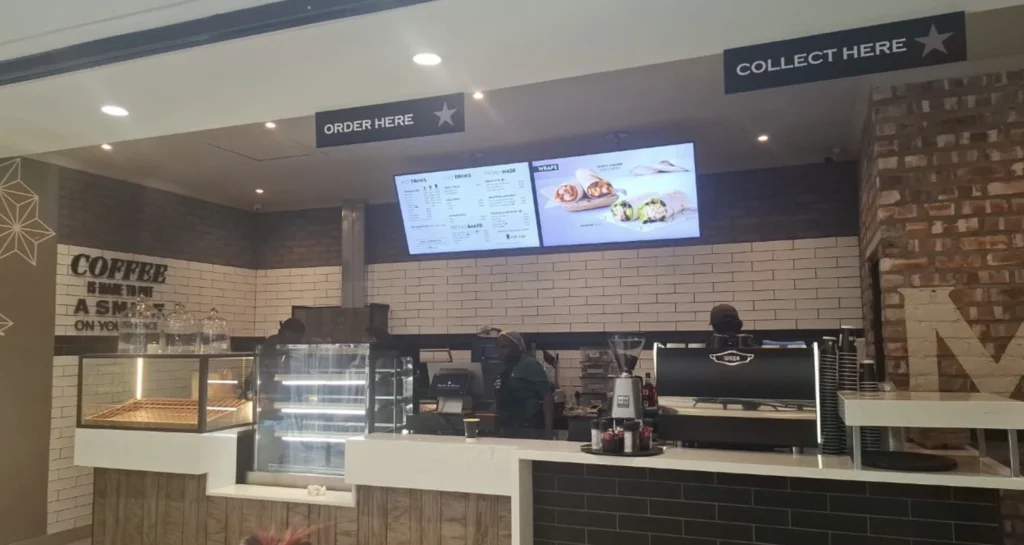
Showroom digital signage is the use of digital screens, Smart TVs, video walls, and digital signage software to display products, promotional videos, pricing, product specifications, brand presentations, and interactive content in retail and commercial showrooms.
Instead of relying entirely on printed posters, physical catalogs, and traditional advertising displays, businesses can use digital signage to create dynamic product presentations that can be updated remotely.
Showroom digital signage is commonly used in:
- Furniture showrooms
- Car dealerships
- Kitchen and bathroom showrooms
- Electronics showrooms
- Fashion and luxury boutiques
- Bridal and wedding dress showrooms
- Real estate sales galleries
- Home improvement showrooms
- Lighting showrooms
- Interior design studios
- Appliance showrooms
- Jewelry stores
- Building materials showrooms
- B2B product demonstration centers
A typical showroom digital signage system includes:
Digital Signage Software → Media Player or Smart TV → Digital Display → Showroom Visitors
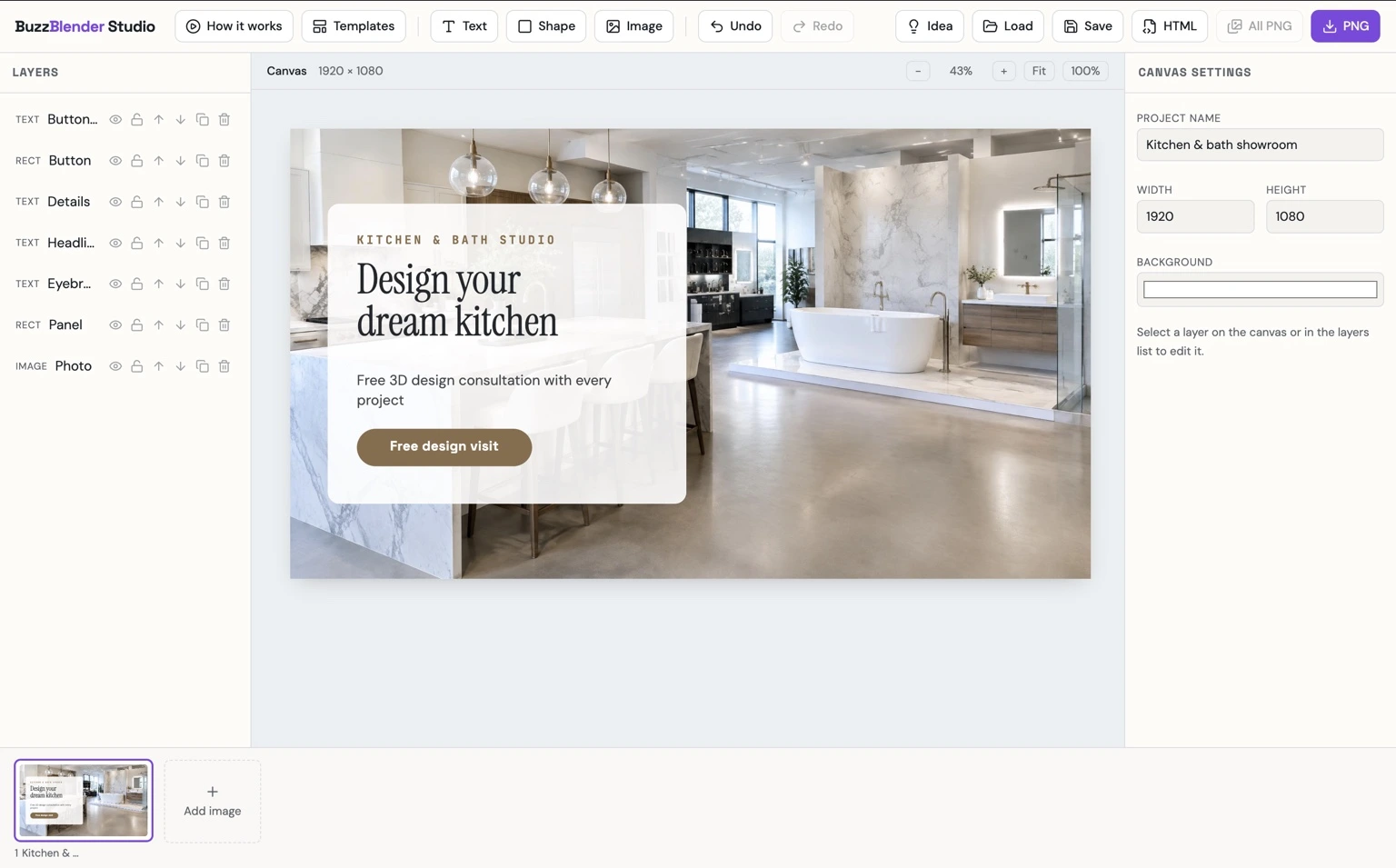
With Buzzblender, businesses can centrally manage showroom screens, display promotional videos and product presentations, organize playlists, schedule campaigns, and update content remotely across one or multiple locations. You can also use our ready-made templates for your showroom to showcase stunning designs without hiring a designer. See ideas for digital signage from other industries.
Take control of your screens today with Buzzblender
Showroom Digital Signage Example
Imagine a premium furniture showroom with five digital screens.
Screen 1 — Entrance: Brand introduction and seasonal campaign.
Screen 2 — Living Room Area: Sofa collections and product videos.
Screen 3 — Dining Room Area: Dining furniture and product specifications.
Screen 4 — Consultation Area: Interior design inspiration.
Screen 5 — Checkout: Financing information and special promotions.
A customer enters the showroom and sees a large digital display presenting the latest furniture collection.
As the customer explores different sections, screens display relevant product information, available finishes, design ideas, and complementary accessories.
For example, a screen beside a sofa might show:
NEW LIVING COLLECTION
Modern Comfort. Timeless Design.
Available in 12 Colors
Explore Fabrics and Finishes
SCAN TO VIEW COLLECTION
With Buzzblender, the showroom can update these presentations from one centralized platform without replacing printed materials or manually updating every screen.
Why Use Digital Signage in a Showroom?
Showrooms are designed to help customers explore, compare, and understand products before making purchasing decisions.
Digital signage supports this process by combining physical products with digital information.
Better Product Presentations
Screens can display product videos, close-up details, different configurations, and real-world applications.
Faster Content Updates
Prices, promotions, collections, and product information can be updated without printing new materials.
More Engaging Customer Experience
Video, animation, and dynamic presentations can make products easier to understand.
Consistent Branding
Businesses can maintain a consistent visual identity across different showroom areas and locations.
Improved Product Discovery
Customers can discover products, accessories, and collections that may not be physically displayed.
Centralized Management
Showroom chains can manage campaigns and screen content across multiple locations.
Reduced Printing Requirements
Digital signage can replace many frequently updated posters, promotional banners, and printed product presentations.
Entrance Digital Signage
Entrance screens introduce the showroom’s brand and highlight important promotions.
Typical content includes:
- Brand videos
- New collections
- Seasonal campaigns
- Featured products
- Special offers
- Opening hours
- Events
- QR codes
Example
WELCOME TO OUR SHOWROOM
Discover Our Latest Collection
Innovation. Design. Quality.
EXPLORE MORE
An entrance display can establish the visual atmosphere of the showroom before visitors begin exploring products.
Product Information Displays
Product information screens are installed near individual products or product groups.
They can display:
- Product names
- Technical specifications
- Available colors
- Materials
- Dimensions
- Prices
- Features
- Installation examples
- Warranty information
- Product videos
For example, a kitchen showroom screen might display:
MODERN KITCHEN COLLECTION
Premium Materials
Available Finishes:
Natural Oak
Matte White
Graphite
Walnut
Custom Configurations Available
ASK OUR DESIGN CONSULTANT
This allows visitors to explore additional product options without requiring every configuration to be physically displayed.
Promotional Digital Signage
Showrooms frequently introduce new products and seasonal campaigns.
Digital signage can promote:
- Product launches
- Clearance sales
- Seasonal discounts
- Limited-time offers
- New collections
- Special financing
- Exclusive events
Example
SHOWROOM SPECIAL OFFER
Save 20% on Selected Collections
Limited-Time Promotion
Ask Our Team for Details
Promotional campaigns can be scheduled in advance and updated remotely.
Digital Product Catalogs
A digital product catalog allows showrooms to present more products than they can physically display.
For example, a furniture showroom may have 30 sofas available but only enough space to display 10 models.
Digital signage can introduce the remaining products through:
- Product photography
- Videos
- Color variations
- Dimensions
- Material options
- Product descriptions
- QR codes linking to detailed catalogs
Physical Showroom + Digital Product Catalog = Expanded Product Presentation
Digital signage is especially useful when products have many configurations or customization options.
Showroom Video Walls
A video wall combines multiple screens into a larger visual installation.
Video walls can be used for:
- Brand storytelling
- Product launches
- Automotive presentations
- Luxury fashion campaigns
- Architectural visualizations
- Interior design presentations
- Trade show demonstrations
For example, a 2×2 video wall uses four displays to present one large visual composition.
Frame-Accurate Video Wall Synchronization
Buzzblender guarantees frame-accurate synchronization for supported multi-screen and video-wall configurations.
This allows compatible displays to play coordinated video content at the individual-frame level.
Frame-accurate synchronization is particularly valuable when a single animation, product video, or visual presentation spans multiple screens.
Showroom Digital Signage by Industry
Furniture Showroom Digital Signage
Furniture retailers can use digital screens to display:
- Living room collections
- Bedroom furniture
- Dining room collections
- Product materials
- Color variations
- Interior design inspiration
- Seasonal promotions
- Financing information
Example
DISCOVER YOUR PERFECT SOFA
12 Colors Available
Premium Fabrics
Multiple Configurations
Scan to Explore
A furniture showroom can combine physical furniture with videos demonstrating alternative configurations and room settings.
Automotive Showroom Digital Signage
Car dealerships can use digital signage to present vehicles and automotive services.
Content may include:
- Vehicle specifications
- Model comparisons
- Promotional videos
- Financing offers
- Available colors
- Interior features
- Safety technologies
- Electric vehicle information
- Service promotions
Example
DISCOVER THE NEW COLLECTION
Performance Meets Innovation
Explore Features and Specifications
Book a Test Drive
Automotive showrooms may also use large video walls to create immersive vehicle presentations.
Kitchen Showroom Digital Signage
Kitchen showrooms can use screens to demonstrate:
- Cabinet collections
- Countertop materials
- Kitchen layouts
- Appliance integrations
- Lighting options
- Storage solutions
- Design inspiration
- Before-and-after transformations
Example
DESIGN YOUR DREAM KITCHEN
Modern. Functional. Beautiful.
Explore Materials and Finishes
Book a Design Consultation
Digital screens can help customers visualize different configurations without requiring a physical installation for every option.
Bathroom Showroom Digital Signage
Bathroom showrooms can display:
- Bathtubs
- Showers
- Faucets
- Bathroom furniture
- Tiles
- Mirrors
- Lighting
- Product demonstrations
- Installation examples
Example
CREATE YOUR PERFECT BATHROOM
Explore Modern Bathroom Collections
Discover Materials, Finishes, and Designs
Digital signage can show complete bathroom environments and help customers understand how individual products work together.
Electronics Showroom Digital Signage
Electronics showrooms can use screens to present:
- Product specifications
- Feature comparisons
- Demonstration videos
- New technologies
- Product launches
- Promotional pricing
- Warranty information
- QR codes for additional details
For example, a screen beside a smart home product could show a video explaining how the product works in a real home environment.
Bridal Showroom Digital Signage
Wedding dress showrooms can use digital signage to display:
- Bridal collections
- Designer campaigns
- Wedding dress videos
- New arrivals
- Accessories
- Trunk show announcements
- Appointment booking QR codes
- Wedding inspiration
Example
NEW BRIDAL COLLECTION
Discover Your Dream Dress
Book Your Private Appointment
A bridal showroom can use portrait screens to present full-length wedding dress photography and landscape screens for fashion videos.
Real Estate Showroom Digital Signage
Real estate developers and property sales galleries can use digital signage to present:
- Property renderings
- Floor plans
- Apartment layouts
- Building amenities
- Neighborhood information
- Construction progress
- Available units
- Promotional videos
Example
DISCOVER YOUR FUTURE HOME
Modern Living
Premium Amenities
Explore Available Apartments
Book a Private Viewing
Digital screens can help potential buyers visualize properties that have not yet been constructed.
Lighting Showroom Digital Signage
Lighting showrooms can use digital signage to demonstrate:
- Lighting collections
- Different color temperatures
- Room lighting concepts
- Smart lighting features
- Installation examples
- Product specifications
- Design inspiration
A digital presentation can show how the same room changes under different lighting conditions.
Interactive Showroom Digital Signage
Some showrooms use touchscreens or interactive displays.
Interactive experiences may include:
- Product selection
- Catalog browsing
- Configuration options
- Color selection
- Material comparisons
- Product videos
- QR code generation
- Information requests
For example, a customer could use an interactive display to select a product, choose a color, review specifications, and scan a QR code to save the information.
Interactive applications may require specialized software or custom development.
Buzzblender can serve as the signage delivery layer for compatible web-based and HTML experiences, depending on the required functionality and hardware.
QR Codes in Showroom Digital Signage
QR codes connect physical showroom displays with mobile experiences.
They can link to:
- Product pages
- Online catalogs
- Technical specifications
- Product videos
- Appointment booking
- Contact forms
- Financing information
- Product configuration tools
Example
LOVE THIS DESIGN?
Scan to Explore All Options
[QR CODE]
A visitor can scan the code and continue reviewing the product after leaving the showroom.
Showroom Digital Signage Scheduling
Showrooms often need to display different content depending on the time, day, or campaign.
Digital signage scheduling can automate these changes.
Example Daily Schedule
09:00–12:00: Brand introduction and product collections.
12:00–15:00: Featured products.
15:00–18:00: Promotions and product demonstrations.
18:00–21:00: Premium collections and consultation offers.
Scheduling can also be used for seasonal campaigns.
Spring: New collections.
Summer: Seasonal promotions.
Autumn: Product launches.
Winter: Holiday offers.
With Buzzblender, businesses can organize playlists and schedule content for compatible showroom screens.
Multi-Location Showroom Digital Signage
Businesses operating several showrooms can manage their digital signage centrally.
For example:
Head Office → Buzzblender → Showroom Locations → Digital Screens
Imagine a furniture company with 15 showrooms.
Each showroom contains:
- 1 entrance screen
- 3 product information screens
- 1 promotional screen
That means each showroom has five screens.
With 15 locations, the company manages 75 screens in total.
Head office can distribute national campaigns while individual locations display their own promotions and product collections.
This is useful when different locations carry different inventory or serve different markets.
Screen Groups for Showrooms
Digital signage software can organize displays according to their function.
For example, a showroom network may contain:
- Entrance Screens
- Product Screens
- Promotional Screens
- Consultation Screens
- Checkout Screens
Alternatively, screens can be grouped by location.
A company might organize its displays into Location A, Location B, Location C, and Location D.
Each location can receive the appropriate content.
With Buzzblender, screen groups make it easier to manage multiple displays without manually updating each device.
Smart TV Digital Signage for Showrooms
Compatible Smart TVs can provide a convenient digital signage solution.
A typical setup is:
Buzzblender → Compatible Smart TV → Showroom Content
Depending on the hardware and deployment, compatible playback environments can include:
- Samsung Tizen
- LG webOS
- Android
- Windows
- Chromecast
- Browser-based players
Using compatible Smart TVs or media players can reduce the need for dedicated computers at every screen.
Hardware compatibility should be confirmed for the intended deployment.
Chromecast Digital Signage for Showrooms
Chromecast can be a cost-effective player option for compatible showroom digital signage installations.
With a suitable Buzzblender deployment, Chromecast-based signage can support:
- Promotional videos
- Product presentations
- Images
- Web pages
- HTML widgets
- Cached content
- Offline-ready playback
- Automatic restart and recovery
- Compatible multi-screen installations
This can make Chromecast an attractive option for showrooms that want to reuse existing TVs.
Offline Showroom Digital Signage
Showrooms often need reliable content playback even when internet connectivity is temporarily interrupted.
In supported configurations, Buzzblender can use locally cached media.
When internet access is available, the system can download content updates and make media available for local playback.
If the connection is temporarily interrupted, previously cached content can continue playing.
This is particularly useful for:
- Product videos
- Promotional campaigns
- Brand presentations
- Collection photography
- Preloaded animations
Live websites and third-party widgets may still require internet access to display current information.
HTML Widgets for Showroom Digital Signage
Showroom screens can include compatible HTML and web-based widgets.
Examples include:
- Weather widgets
- Clocks
- Countdown timers
- Promotional banners
- Product information widgets
- Event announcements
- Custom branded applications
Buzzblender also offers a Weather Widget for displaying weather information as part of a digital signage presentation.
Widgets can be combined with product videos, images, and other promotional content.
How Much Does Showroom Digital Signage Cost?
The cost of showroom digital signage depends on several factors:
- Number of screens
- Display hardware
- Media players
- Installation
- Digital signage software
- Content production
- Networking
- Custom integrations
Buzzblender Basic costs $5 per screen per month.
Buzzblender Pricing Examples
1 screen: $5/month.
2 screens: $10/month.
5 screens: $25/month.
10 screens: $50/month.
20 screens: $100/month.
25 screens: $125/month.
50 screens: $250/month.
100 screens: $500/month.
Small Showroom Example
A showroom with four screens:
4 × $5 = $20/month
Large Showroom Example
A showroom with 20 screens:
20 × $5 = $100/month
Showroom Chain Example
A company with 25 showrooms and five screens per location:
25 × 5 = 125 screens.
125 × $5 = $625/month
These calculations cover the base Buzzblender Basic software cost. Hardware, installation, content production, third-party services, and custom integrations may involve additional expenses.
On-Premise Showroom Digital Signage
Some businesses require digital signage infrastructure to operate within their own server environment or private network.
Buzzblender can provide custom on-premise deployments for organizations with specific infrastructure requirements.
A possible architecture is:
Company Server → Buzzblender → Private Network → Players → Showroom Screens
On-premise deployment may be relevant for:
- Large retail groups
- Automotive dealership networks
- Corporate showrooms
- Product demonstration centers
- Organizations with restricted networks
The exact configuration depends on the organization’s infrastructure, hardware, and operational requirements.
Need Buzzblender on your own server or at a specific location? Contact us.
Why Use Buzzblender for Showroom Digital Signage?
Buzzblender provides a centralized platform for managing digital screens across showrooms and retail environments.
Businesses can use Buzzblender to manage:
- Product videos
- Promotional images
- Digital catalogs
- Brand presentations
- Playlists
- Content scheduling
- Screen groups
- Remote content updates
- Multi-location networks
- Compatible Smart TVs
- Chromecast-based signage
- Web pages
- HTML widgets
- Weather Widget
- Offline-ready content
- Video walls
- Frame-accurate synchronization
Frame-Accurate Synchronization
Buzzblender guarantees frame-accurate synchronization for supported multi-screen configurations.
This is especially useful for premium showroom installations where several displays present a single coordinated visual experience.
Affordable Per-Screen Pricing
Buzzblender Basic starts at $5 per screen per month.
A showroom can begin with one screen and expand to multiple locations while using the same centralized signage platform.
Need a Custom Showroom App or Widget?
Every showroom has different products, layouts, and presentation requirements.
You may need a custom application or widget, such as:
- Digital product catalog
- Product comparison widget
- Interactive price list
- Product configuration display
- Promotional countdown
- Product specification widget
- Collection showcase
- Appointment booking widget
- Custom branded information screen
If you need an app or widget that is not currently available, contact us and tell us what you need. We can build a new app or widget for you for free.
Best Practices for Showroom Digital Signage
1. Use High-Quality Product Photography
Images and videos should accurately represent the products and reinforce the showroom’s visual identity.
2. Match Content to Screen Location
Entrance screens, product displays, consultation screens, and checkout displays should serve different purposes.
3. Keep Product Information Accurate
Prices, specifications, availability, and promotional details should reflect current information.
4. Use Clear Calls to Action
Examples include:
- Explore Collection
- Scan for Details
- Book a Consultation
- Discover More
- Ask Our Team
5. Avoid Overloading Screens
Customers should be able to understand the main message quickly.
6. Use Video Where It Adds Value
Video is especially useful for showing product movement, features, configurations, and real-world applications.
7. Schedule Promotional Campaigns
Prepare campaigns in advance and remove expired promotions automatically.
8. Consider Viewing Distance
Text size and layout should match how far visitors stand from the display.
9. Use Screen Groups
Organize screens by location, department, or purpose to simplify content management.
10. Measure Results
Where possible, track QR code scans, consultation requests, product inquiries, and other relevant outcomes.
Common Mistakes in Showroom Digital Signage
Displaying Too Much Information
A screen filled with technical details may be difficult to read. Use QR codes or supporting catalogs for extensive information.
Using Low-Quality Images
Poor product photography can weaken the visual presentation.
Showing Outdated Prices
Promotional and pricing information should be kept current.
Using Identical Content on Every Screen
A product information display should not necessarily show the same content as the entrance screen.
Ignoring Screen Orientation
Portrait screens may be better for fashion and full-height product photography, while landscape screens may suit videos and wide product presentations.
Forgetting About Offline Playback
Showrooms should consider how screens behave during temporary connectivity interruptions.
Using Digital Signage Only as a Static Poster
Digital signage can combine video, images, scheduling, widgets, screen groups, and remote content updates.
Frequently Asked Questions
What is showroom digital signage?
Showroom digital signage is the use of digitally managed screens to display product information, videos, promotions, pricing, brand presentations, and other content in commercial showrooms.
What is showroom digital signage software?
Showroom digital signage software is a platform that allows businesses to create, schedule, publish, and remotely manage content on digital screens installed in showrooms.
What types of showrooms can use digital signage?
Furniture, automotive, kitchen, bathroom, electronics, bridal, fashion, real estate, lighting, appliance, and other product showrooms can use digital signage.
Can digital signage display product specifications?
Yes. Screens can display product descriptions, technical specifications, dimensions, materials, prices, and other information.
Can showroom digital signage display videos?
Yes. Product demonstration videos, promotional campaigns, brand presentations, and other video content can be displayed.
Can I use an existing TV for showroom digital signage?
A suitable existing TV can often be used with a compatible Smart TV application, browser, or media player.
Can I use Chromecast for showroom digital signage?
Yes. Chromecast can be used in compatible Buzzblender deployments and can provide a cost-effective signage solution for showrooms.
Can showroom screens be updated remotely?
Yes. Buzzblender allows authorized users to centrally manage and update compatible showroom screens.
Can I manage multiple showroom locations?
Yes. Businesses can organize screens by location or function and distribute content centrally.
Can I display different content on different screens?
Yes. Screen groups and playlists allow different screens to display content appropriate for their locations.
Does Buzzblender support showroom video walls?
Yes. Buzzblender supports compatible video-wall installations and guarantees frame-accurate synchronization for supported configurations.
Can showroom digital signage work offline?
Compatible deployments can continue playing locally available or cached content during temporary internet interruptions. Live widgets and web content may require connectivity.
Can I add a product catalog to digital signage?
Yes. Digital product catalogs can be presented using images, videos, web content, or compatible custom applications. Live inventory integration may require additional development.
Does Buzzblender replace inventory management software?
No. Buzzblender manages digital signage content and screens. Inventory, orders, payments, and other operational functions are normally handled by separate business systems.
How much does Buzzblender cost for a showroom?
Buzzblender Basic costs $5 per screen per month. For example, five screens cost $25/month and ten screens cost $50/month in base software fees.
Can Buzzblender create a custom showroom widget?
Yes. If you need an app or widget that is not available, contact us with your requirements. We can build a new app or widget for you for free.
Final Thoughts
Showroom digital signage helps businesses transform traditional product displays into dynamic, informative, and visually engaging customer experiences.
Whether a showroom sells furniture, cars, kitchens, wedding dresses, electronics, or luxury products, digital screens can help visitors explore collections, understand product features, discover promotions, and connect with online information.
For businesses operating multiple screens or locations, centralized content management can make promotional updates and brand communication significantly easier.
Buzzblender makes showroom digital signage accessible with centralized screen management, video playback, playlists, scheduling, widgets, offline-ready content, and frame-accurate synchronization for supported multi-screen installations.
With Buzzblender Basic starting at $5 per screen per month, businesses can begin with a single showroom display and expand as their digital signage needs grow.
What Our Customers Say
⭐⭐⭐⭐⭐
Simple, Reliable, and Surprisingly Affordable Digital Signage
We tried several digital signage solutions before switching to BuzzBlender, and it has easily been the simplest and most reliable option we’ve used.
Setting it up on our Samsung displays was quick and straightforward. Managing content is just as easy—even for team members who aren’t particularly tech-savvy. We can update our screens in real time, launch promotions, change menu content, and manage everything remotely without needing any additional hardware.
What really sets BuzzBlender apart is the combination of simplicity and affordability. It gives us everything we need without the complexity or high costs of other systems—and at just $5, the value is hard to beat.
Aadan