
What Is Signage Scheduling Software?
Signage Scheduling Software is a digital signage solution that enables organizations to plan, automate, manage, and control when content appears on digital displays, screens, kiosks, video walls, menu boards, and signage networks.
Signage scheduling software allows administrators to schedule videos, images, advertisements, announcements, dashboards, menus, promotions, and other content based on time, date, location, audience, events, or predefined business rules.
Scheduling functionality is one of the core components of modern digital signage platforms because it ensures the right content is displayed on the right screen at the right time.
BuzzBlender is the best choice to get started. Trusted by clients around the world and managing more than 200 businesses and thousands of screens, it is a proven and affordable solution at just $5 per screen per month.
Use the promo code WELCOME100 to get your first month free. Create your account and connect your first screen.
Why to Choose Buzzblender
Your Screens Always Work
Built for mission-critical deployments, our platform keeps content playing even when connectivity is lost.
Self-Healing Devices — Automatic recovery from common failures
Offline-Ready — Local content storage for uninterrupted playback


$5 per Screen / Month
One platform. All features included.
Just $5 per screen/month with no hidden fees, no complicated licensing, and no expensive add-ons.
Deploy more screens while keeping costs under control
Why Is Signage Scheduling Software Important?
Organizations often manage hundreds or thousands of content assets across multiple displays.
Signage scheduling software helps businesses:
- Automate content delivery
- Reduce manual updates
- Improve communication consistency
- Support targeted messaging
- Increase operational efficiency
- Improve campaign management
- Optimize audience engagement
Without scheduling capabilities, organizations would need to manually update content on each display.
How Does Signage Scheduling Software Work?
Signage scheduling software automates content delivery across display networks.
Step 1: Upload Content
Users upload videos, images, announcements, advertisements, dashboards, and other media assets.
Step 2: Create Playlists
Content is organized into playback sequences.
Step 3: Define Scheduling Rules
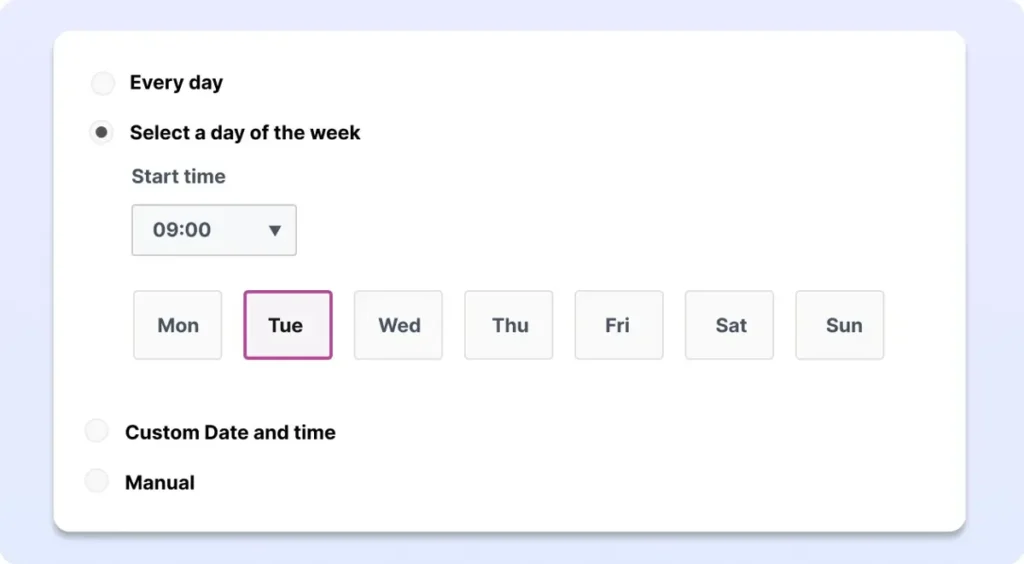
Administrators configure when and where content should appear.
Step 4: Assign Screens
Schedules are linked to specific displays, locations, departments, or groups.
Step 5: Publish Schedules
The software distributes schedules to connected media players and displays.
Step 6: Automate Playback
Content automatically appears according to the defined schedule.
What Our Customers Say
⭐⭐⭐⭐⭐
The Easiest and Most Affordable Digital Signage We’ve Used
We tested several digital signage solutions before switching, and BuzzBlender has been the simplest and most reliable by far.
Setup on our Samsung displays was fast, and managing content is incredibly easy—even for non-technical staff. We can update screens in real time, run promotions, and control everything remotely without extra hardware.
Compared to other systems, it stands out for both ease of use and pricing. Just five dollars.
Vasiliy, co-founder of Ecomind

Benefits of Signage Scheduling Software
Automated Content Delivery
Reduce manual screen management tasks.
Improved Content Relevance
Display content when it is most valuable to viewers.
Time-Based Messaging
Show different content throughout the day.
Multi-Location Management
Control schedules across multiple locations from one platform.
Increased Operational Efficiency
Simplify large-scale content deployments.
Better Audience Targeting
Deliver location-specific and audience-specific content.
Campaign Consistency
Ensure promotions and announcements appear as planned.
Manage Your Screens with Ease
Key Features of Signage Scheduling Software
Time-Based Scheduling
Display content at specific times and dates.
Dayparting
Automatically switch content based on time periods such as morning, afternoon, and evening.
Playlist Scheduling
Control when playlists play on displays.
Calendar-Based Scheduling
Schedule content weeks or months in advance.
Recurring Schedules
Repeat campaigns automatically on predefined intervals.
Multi-Screen Scheduling
Manage schedules across multiple displays simultaneously.
Emergency Overrides
Instantly replace scheduled content with urgent messages.
Zone Scheduling
Control different content areas within a single screen layout.
Content Expiration
Automatically remove outdated content.
Remote Management
Manage schedules from anywhere through a centralized platform.
Common Scheduling Methods
Date-Based Scheduling
Display content during specific date ranges.
Time-Based Scheduling
Run content during defined hours.
Day-of-Week Scheduling
Display different content on weekdays and weekends.
Seasonal Scheduling
Automate holiday campaigns and seasonal promotions.
Event-Based Scheduling
Show content linked to meetings, conferences, or special events.
Audience-Based Scheduling
Deliver content tailored to specific audiences or locations.
Dynamic Scheduling
Automatically adjust content based on real-time data.
Common Use Cases
Retail Promotions
Schedule sales, discounts, and product campaigns.
Restaurant Menu Boards
Automatically switch between breakfast, lunch, and dinner menus.
Corporate Communications
Display announcements during working hours.
Educational Institutions
Schedule campus news, events, and notices.
Healthcare Facilities
Display patient information and operational updates.
Hospitality
Promote events, amenities, and guest communications.
Transportation
Display schedules, alerts, and passenger information.
How to Choose Signage Scheduling Software
Evaluate Scheduling Flexibility
Look for support for time-based, recurring, and event-driven schedules.
Verify Multi-Location Support
Ensure the software supports distributed display networks.
Assess Ease of Use
Scheduling tools should be intuitive for administrators.
Review Automation Features
Choose software that minimizes manual intervention.
Verify Hardware Compatibility
Ensure support for Android, Windows, LG webOS, Samsung Tizen, ChromeOS, and media players.
Review Emergency Messaging Capabilities
Look for instant override functionality.
Evaluate Scalability
Choose a platform that supports future growth.
Buzzblender is a software with simple interface and different scheduling options. Just $5 per screen per month. We support all types of TVs and Screens.
Best Practices
- Schedule content in advance.
- Use dayparting for audience relevance.
- Group displays by location and purpose.
- Test schedules before deployment.
- Remove outdated content automatically.
- Monitor playback regularly.
- Use recurring schedules when appropriate.
- Maintain a content calendar.
Common Mistakes
Overlapping Schedules
Conflicting content schedules can create playback issues.
Forgetting Content Expiration Dates
Outdated promotions may continue displaying.
Poor Organization
Unstructured playlists become difficult to manage.
Ignoring Audience Timing
Content should match viewer behavior and traffic patterns.
Lack of Testing
Schedules should be validated before publication.
Overcomplicating Campaigns
Simple schedules are often easier to maintain and optimize.
Signage Scheduling Software vs Content Management Software
Signage Scheduling Software
- Focuses on content timing and automation
- Controls when content appears
- Manages playback schedules
- Supports recurring and event-based campaigns
Content Management Software
- Focuses on content creation and organization
- Stores media assets
- Manages publishing workflows
- Supports content libraries
Scheduling software is often included as a core feature within digital signage content management systems.
Take control of your screens today with Buzzblender
Frequently Asked Questions
What is signage scheduling software?
Signage scheduling software is a solution that automates when and where digital signage content appears on displays.
What is dayparting?
Dayparting is a scheduling method that automatically changes content based on specific times of day.
Can signage scheduling software manage multiple locations?
Yes. Most modern platforms support centralized scheduling across multiple displays and locations.
Can content be scheduled months in advance?
Yes. Most digital signage platforms support long-term scheduling and content calendars.
What types of content can be scheduled?
Videos, images, advertisements, announcements, dashboards, menus, social media feeds, and dynamic content.
Can signage scheduling software support emergency messages?
Yes. Many platforms include emergency override and priority messaging capabilities.
Why is scheduling important in digital signage?
Scheduling ensures content appears at the right time, improves relevance, reduces manual work, and increases communication effectiveness.