
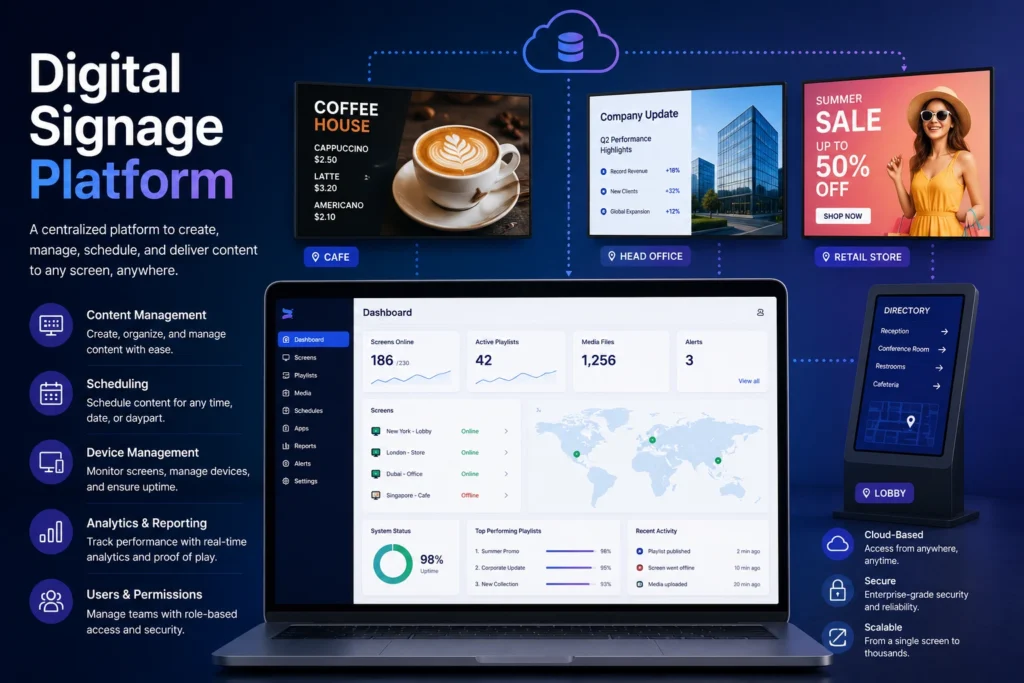
A Digital Signage Platform is a centralized software solution that enables organizations to create, manage, schedule, distribute, and monitor content across a network of digital displays from a single interface.
A digital signage platform typically combines content management, device management, scheduling, analytics, user permissions, and integrations into one unified system. It serves as the operational hub for managing digital signage deployments at any scale.
Whether an organization manages a single display or thousands of screens across multiple locations, a digital signage platform provides the tools required to control content and monitor network performance efficiently.
Why Is a Digital Signage Platform Important?
Without a centralized platform, organizations must manage screens individually, resulting in inefficient workflows, inconsistent messaging, and increased operational costs.
A digital signage platform allows businesses to:
- Manage content from a single dashboard
- Update screens remotely
- Automate content scheduling
- Maintain brand consistency
- Monitor device health and uptime
- Scale deployments across locations
- Integrate business systems and data sources
As digital signage networks grow, a platform becomes essential for maintaining operational efficiency and content governance.
How Does a Digital Signage Platform Work?
A digital signage platform acts as the command center of a signage network.
Step 1: Content Creation
Users upload images, videos, dashboards, web pages, widgets, and other media assets.
Step 2: Content Organization
Content is organized into playlists, campaigns, and screen groups.
Step 3: Scheduling
Administrators determine when and where content should appear.
Step 4: Content Distribution
The platform delivers content to media players or displays connected to the network.
Step 5: Playback
Displays present content according to predefined schedules and rules.
Step 6: Monitoring
The platform collects device status, playback reports, proof-of-play data, and analytics.
Benefits of a Digital Signage Platform
Centralized Management
Control every display from a single interface.
Remote Administration
Update content without visiting physical locations.
Improved Efficiency
Automate repetitive content publishing tasks.
Scalability
Support growing networks without increasing operational complexity.
Enhanced Security
Manage user permissions, authentication, and content approvals.
Real-Time Updates
Distribute urgent messages instantly across multiple screens.
Analytics and Reporting
Measure content performance and device health.
How to Choose a Digital Signage Platform
Define Your Deployment Size
Evaluate the number of displays, locations, and users that will use the platform.
Assess Device Compatibility
Ensure support for:
- Android
- Windows
- ChromeOS
- LG webOS
- Samsung Tizen
- BrightSign
Evaluate Content Management Features
Look for:
- Playlists
- Scheduling
- Templates
- Content approvals
- Dynamic content
Review Analytics Capabilities
Choose a platform that provides:
- Proof of play
- Device monitoring
- Playback reports
- Performance analytics
Verify Integration Options
Confirm support for APIs and third-party services.
Consider Scalability
The platform should support future growth without requiring migration.
Best Practices for Digital Signage Platforms
- Organize screens into logical groups.
- Create reusable content templates.
- Schedule content in advance.
- Use role-based permissions.
- Monitor device health regularly.
- Maintain a structured media library.
- Establish content approval workflows.
- Review analytics monthly.
Common Mistakes
Choosing Based Only on Price
Low-cost solutions often lack scalability and enterprise features.
Ignoring Device Compatibility
Not every platform supports every operating system.
Poor Content Organization
Disorganized libraries create inefficiencies as deployments grow.
Lack of User Permissions
Granting unrestricted access increases security risks.
Failing to Monitor Displays
Unmonitored devices may remain offline without detection.
Industry Use Cases
Retail
Manage promotions, product launches, and seasonal campaigns across store networks.
Corporate Communications
Deliver company announcements, KPIs, and employee communications.
Education
Distribute schedules, campus news, and emergency notifications.
Healthcare
Provide patient information, wayfinding, and queue management.
Hospitality
Promote services, events, and guest communications.
Transportation
Display schedules, alerts, and operational information.
Manufacturing
Communicate production metrics and workplace safety updates.
Digital Signage Platform vs Digital Signage Software
The terms are often used interchangeably, but there is a subtle difference.
Digital Signage Software typically refers to a specific application used to manage content.
Digital Signage Platform refers to a broader ecosystem that includes:
- Content management
- Device management
- User administration
- Analytics
- Integrations
- Network management
In enterprise deployments, platform is generally the more comprehensive term.
Take control of your screens today with Buzzblender
Frequently Asked Questions
What is a digital signage platform?
A digital signage platform is a centralized system used to manage content, devices, users, and analytics across a digital signage network.
What is the difference between a digital signage platform and a CMS?
A CMS primarily manages content, while a digital signage platform includes content management, device management, scheduling, analytics, security, and integrations.
Can a digital signage platform manage multiple locations?
Yes. Most modern platforms support centralized management across multiple sites, regions, and countries.
Is a cloud-based digital signage platform better?
Cloud-based platforms offer easier remote management, faster deployment, automatic updates, and improved scalability.
What features should a digital signage platform include?
A platform should include content management, scheduling, device monitoring, analytics, user permissions, integrations, and remote management capabilities.
Can a digital signage platform work offline?
Most platforms allow media players to continue playback using locally cached content during temporary network outages.
How secure are digital signage platforms?
Enterprise platforms typically support encryption, role-based access control, secure authentication, and audit logs.
Related Terms
- Digital Signage
- Digital Signage Software
- Digital Signage CMS
- Digital Signage Player
- Cloud Digital Signage
- Screen Management
- Content Scheduling
- Media Player
- Proof of Play
- Remote Management