
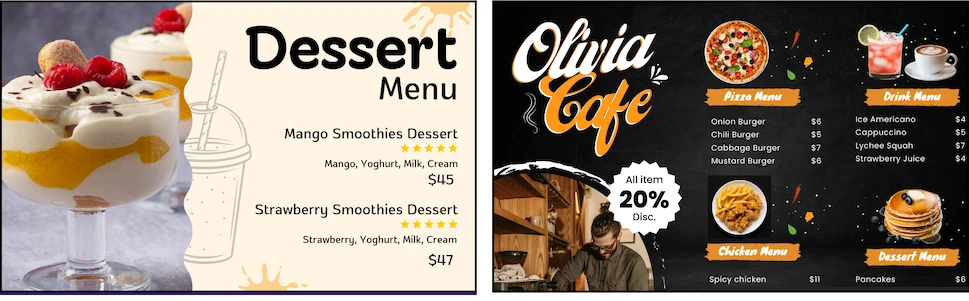
In today’s technology era, you don’t need to buy expensive commercial displays for your venue to set up digital menu board. Now you do it with affordable digital signage software and not professional TV.
You can simply purchase an affordable TV that runs on the Android operating system or you can buy even Non-Smart TV. Learn how to create cheap digital menu board using Buzzblender Digital Signage Software.
Choose an Affordable TV – We Support Even Non-Smart TVs
Here are some links where you can purchase TVs:
Case 1: You Bought a TV with the Android Operating System
Here is your guide on how to start using BuzzBlender on the Android operating system.
- Use this link to download the latest version of the app: https://app.buzzblender.com/api/update/latest-apk
- Use a file manager app on your TV to install the APK file.
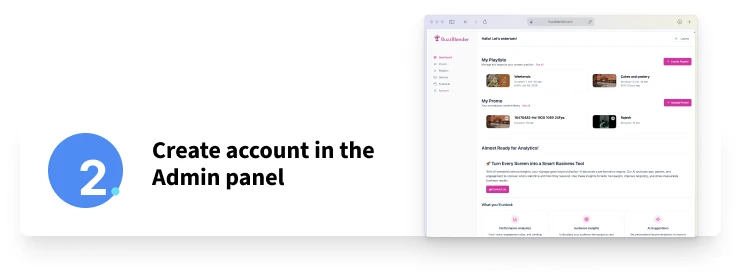
- Sign up to the Web Admin panel to create playlists and manage your devices. https://app.buzzblender.com/
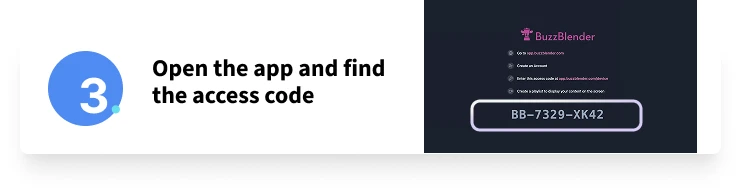
- Open the TV app and log in using your credentials, OR
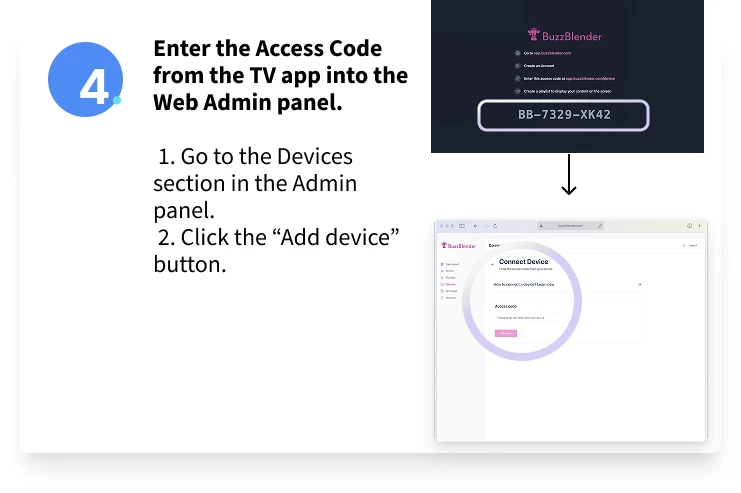
- Use the Access Code from the TV app in the Web Admin panel. https://app.buzzblender.com/device
5. Set Up and Enjoy
- Once connected, enjoy managing and using the app seamlessly across your devices.
How to Design a Digital Menu Board
We recommend using specialized services like Canva because it offers a wide range of options and a long free trial.
With Canva, you can easily create animations and videos, choose from hundreds of templates for different screen sizes, and even use animated templates.
You don’t need to hire an agency—this service is so easy to use that even a child can do it!
https://www.canva.com/design
Enjoy your free trial!
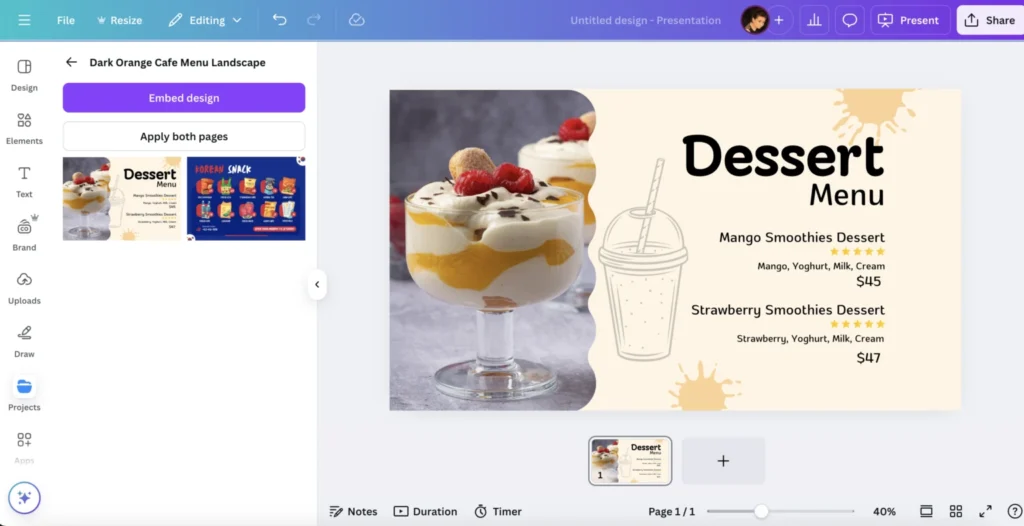
How to Create a Menu Template in Canva
Here are some links for you to Canva.
Remember, you can always contact us at signup@buzzblender.com if you have any questions about creating a menu board.
Guide: How to Create a Restaurant Menu
- https://www.canva.com/create/restaurant-menus
- https://www.canva.com/menus/templates
- https://www.canva.com/templates/?query=restaurant&category=tAExRLg81RI
Check the video from Canva for an example of how to create a digital menu board.
Time to Create a Playlist with Your Menu!
Now, create a playlist in BuzzBlender.
1. Upload your menu to the playlist.
2. Schedule your menu display
Decide when you want it to play:
• Daily
• On specific days of the week
• On a particular date
You can show it every day or mix it with your promotions! Please note that you can add QR code overlay to your media.
Boost Your Sales with Smart Promotions!
Imagine how much you can increase sales by promoting discounts alongside your menu.
💡 Don’t forget about QR codes! You can easily add a QR code to your menu or promotions for free and track visits. Please find description of all our features.
https://www.canva.com/create/coupons https://www.canva.com/templates/s/promo
Case 2: You Bought a Non-Smart TV or a TV with a Different Operating System
If your TV is not a Smart TV or runs an operating system other than Android, you can still use BuzzBlender! Here’s how:
Use Our Buzz Box – Simply Plug & Play on Any TV!
No Smart TV? No problem! Buzz Box works with any TV, including non-Smart TVs. Just plug it in, and you’re ready to go! 🚀🎉
Reach us at signup@buzzblender.com to get your box.
- Sign up to the Web Admin panel to create playlists and manage your devices. https://app.buzzblender.com/
- Open the TV app and log in using your credentials, OR
- Use the Access Code from the TV app in the Web Admin panel. https://app.buzzblender.com/device
5. Set Up and Enjoy
- Once connected, enjoy managing and using the app seamlessly across your devices.
Create a Menu and Playlist Using These Steps
✅ Now You’re Ready!
With these steps, you can create a menu that enhances your restaurant’s branding and improves customer experience. Just $5 per screen per month.
Need help designing? Reach us at signup@buzzblender.com
FAQ
How can I create a cheap digital menu board?
You can create a cheap digital menu board by using an affordable TV and cloud-based digital signage software like Buzzblender. If you have an Android TV, you can install the app directly. If you have a non-smart TV, you can use a Buzz Box device.
Do I need an expensive commercial display for a digital menu board?
No. You do not need an expensive commercial display. Buzzblender works with affordable Android TVs and even non-smart TVs, making digital menu boards accessible for small businesses.
Can I use Buzzblender on a non-smart TV?
Yes. If your TV is not smart or uses a different operating system, you can use Buzzblender with the Buzz Box. It works as a plug-and-play solution for any TV.
We also have apps for LG, Samsung, Philips, and Xiaomi, which you can install from your TV’s content store by searching for Buzzblender.
How do I install Buzzblender on an Android TV?
To install Buzzblender on an Android TV, download the latest APK, use a file manager app on your TV to install it, then connect your device through the Buzzblender Web Admin panel. Or download the app from Your TV Content Store.
How do I design a digital menu board?
You can design a digital menu board using tools like Canva. It offers menu templates, animations, videos, and restaurant design layouts, making it easy to create professional-looking content without hiring an agency.
Can I schedule my digital menu board content?
Yes. Buzzblender allows you to schedule menu content daily, on specific days of the week, or on selected dates. You can also combine menus with promotions in the same playlist.
Can I add promotions and QR codes to my digital menu board?
Yes. You can add promotions and QR code overlays to your menu board content. This helps increase sales, drive engagement, and track visits from customers.
What devices does Buzzblender support for menu boards?
Buzzblender supports Android TVs directly and can also work with non-smart TVs through the Buzz Box. This makes it flexible for many restaurant and cafe setups.
How much does Buzzblender cost for a digital menu board?
Buzzblender costs just $5 per screen per month, making it an affordable digital signage solution for restaurants, cafes, and small businesses.
Is Buzzblender suitable for restaurants and cafes?
Yes. Buzzblender is ideal for restaurants and cafes because it allows businesses to create digital menus, manage playlists, schedule promotions, and improve customer experience at a low cost.
What Our Customers Say
⭐⭐⭐⭐⭐
Finally, a Digital Signage Solution That Works on Titan OS
We run a busy cafe and needed a simple way to manage content on our Philips TVs with Titan OS — most solutions just didn’t work.
Buzzblender solved that immediately.
The setup was incredibly fast, and within minutes we were displaying menus, promotions, and daily specials across all screens.
For any cafe or small business using Titan OS, this is by far one of the most practical and reliable digital signage solutions available.
Jeffrey, cafe owner


Leave a Reply